GraphQL Yoga + Pothos Schema Builder: Building a Type-Safe GraphQL API in TypeScript Without Code Generation
Teams migrating from REST API to GraphQL share a common barrier. They must manage .graphql SDL files and resolver types separately, while also running a graphql-codegen build step to keep the two in sync. If you miss the codegen step when the SDL changes, compilation passes but type errors explode at runtime. When the "codegen → tsc → build" order gets scrambled in the build pipeline, CI fails for obscure reasons. As this friction accumulates, teams feel the operational cost before they feel the benefits of GraphQL.
Using GraphQL Yoga together with Pothos Schema Builder eliminates the root cause of this problem. TypeScript code itself becomes the single source of truth for the schema. No separate .graphql files, no graphql-codegen build step, no decorators for reflect-metadata. Pothos leverages TypeScript's type inference to validate types between schema definitions and resolver implementations at compile time, and Yoga takes that schema and serves it as a GraphQL server that runs on any JS runtime.
In this article, we'll walk through why Pothos's code-first approach is a strong choice in today's TypeScript ecosystem, how to set it up and use it in a real project, and when this combination isn't the right fit. We'll cover in depth — with code — the pattern that automatically solves the N+1 problem in Prisma integration, and how to declaratively implement schema-level authentication and authorization.
Core Concepts
GraphQL Yoga: A Runtime-Agnostic GraphQL Server
GraphQL Yoga is a GraphQL HTTP server developed by The Guild team. What sets it apart from other servers is that it adopts the WHATWG Fetch API spec as its core architecture. Because it handles Request/Response objects using the web-standard Request/Response rather than Node.js-specific http.IncomingMessage, the same code runs as-is on Node.js, Bun, Deno, Cloudflare Workers, and AWS Lambda.
Against the official graphql-http conformance test suite, it fully satisfies both mandatory and optional items of the GraphQL over HTTP specification. Its bundle is lighter than Apollo Server's, and SSE (Server-Sent Events)-based subscriptions are built in. Via the Envelop plugin system, you can layer on depth limiting, response caching, and rate limiting.
flowchart LR
    A[TypeScript Code] --> B[Pothos Builder]
    B --> C[GraphQL Schema]
    C --> D[GraphQL Yoga]
    D -. Deploy .-> E[Node.js]
    D -. Deploy .-> F[Bun / Deno]
    D -. Deploy .-> G[Cloudflare Workers]
    D -. Deploy .-> H[AWS Lambda]
Pothos: A Code-First Schema Builder
Pothos (formerly GiraphQL) is a library that uses TypeScript's type inference and generics to define GraphQL schemas in code.
No code generation. Resolver parameter types (args, context, parent) are automatically inferred without a build step like graphql-codegen. You no longer need to coordinate "codegen first, build second" order in your CI pipeline.
No decorators. TypeGraphQL declares schemas using decorators like @ObjectType() and @Field(), which require experimentalDecorators and reflect-metadata. Pothos uses only plain function calls like builder.objectType() and builder.queryField(). No special compiler options need to be added to tsconfig.json.
The Pothos core package has negligible runtime overhead — the only exception being the builder.toSchema() call that runs at server startup. It has only the graphql package as a peer dependency, and all type validation happens at compile time.
Code-First vs. Schema-First
| Item | Schema-First | Code-First (Pothos) |
|---|---|---|
| Source of Truth | .graphql SDL files |
TypeScript code |
| Type Sync | Requires codegen build step | Automatic compile-time inference |
| Resolver Types | References codegen-generated types | Auto-derived from builder |
| Collaboration | SDL files can drive API design | Code changes are schema changes |
| Learning Curve | SDL syntax is intuitive | Requires understanding TypeScript generics |
| CI Pipeline | codegen → tsc → build | tsc → build |
This is not to say schema-first is bad. If your frontend team drives API design through SDL files, or you share the schema first and each team implements in parallel, schema-first is still perfectly valid. Code-first is a natural fit for teams where "TypeScript code is the center, and the schema is the output."
Comparison with Similar Libraries
| Pothos | TypeGraphQL | Nexus | |
|---|---|---|---|
| Approach | Code-first, functional | Code-first, decorators | Code-first, functional |
| Decorator Dependency | None | Yes (requires reflect-metadata) |
None |
| Maintenance Status | Active | Active | Effectively abandoned (since 2022) |
| Community Resources | Relatively sparse | Relatively abundant | Low |
| Primary Use Cases | Prisma integration, greenfield projects | NestJS ecosystem, decorator codebases | Not recommended for new projects |
| Official Prisma Integration | @pothos/plugin-prisma (official) |
Third-party integration | Formerly official, now deprecated |
TypeGraphQL has richer community resources and pairs well with NestJS. Nexus has been effectively unmaintained by the Prisma team since 2022, so it's best avoided for new projects.
Two Layers of Type Safety
Pothos is responsible for type safety inside the server. If the value a resolver returns doesn't match its GraphQL type, tsc catches it at compile time. If you need end-to-end type safety all the way to the client, you can opt for a hybrid approach: graphql-codegen consumes the schema Pothos generates at runtime and separately generates client-side types.
Practical Application
Step 1: Installation and Basic Setup
npm install graphql-yoga @pothos/core graphqlThere's one thing to watch out for when creating a SchemaBuilder. Methods like t.exposeString("title") validate parent type property keys at compile time — for this validation to work, you must explicitly register backing types in the Objects generic.
// src/builder.ts
import SchemaBuilder from "@pothos/core";

export interface Post {
  id: string;
  title: string;
  published: boolean;
}

interface Context {
  userId?: string;
}

const builder = new SchemaBuilder<{
  Context: Context;
  Objects: { Post: Post }; // required for key validation in expose* methods
}>({});

export default builder;
Without registering Objects, t.exposeString("title") cannot verify that title: string exists on the Post type. This registration is the practical foundation of "compile-time validation."
// src/schema.ts
import builder from "./builder";
import type { Post } from "./builder";

builder.objectType("Post", {
  description: "A blog post",
  fields: (t) => ({
    id: t.exposeID("id"),
    title: t.exposeString("title"),       // compile error if Post lacks title: string
    published: t.exposeBoolean("published"),
  }),
});

builder.queryType({
  fields: (t) => ({
    posts: t.field({
      type: ["Post"],
      resolve: async (): Promise<Post[]> => {
        return [{ id: "1", title: "First Post", published: true }];
      },
    }),
  }),
});

export const schema = builder.toSchema();
Connecting to the Yoga server is all it takes.
// src/index.ts
import { createYoga } from "graphql-yoga";
import { createServer } from "http";
import { schema } from "./schema";

const yoga = createYoga({ schema });
const server = createServer(yoga);

server.listen(4000, () => {
  console.log("GraphQL server: http://localhost:4000/graphql");
});
When you start the server, GraphiQL 2.0 is automatically served at http://localhost:4000/graphql.
Step 2: Automatically Solving N+1 with the Prisma Plugin
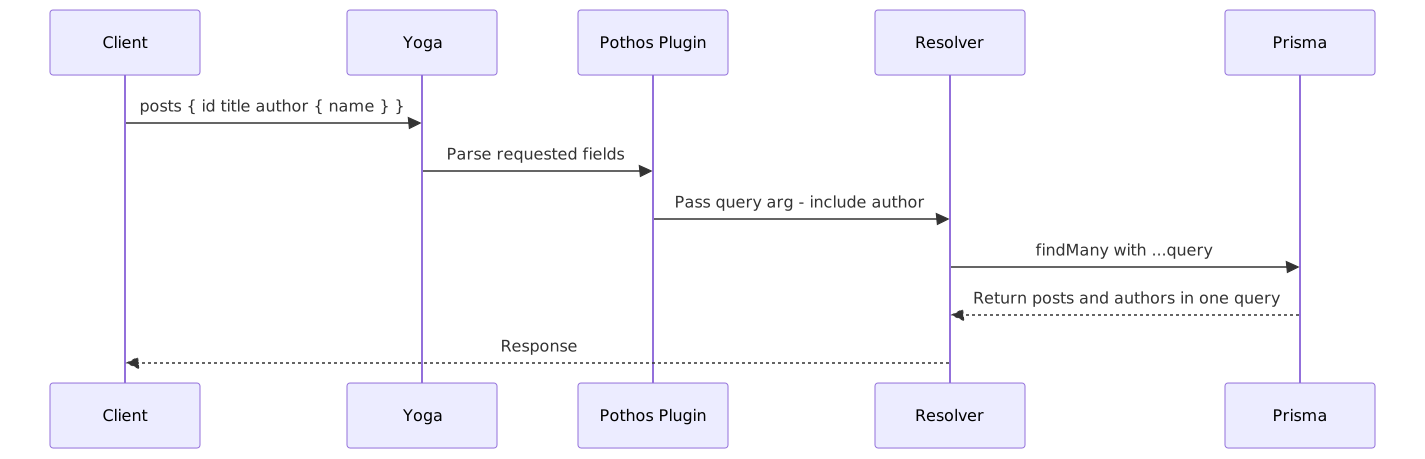
The N+1 query problem is a perennial headache in GraphQL. @pothos/plugin-prisma automatically resolves it via the query argument pattern.
npm install @pothos/plugin-prisma @prisma/clientFor the Prisma plugin to generate its type file, you need to add a generator block to schema.prisma and run prisma generate. Skipping this step means the import type PrismaTypes from "@pothos/plugin-prisma/generated" path shown below won't exist, and compilation fails immediately.
// schema.prisma
generator client {
  provider = "prisma-client-js"
}

generator pothos {
  provider = "prisma-pothos-types"
}npx prisma generateAdd three things to the builder.ts from Step 1: the PrismaPlugin import, the PrismaTypes generic, and the plugin configuration.
// src/builder.ts — with Prisma plugin added
import SchemaBuilder from "@pothos/core";
import PrismaPlugin from "@pothos/plugin-prisma";                // added
import type PrismaTypes from "@pothos/plugin-prisma/generated";  // added
import { PrismaClient } from "@prisma/client";                   // added

export const prisma = new PrismaClient();

interface Context {
  prisma: PrismaClient; // added
  userId?: string;
}

const builder = new SchemaBuilder<{
  Context: Context;
  PrismaTypes: PrismaTypes; // added
}>({
  plugins: [PrismaPlugin],  // added
  prisma: {                 // added
    client: prisma,
    exposeDescriptions: true,
    filterConnectionTotalCount: true,
  },
});

export default builder;
Using prismaObject automatically derives a GraphQL type from a Prisma model.
// src/schema/post.ts
import { builder, prisma } from "../builder";

builder.prismaObject("Post", {
  fields: (t) => ({
    id: t.exposeID("id"),
    title: t.exposeString("title"),
    author: t.relation("author"), // expose a Prisma relation as a GraphQL field
  }),
});

builder.queryField("posts", (t) =>
  t.prismaField({
    type: ["Post"],
    resolve: async (query, _root, _args, ctx) => {
      // Example console.log(query) output: { include: { author: true } }
      // Pothos analyzes the client's requested fields and computes this automatically
      return ctx.prisma.post.findMany({
        ...query,               // required include/select is automatically included
        where: { published: true },
      });
    },
  })
);
t.relation("author") and t.prismaField serve different purposes. t.prismaField is used for entry-point resolvers that call Prisma directly — you must spread ...query for the N+1 optimization to work. t.relation declares a Prisma model relation; the plugin automatically includes the required include for that relation when computing the parent type's query, so no additional Prisma calls are made.
Step 3: Declarative Auth with scope-auth
@pothos/plugin-scope-auth lets you attach authentication logic declaratively at the schema definition level.
npm install @pothos/plugin-scope-auth// src/builder.ts — with scope-auth added
import ScopeAuthPlugin from "@pothos/plugin-scope-auth";
// In a real project, replace with an implementation using a DB query or cache
declare function isAdminUser(userId: string): Promise<boolean>;
const builder = new SchemaBuilder<{
Context: Context;
AuthScopes: {
isAuthenticated: boolean;
isAdmin: boolean;
};
}>({
plugins: [ScopeAuthPlugin],
authScopes: async (ctx) => ({
isAuthenticated: !!ctx.userId,
isAdmin: ctx.userId !== undefined && (await isAdminUser(ctx.userId)),
}),
});Each scope is lazily evaluated once per request, only when a field requiring that scope is actually queried. Even a scope like isAdmin that needs a DB lookup only runs on requests that include an isAdmin-protected field in their query — so not every request incurs a DB lookup cost.
// src/schema/admin.ts
import { builder } from "../builder";

// In a real project, replace with an implementation
declare function getUserById(userId: string): Promise<string>;

builder.queryField("adminDashboard", (t) =>
  t.field({
    type: "String",
    authScopes: {
      isAdmin: true, // automatically denied if isAdmin is false
    },
    resolve: () => "Admin-only data",
  })
);

builder.queryField("myProfile", (t) =>
  t.field({
    type: "String",
    authScopes: {
      isAuthenticated: true,
    },
    resolve: (_root, _args, ctx) => {
      // authScopes guarantees isAuthenticated, but TypeScript can't narrow to string
      return getUserById(ctx.userId as string);
    },
  })
);
ctx.userId as string is an intentional type assertion. Because this resolver only executes when the authScopes: { isAuthenticated: true } condition is met, userId is guaranteed to be truthy — but TypeScript cannot automatically narrow it to string.
Note when using with the relay plugin: If you use the relay plugin (the official Pothos plugin that supports the Relay spec's Connection/Node interfaces) alongside scope-auth, the order of the plugin array matters. The official documentation recommends registering relay before scope-auth. If the order is wrong, the authScopes function may not correctly receive parsed GlobalIDs.
const builder = new SchemaBuilder({
  plugins: [RelayPlugin, ScopeAuthPlugin], // register relay first
  // ...
});
Pros and Cons
Advantages
| Item | Details |
|---|---|
| No Code Generation | Simplified CI pipeline, eliminates SDL↔resolver sync issues |
| Negligible Runtime Overhead | Pothos core depends only on graphql; type validation is at compile time |
| Plugin Ecosystem | Official support for Prisma, Relay, Scope-Auth, DataLoader, Mocks, and more |
| Runtime Agnostic | Same code runs on Node, Bun, Deno, Cloudflare Workers, etc. |
| Lightweight Bundle | Smaller bundle size compared to Apollo Server |
| Maintainability | Schema and resolvers managed together, preserving code locality |
| GraphQL Spec Compliance | Full GraphQL over HTTP compliance, built-in SSE subscriptions |
Drawbacks and Caveats
| Item | Details |
|---|---|
| Learning Curve | TypeScript generics-based API; type error messages can be cryptic for complex unions and interfaces |
| Client Types Are Separate | Pothos doesn't generate client types; requires graphql-codegen for that |
| Poor Fit for Schema-First Collaboration | Doesn't align with workflows where the frontend team drives API design via SDL |
| Fewer Community Resources | Fewer downloads than TypeGraphQL means fewer examples and articles |
| Plugin Initialization Order | Order dependency when combining relay + scope-auth |
| Apollo Federation | Apollo ecosystem is more mature if large-scale microservice federation is a core requirement |
Common Mistakes in Practice
Omitting the query argument
If you use @pothos/plugin-prisma but don't spread the query argument in your resolve function, the N+1 optimization won't work. When using prismaField, you must always include it as { ...query } in the Prisma query arguments. When debugging, console.log(query) lets you see how objects like { include: { author: true } } are computed.
Expecting client types from Pothos
Pothos provides type safety for server resolvers — it does not generate client query response types. If you need type-safe query hooks on the frontend, you need to set up graphql-codegen separately.
Confusing Pothos with Nexus Pothos's former name was GiraphQL, and its API style is similar to Nexus, which can cause initial confusion. Since Nexus is effectively deprecated, choose Pothos for new projects.
Cryptic type error messages
Pothos's TypeScript generic error messages can look long and confusing at first. When you get a type error in union types or interface inheritance, the most effective approach is to find the key line at the end of the error message and compare it against your SchemaTypes generic definition.
Closing Thoughts
If you're using Prisma, your team works code-first, and you care about runtime portability, GraphQL Yoga + Pothos is the most cohesive choice in today's TypeScript ecosystem. It removes the codegen build step to keep CI simple, co-locates resolver and schema definitions to improve code locality, and resolves the N+1 problem through the Prisma plugin without boilerplate.
On the other hand, if you're working in a NestJS-based codebase, using a schema-first collaboration workflow, or need large-scale Apollo Federation architecture, this combination may not be the best fit.
flowchart TD
    A{New TypeScript GraphQL Project} --> B{Prefer decorator-based approach?}
    B -->|Yes| C{Using NestJS?}
    C -->|Yes| D[TypeGraphQL with NestJS]
    C -->|No| E[Consider TypeGraphQL]
    B -->|No| F{Using Prisma?}
    F -->|Yes| G[Recommended: Pothos with Prisma plugin]
    F -->|No| H{Need edge deployment or runtime agnosticism?}
    H -->|Yes| I[Pothos with GraphQL Yoga]
    H -->|No| J[Either Pothos or TypeGraphQL works]
To get started, these three steps are enough.
- Install the basic stack: Start with three packages —
graphql-yoga,@pothos/core, andgraphql. Register theObjectsgeneric correctly and verify that compile-time validation forexpose*methods actually works. - Add the Prisma plugin: Register the
prisma-pothos-typesgenerator inschema.prisma, runprisma generate, then implement N+1-free data fetching with the...querypattern. - Add an authorization layer with scope-auth: Apply declarative permission control to each field. Thanks to lazy scope evaluation, you can maintain field-level authorization while minimizing DB lookup costs.
If you're incrementally migrating from an existing SDL-first schema, a realistic strategy is to keep existing resolvers as-is and write new domain areas in the Pothos style. Remove SDL files only after all types in that domain have been converted to Pothos.
References
- Pothos GraphQL Official Docs
- Pothos v4 Official Docs
- Pothos SchemaBuilder Guide
- Pothos Prisma Plugin Docs
- Pothos Scope-Auth Plugin Docs
- GraphQL Yoga Official Docs
- GraphQL Yoga Cloudflare Workers Integration Guide
- GraphQL Yoga Comparison with Other Server Libraries
- Pothos GitHub Repository
- Revisiting GraphQL in 2025: A Type-Safe Stack with Pothos and Relay — DEV Community
- Pothos vs. TypeGraphQL for TypeScript schema building — LogRocket Blog
- Code-first GraphQL with Pothos — graphql.wtf Episode #60
- Achieving end-to-end type safety in a modern JS GraphQL stack — Escape.tech
- Pothos Evaluation Report — DEV Community
- Schema-First vs Code-Only GraphQL — Apollo Blog