CDN cache stays intact, personalized UI served from the server — how Astro 5 Server Islands and Content Layer are transforming content site architecture
If you've worked on a Next.js project, you've probably heard the requirement: "This banner should only be visible to logged-in users." The dilemma starts right there. Switching the entire page to SSR means giving up CDN caching; fetching on the client causes layout shifts; handling it in middleware makes the architecture complex. Astro 5 resolves this dilemma — common in content and marketing sites — by "drawing server rendering boundaries at the component level, not the page level."
Server Islands, officially introduced in Astro 5 (released December 2024), is a rendering primitive that inserts component-level server-rendered regions into a static HTML page. Most of the page is cached on the CDN, while only components marked with server:defer are rendered on the server at request time. The Content Layer API connects external sources like headless CMSes, REST APIs, and databases as a build-time ETL pipeline, allowing you to query them through a single type-safe API. When these two features work together, the "static vs. dynamic" dichotomy that content sites face disappears.
This article walks through the internal mechanics of Server Islands, patterns for integrating external CMSes like Storyblok and Sanity with Content Layer, and common mistakes made in practice — all with real code.
Core Concepts
Islands Architecture — "Static by Default, Dynamic Only Where Needed"
The core of Astro's Islands Architecture, present from the very beginning, is simple: serve most of the page as static HTML with no JavaScript, and selectively hydrate only the components that need interactivity. Directives like client:load and client:visible have handled that role.
Server Islands extends this concept to the server side. If client hydration is "running JS in the browser," a server island is "generating HTML on the server at request time." Only components that need personalization go through the server; everything else is handled by the CDN.
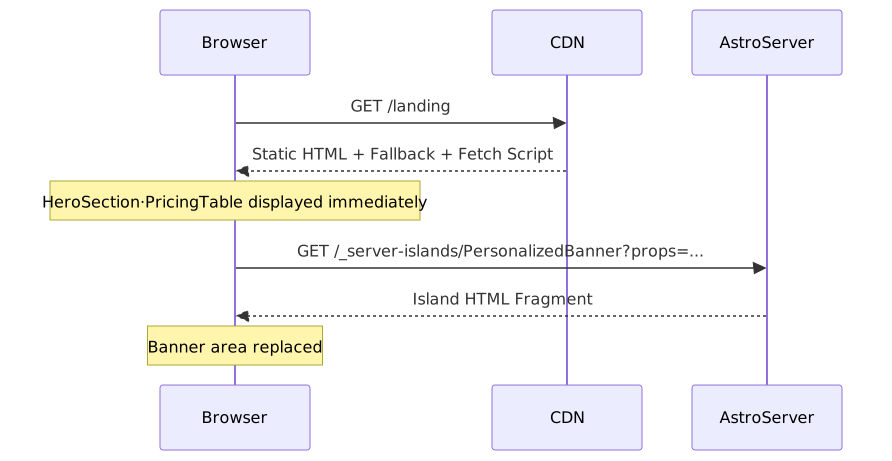
The two requests operate completely independently. The initial page load returns static HTML from the CDN, and island requests are sent directly from the browser to the server (or serverless function), bypassing the CDN.

server:defer — How to Declare an Island
Usage is straightforward. Add the server:defer directive to an .astro component.
---
// src/components/PersonalizedBanner.astro
const { userId } = Astro.props;
const user = await fetchUser(userId);   // Runs at request time
const promo = await fetchPromo(user.region);
---
<div class="banner">
  <p>Hello, {user.name} 👋</p>
  <p>{promo.message}</p>
</div>---
// src/pages/landing.astro
import PersonalizedBanner from '../components/PersonalizedBanner.astro';
import HeroSection from '../components/HeroSection.astro';
import PricingTable from '../components/PricingTable.astro';
const userId = Astro.cookies.get('userId')?.value;
---
<main>
<!-- These two components are generated as static HTML at build time -->
<HeroSection />
<PricingTable />
<!-- Only this island is rendered on the server at request time -->
<PersonalizedBanner server:defer userId={userId}>
<div slot="fallback" class="banner-skeleton">Loading…</div>
</PersonalizedBanner>
</main>At build time, the slot where PersonalizedBanner should appear is replaced with fallback content and a client-side fetch script. After the browser loads the page, that script sends a request to a dedicated endpoint to retrieve the island HTML and swap it in.
The sequence diagram below makes this more intuitive.
About Props Serialization: Props passed to a
server:defercomponent are encrypted with a server-generated key and transmitted as URL query strings. This means the props themselves are not readable as plaintext in the URL. However, values that cannot be serialized — such as functions or objects with circular references — cannot be passed.
Content Layer API — Pulling External CMSes into the Build Pipeline
Astro's original Content Collections were optimized for local Markdown files. The Content Layer API extends this to external sources. By specifying a loader in defineCollection(), you fetch external data at build time, validate it against a Zod schema, and cache it in a local data store. You can then query it in a type-safe manner using getCollection() / getEntry().
Config File Location: Starting with Astro 5, the collection configuration file location has changed to
src/content.config.ts(relative to the project root). This differs from the previoussrc/content/config.tspath, so be careful when migrating.
// src/content.config.ts
import { defineCollection, z } from 'astro:content';
import { storyblokLoader } from '@storyblok/astro';

const blog = defineCollection({
  loader: storyblokLoader({
    accessToken: import.meta.env.STORYBLOK_TOKEN,
    version: 'published',
  }),
  schema: z.object({
    title: z.string(),
    publishedAt: z.coerce.date(),
    slug: z.string(),
    excerpt: z.string().optional(),
    coverImage: z.string().url().optional(),
  }),
});

export const collections = { blog };---
// src/pages/blog/index.astro
import { getCollection } from 'astro:content';
const posts = await getCollection('blog');
const sorted = posts.sort(
(a, b) => b.data.publishedAt.getTime() - a.data.publishedAt.getTime()
);
---
<ul>
{sorted.map(post => (
<li>
<a href={`/blog/${post.data.slug}`}>{post.data.title}</a>
<time>{post.data.publishedAt.toLocaleDateString('en-US')}</time>
</li>
))}
</ul>You might wonder, "If we fetch at build time, don't we need to rebuild every time the CMS is updated?" The official Storyblok loader supports delta updates. It only re-requests changed items, so incremental builds stay fast even on large sites.
Practical Application
Scenario 1 — Marketing Landing Page + Regional Promotions
This pattern caches the page body (headlines, pricing tables, feature highlights) on the CDN, while separating only the promotional banner — which varies by login state and region — into a Server Island.
---
// src/components/RegionalPromo.astro
import { getEntry } from 'astro:content';

const { region, isLoggedIn } = Astro.props;

const promo = await getEntry('promotions', region);

const message = isLoggedIn
  ? promo?.data.memberMessage
  : promo?.data.guestMessage;
---
{message && (
  <div class={`promo promo--${region}`}>
    <p>{message}</p>
    {isLoggedIn && <a href="/my/coupons">View Coupons →</a>}
  </div>
)}---
// src/pages/index.astro
import RegionalPromo from '../components/RegionalPromo.astro';
const region = Astro.cookies.get('region')?.value ?? 'kr';
const isLoggedIn = Boolean(Astro.cookies.get('session')?.value);
---
<main>
<HeroSection />
<FeatureGrid />
<PricingTable />
<RegionalPromo
server:defer
region={region}
isLoggedIn={isLoggedIn}
>
<div slot="fallback" class="promo-skeleton" aria-hidden="true" />
</RegionalPromo>
</main>Since the page body is served from the CDN cache, TTFB stays in the tens-of-milliseconds range on cache hits, while still delivering personalized messages to logged-in users.
Scenario 2 — Blog + Real-Time Social Data
Article body content is fetched at build time via Content Layer and rendered as static HTML, while frequently changing social data like comment counts and like counts are handled by a Server Island.
// src/content.config.ts
import { defineCollection, z } from 'astro:content';
import { storyblokLoader } from '@storyblok/astro';

const articles = defineCollection({
  loader: storyblokLoader({ accessToken: import.meta.env.STORYBLOK_TOKEN }),
  schema: z.object({
    title: z.string(),
    slug: z.string(),
    body: z.string(),
    publishedAt: z.coerce.date(),
    author: z.string(),
  }),
});

export const collections = { articles };---
// src/components/SocialStats.astro
const { articleSlug } = Astro.props;
let stats = { comments: 0, likes: 0, views: 0 };
try {
const res = await fetch(
`${import.meta.env.API_BASE}/stats/${articleSlug}`,
{ headers: { Authorization: `Bearer ${import.meta.env.API_TOKEN}` } }
);
if (res.ok) {
stats = await res.json();
}
} catch {
// Render with default values (0) on network error
}
---
<div class="social-stats">
<span>💬 Comments {stats.comments}</span>
<span>❤️ Likes {stats.likes}</span>
<span>👁️ Views {stats.views.toLocaleString('en-US')}</span>
</div>---
// src/pages/articles/[slug].astro
import { getEntry } from 'astro:content';
import SocialStats from '../../components/SocialStats.astro';
const { slug } = Astro.params;
const article = await getEntry('articles', slug!);
if (!article) return Astro.redirect('/404');
---
<article>
<h1>{article.data.title}</h1>
<p>by {article.data.author} · {article.data.publishedAt.toLocaleDateString('en-US')}</p>
<!--
Only use set:html with HTML from trusted sources.
If body may contain external user input, server-side sanitization is required.
-->
<div set:html={article.data.body} />
<SocialStats server:defer articleSlug={article.data.slug}>
<span slot="fallback" class="stats-skeleton" aria-hidden="true" />
</SocialStats>
</article>Scenario 3 — E-Commerce Product Page
Product images, descriptions, and specs are served statically, while only real-time inventory and cart button state are handled as islands.
This scenario reveals an important characteristic of Server Islands. Islands do not block each other. Each island has its own independent fetch script, so the browser sends requests to the server in parallel. Even while StockStatus is waiting on a slow inventory API, CartButton can render as soon as its separate response arrives. In traditional SSR, the slower of two data sources dominates the overall TTFB, but with Server Islands, each piece is independently replaced as soon as it's ready.
---
// src/pages/products/[id].astro
import { getEntry } from 'astro:content';
import StockStatus from '../../components/StockStatus.astro';
import CartButton from '../../components/CartButton.astro';

const product = await getEntry('products', Astro.params.id!);
if (!product) return Astro.redirect('/404');

const userId = Astro.cookies.get('userId')?.value;
---
<section>
  <!-- Static area — CDN cache -->
  <img src={product.data.imageUrl} alt={product.data.name} />
  <h1>{product.data.name}</h1>
  <p>{product.data.description}</p>
  <SpecTable specs={product.data.specs} />

  <!-- Both islands load in parallel, independently -->
  <StockStatus server:defer productId={product.id}>
    <span slot="fallback">Checking inventory…</span>
  </StockStatus>

  <CartButton server:defer productId={product.id} userId={userId}>
    <button slot="fallback" disabled>Loading…</button>
  </CartButton>
</section>
Adapter Configuration for Deployment
In development (astro dev), Server Islands work without an adapter. This can cause you to deploy confidently after local testing only to find islands not rendering at all. If environment variables are correct and the build succeeded but island slots are stuck showing fallback content, check your adapter configuration first.
// astro.config.mjs
import { defineConfig } from 'astro/config';
import vercel from '@astrojs/vercel';  // or netlify, node

export default defineConfig({
  output: 'static',     // Default — static pages
  adapter: vercel(),    // Required for Server Islands support
  integrations: [],
});
Production deployment requires one of the Netlify, Vercel, or Node.js adapters.
Common Mistakes in Practice
1. Applying server:defer Directly to React Components
server:defer only applies to .astro files. Applying it directly to React or Vue components silently does nothing. You must wrap them in an .astro wrapper.
<!-- ❌ This does not work -->
<ReactCart server:defer userId={userId} />---
// src/components/CartIsland.astro — .astro wrapper
import ReactCart from './ReactCart.tsx';
const { userId } = Astro.props;
const cartData = await fetchCart(userId);
---
<ReactCart client:load initialData={cartData} /><!-- ✅ Apply server:defer to the .astro wrapper in the page -->
<CartIsland server:defer userId={userId}>
<span slot="fallback">Loading cart…</span>
</CartIsland>2. Passing Large Objects as Props
Props are serialized as URL query strings. Passing entire objects can hit URL length limits, which triggers a POST fallback and disables browser caching. It's much safer to pass only an ID and fetch the necessary data inside the island.
<!-- ❌ Passing entire object — risk of exceeding URL length -->
<ProductStatus server:defer product={fullProductObject} />

<!-- ✅ Pass only the ID, fetch inside the island -->
<ProductStatus server:defer productId={product.id} />
Pros and Cons
Where It Fits and Where It Doesn't

Advantages
| Item | Description |
|---|---|
| Optimal Caching Strategy | Static areas aggressively cached on CDN; only dynamic areas rendered on demand |
| Independent Parallel Loading | Islands load in parallel — a slow island doesn't block other areas |
| Fine-Grained Cache Control | Cache-Control headers can be set individually per island |
| Props Encryption | Server island props are encrypted with a server-generated key; not readable as plaintext in the URL |
| Type Safety | Build-time type validation with Content Layer + Zod schema |
| Minimal JS Bundle | Pages with almost no JavaScript by default — dramatically lighter than full-stack frameworks |
| CMS Ecosystem | Rich selection of official and community loaders for Storyblok, Sanity, Strapi, Hygraph, and more |
Disadvantages and Caveats
| Item | Description |
|---|---|
| Astro Components Only | server:defer is limited to .astro files — cannot be applied directly to React or Vue components |
| Props Serialization Constraints | Functions and objects with circular references cannot be passed |
| URL Length Limit | Large props trigger a POST fallback, bypassing browser cache |
| JS Required | Only fallback content is shown when client-side JS is disabled |
| Adapter Required | Netlify, Vercel, or Node.js adapter must be installed for deployment |
| Excessive Dynamic Content | Full SSR is more appropriate if most of the page is personalized |
| Content Layer Learning Curve | Migrating from existing Content Collections requires understanding the loader concept and data store structure |
Closing Thoughts
The core of Astro 5 Server Islands is not "static vs. dynamic" — it's "where do you draw the boundary." Without converting the entire page to SSR, you can route only the components that need personalization through the server while the rest of the page continues to benefit from CDN caching. The Content Layer API serves as the glue that integrates external CMS data into the build pipeline in a type-safe way.
If you're starting a new project or a new page, here's the recommended order:
- Pick one page that is "mostly static but needs some personalization" and build it in Astro. The impact of a single
server:deferline will likely surprise you. - If you're using a headless CMS, attach the official Content Layer loader and replace your existing
fetch()code withgetCollection(). Thanks to Zod schemas, type errors will start being caught at build time. - Open the Astro DevToolbar and verify that island boundaries are divided as intended. You can visually inspect islands directly in the browser, making debugging much easier.
References
- Astro 5.0 Official Release Notes
- Server Islands Official Documentation
- Islands Architecture Concept Documentation
- Content Layer Deep Dive — Official Blog
- Content Collections Official Documentation
- Astro Content Loader API Reference
- Storyblok — Announcing the Astro Content Layer Loader
- Sanity + Astro Official Guide
- Strapi — How to Create a Custom Astro Loader with Content Layer API
- Nick Taylor — How Astro Server Islands Work and When to Use Them
- BCMS — Astro Server Islands Tutorial
- Astro 5.x Best Practices Guide (2024-2025)