Implementing long-running business workflows with Temporal
Have you ever spent half a day after a production payment workflow broke just trying to figure out how far it got? On our team, after a Worker process restart, we were left with 7 orders where inventory had been deducted but payment status was uncertain — and we spent two days with the support team manually reconciling them one by one. Four double-charges, three uncharged.
Our response at the time was a Redis queue + DB status column + reprocessing cron job, but as each component patched the failures of the others, code complexity grew exponentially.
Temporal approaches this problem fundamentally differently. Rather than asking "how do we detect and recover from failure," it's a framework that lets you "write only business logic as if failure doesn't exist." Even if a Worker dies or a server restarts — the workflow resumes exactly from the last completed point.
Temporal's Core Idea: Durable Execution
In a typical background job system, if a Worker dies mid-execution you have to track partial execution state yourself. Temporal's core idea is different. It durably records every execution event in an Event History, and upon restart after a failure, replays this history to restore state exactly as it was.
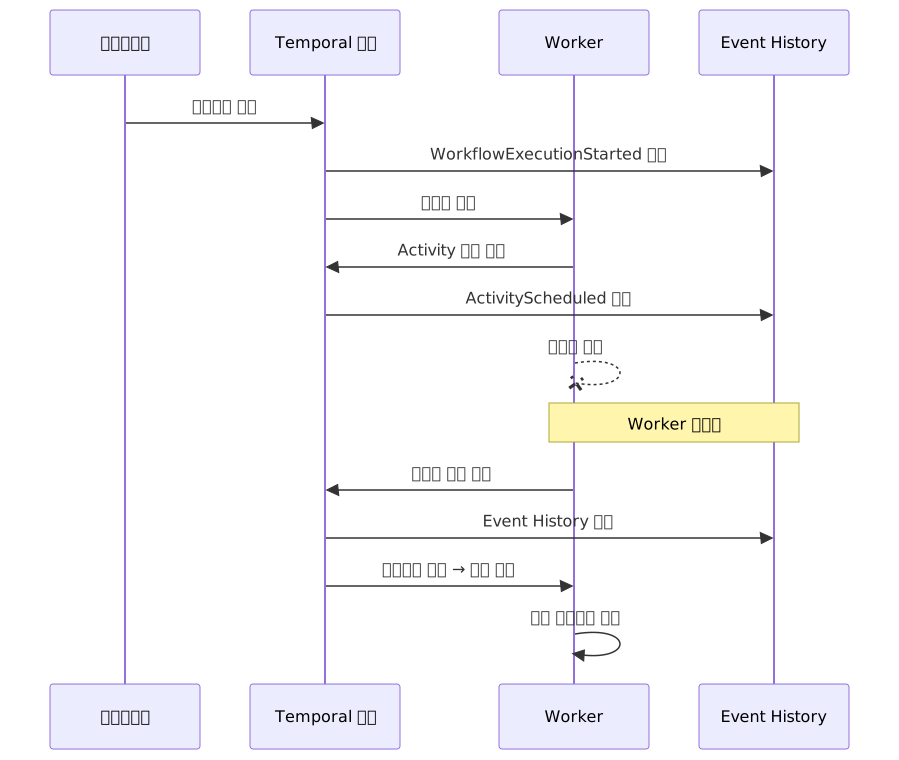
Thanks to this structure, developers can focus solely on the happy-path business logic instead of recovery logic.
Overall Architecture Flow
Before looking at code, understanding how the components connect will make the examples that follow much easier to read.

Workers can scale horizontally — if one dies, another Worker replays the Event History and picks up where it left off. Clients communicate only with the Temporal server and never need to know whether a Worker has failed.
Four Core Building Blocks
Workflow — The Skeleton of Business Logic
A Workflow expresses a business process as a plain TypeScript function. It must be written deterministically — because when the same Event History is replayed, the execution order must always be identical.
Direct HTTP requests are not allowed in Workflow code. For time references, use
now()provided by@temporalio/workflowinstead ofDate.now(). The TypeScript SDK patchesDate.now()in the sandbox, but using the SDK-provided API is idiomatic and ensures consistency when migrating to another language SDK.
All I/O and side effects are delegated to Activities.
Activity — Where Real Work Happens
Activities handle operations with side effects such as external API calls, DB queries, and payment processing. By default, automatic retries with exponential backoff are applied.
Worker — The Execution Engine
A Worker is a process that polls the Temporal server for tasks and executes Workflows and Activities. You can run multiple Workers for horizontal scaling, and if one dies another picks up the work.
Signal / Query — In-Flight Interaction
- Signal: Asynchronously delivers external input to a running workflow (e.g., payment approval, cancellation request)
- Query: Synchronously reads the current workflow state (e.g., checking the current order stage)
The Saga Pattern — Distributed Transaction Rollback in Plain Code
In distributed systems, "A succeeded but B failed — how do we undo A?" is an age-old problem, since you can't roll back atomically like a database transaction.
Temporal lets you express this Saga pattern with native try/catch without any special framework. The approach is to stack compensating transactions in an array as each step completes, then execute them in reverse order (LIFO) when an error occurs.

When any step fails, the compensations accumulated up to that point are executed in reverse order. If the email step fails, rollback proceeds as: payment refund → inventory release.
Project Setup
pnpm add @temporalio/client @temporalio/worker @temporalio/workflow @temporalio/activityIn tsconfig.json, enable "lib": ["ES2017"] or higher, and enable strict mode.
Minimal Working Example
Before looking at complex patterns, let's confirm the basic structure first. A minimal example with one Activity and one Workflow.
// greeting.activities.ts
export async function greet(name: string): Promise<string> {
  return `Hello, ${name}!`;
}// greeting.workflow.ts
import { proxyActivities } from '@temporalio/workflow';
import type * as activities from './greeting.activities';
const { greet } = proxyActivities<typeof activities>({
startToCloseTimeout: '5s',
});
export async function greetingWorkflow(name: string): Promise<string> {
return await greet(name);
}// client.ts
import { Client, Connection } from '@temporalio/client';
import { greetingWorkflow } from './greeting.workflow';
const connection = await Connection.connect();
const client = new Client({ connection });
const result = await client.workflow.execute(greetingWorkflow, {
args: ['World'],
taskQueue: 'greeting',
workflowId: 'greeting-001',
});
console.log(result); // "Hello, World!"This structure — side effects in Activities, composition in Workflows, execution from the Client — is the skeleton of every Temporal application.
Payment Workflow — Applying the Saga Pattern
The compensations array pattern may feel somewhat verbose at first. But when you actually implement a 4–5 step order process, having each step paired with its compensation side by side makes it easier to track.
// payment.workflow.ts
import { proxyActivities, ApplicationFailure } from '@temporalio/workflow';
import type * as activities from './payment.activities';

const {
  reserveInventory,
  chargePayment,
  sendConfirmation,
  releaseInventory,
  refundPayment,
} = proxyActivities<typeof activities>({
  startToCloseTimeout: '30s',
  retry: {
    maximumAttempts: 5,
    initialInterval: '1s',
    backoffCoefficient: 2,
    nonRetryableErrorTypes: ['InvalidPaymentMethodError'],
  },
});

export async function orderWorkflow(orderId: string, amount: number): Promise<void> {
  const compensations: Array<() => Promise<void>> = [];

  try {
    await reserveInventory(orderId);
    compensations.push(() => releaseInventory(orderId));

    await chargePayment(orderId, amount);
    compensations.push(() => refundPayment(orderId));

    await sendConfirmation(orderId);
    // The email itself cannot be undone, so no compensation is pushed.
    // If an exception is thrown at this step, catch will cleanly run the prior payment and inventory compensations.

  } catch (originalErr) {
    // Run each compensation independently — if one fails, the rest continue
    const compensationErrors: Error[] = [];
    for (const compensate of [...compensations].reverse()) {
      try {
        await compensate();
      } catch (err) {
        compensationErrors.push(err as Error);
      }
    }

    if (compensationErrors.length > 0) {
      // Partial rollback state: workflow ends as FAILED and manual intervention is required
      throw ApplicationFailure.nonRetryable(
        `Saga compensation final failure for ${compensationErrors.length} item(s) — manual recovery required`,
        'PartialCompensationFailure'
      );
    }

    throw originalErr;
  }
}
Idempotency Keys — An Essential Pattern for Preventing Duplicate Charges
Activities follow an at-least-once execution model. If a Worker successfully calls the payment API but crashes before reporting completion to the Temporal server, that Activity will be re-executed. This can result in duplicate charges.
The solution is to always pass an idempotency key.
// payment.activities.ts
import { stripe } from './stripe.client';
import { db } from './db.client';

export async function chargePayment(orderId: string, amount: number): Promise<string> {
  const charge = await stripe.charges.create(
    { amount, currency: 'usd', source: 'tok_visa' },
    { idempotencyKey: `charge-${orderId}` }
  );

  // Save the charge record — refundPayment will look up the stripeId from here
  await db.charge.upsert({
    where: { orderId },
    create: { orderId, stripeId: charge.id },
    update: {}, // ignore if already saved (idempotent)
  });

  return charge.id;
}

export async function reserveInventory(orderId: string): Promise<void> {
  await db.inventory.upsert({
    where: { orderId },
    create: { orderId, status: 'reserved' },
    update: {},
  });
}

export async function releaseInventory(orderId: string): Promise<void> {
  await db.inventory.updateMany({
    where: { orderId, status: 'reserved' },
    data: { status: 'released' },
  });
}

export async function refundPayment(orderId: string): Promise<void> {
  const charge = await db.charge.findUnique({ where: { orderId } });
  if (!charge) return; // chargePayment failed before saving to DB

  await stripe.refunds.create(
    { charge: charge.stripeId },
    { idempotencyKey: `refund-${orderId}` }
  );
}

export async function sendConfirmation(orderId: string): Promise<void> {
  await emailService.send({
    template: 'order-confirmed',
    orderId,
    idempotencyKey: `email-${orderId}`,
  });
}
Polling External APIs — Durable Timers and continue-as-new
Patterns like "wait until complete" — such as polling a shipping tracking API — can also be expressed cleanly with Temporal. Unlike a regular setTimeout, sleep() persists the timer state even if the Worker restarts.
However, workflows running for weeks or more can accumulate Event History until they hit the size limit. The key point when using continueAsNew to start a fresh execution is that you must pass the deadline state as an argument. Passing an absolute timestamp instead of relative remaining time ensures the original deadline is preserved across continue-as-new restarts.
// shipping.workflow.ts
import {
  proxyActivities,
  sleep,
  now,
  workflowInfo,
  continueAsNew,
  ApplicationFailure,
} from '@temporalio/workflow';
import type * as activities from './shipping.activities';

const { checkShipmentStatus, notifyDelivered } =
  proxyActivities<typeof activities>({ startToCloseTimeout: '10s' });

export interface TrackShipmentInput {
  orderId: string;
  deadlineEpoch: number; // calculated by the client as Date.now() + N days and passed in
}

export async function trackShipmentWorkflow({
  orderId,
  deadlineEpoch,
}: TrackShipmentInput): Promise<void> {
  while (true) {
    if (now() >= deadlineEpoch) {
      throw ApplicationFailure.nonRetryable(`Shipment timeout: ${orderId}`);
    }

    const status = await checkShipmentStatus(orderId);

    if (status === 'delivered') {
      await notifyDelivered(orderId);
      return;
    }

    if (status === 'lost' || status === 'returned') {
      throw ApplicationFailure.nonRetryable(`Shipment anomaly: ${orderId} - ${status}`);
    }

    // Hand off to a new execution before history grows too large.
    // Passing deadlineEpoch (absolute value) preserves the original deadline after restart.
    if (workflowInfo().historyLength > 1000) {
      await continueAsNew<typeof trackShipmentWorkflow>({ orderId, deadlineEpoch });
    }

    await sleep('30m');
  }
}
Start from the client with an absolute timestamp:
await client.workflow.start(trackShipmentWorkflow, {
  args: [{ orderId, deadlineEpoch: Date.now() + 14 * 24 * 60 * 60 * 1000 }],
  taskQueue: 'shipping',
  workflowId: `shipping-${orderId}`,
});
Receiving External Events with Signals
Situations like a user requesting cancellation during payment, or an admin manually approving an order, can be handled with Signals.
// approval.workflow.ts
import {
  defineSignal,
  setHandler,
  condition,
  proxyActivities,
} from '@temporalio/workflow';
import type * as activities from './approval.activities';

export const approvalSignal = defineSignal<[boolean]>('approvalDecision');

const { processApprovedOrder, notifyRejection } =
  proxyActivities<typeof activities>({ startToCloseTimeout: '30s' });

export async function manualApprovalWorkflow(orderId: string): Promise<string> {
  let approved: boolean | null = null;

  setHandler(approvalSignal, (decision: boolean) => {
    approved = decision;
  });

  // Wait up to 48 hours; returns false if no response received
  const received = await condition(() => approved !== null, '48h');

  if (!received || approved === false) {
    await notifyRejection(orderId);
    return 'rejected';
  }

  await processApprovedOrder(orderId);
  return 'approved';
}
Sending an approval signal from outside:
// client code
import { Client } from '@temporalio/client';
import { approvalSignal } from './approval.workflow';

const client = new Client();
await client.workflow.getHandle(`approval-${orderId}`).signal(approvalSignal, true);
Worker Configuration
// worker.ts
import { Worker } from '@temporalio/worker';
import * as paymentActivities from './payment.activities';
import * as shippingActivities from './shipping.activities';

const worker = await Worker.create({
  workflowsPath: new URL('./workflows', import.meta.url).pathname, // ESM environment
  activities: {
    ...paymentActivities,
    ...shippingActivities,
  },
  taskQueue: 'order-processing',
});

await worker.run();
In a CJS environment (using require), use workflowsPath: require.resolve('./workflows').
Pros and Cons
Advantages
| Item | Description |
|---|---|
| Code-first approach | Define workflows in TypeScript instead of JSON/YAML — IDE autocomplete, type safety, and unit tests all available |
| Automatic retries | Fine-grained per-Activity retry policies built in — max attempts, backoff coefficient, non-retryable error type classification |
| Crash recovery | If a Worker process dies, another Worker automatically resumes from the last completed point |
| Testability | Full workflow unit testing in an in-memory environment with @temporalio/testing |
| Visibility | Real-time view of all workflow states, event history, and retry records in the Temporal UI |
| Polyglot | Official SDKs for Go, Java, TypeScript, Python, .NET, and PHP |
Caveats
| Item | Description |
|---|---|
| Determinism constraints | Cannot make direct HTTP requests or generate random values in Workflow code. Must develop the habit of using SDK-provided APIs (now(), sleep()) |
| Operational complexity | Self-hosting requires managing PostgreSQL/Cassandra, Elasticsearch, multiple service components, and monitoring infrastructure |
| Over-engineering risk | For simple background jobs (3 steps or fewer), a lightweight queue like BullMQ is more appropriate |
| Final state on compensation failure | If a compensation Activity exhausts all retries, the Workflow ends as FAILED and partially rolled-back data remains. This cannot be auto-recovered, so it must be classified with an explicit error type like PartialCompensationFailure wired to operational alerts |
| Versioning difficulty | Changing code while there are in-flight workflows can violate replay determinism — requires backward-compatible handling with the patched() API |
Common Mistakes
1. Making direct API calls inside a Workflow
// Wrong
export async function wrongWorkflow(orderId: string) {
  const response = await fetch(`https://api.example.com/order/${orderId}`);
}

// Correct
export async function correctWorkflow(orderId: string) {
  const result = await fetchOrderDetails(orderId); // Activity wrapped with proxyActivities
}
2. Using Node.js native timers
// Wrong — timer is lost on Worker restart
await new Promise(resolve => setTimeout(resolve, 30000));

// Correct — timer state persists even if Worker dies
await sleep('30s');
3. Missing idempotency keys
Overlooking the at-least-once model and omitting idempotency keys on external API calls leads to duplicate charges and duplicate sends. All external write operations inside an Activity must use a deterministic idempotency key (orderId, ${orderId}-step).
4. Wrapping the Saga compensation loop in a single try/catch
When running compensation functions in a loop, having only one try/catch with no individual try/catch around each means that if the first compensation fails, the remaining compensations will not execute. Each compensation must handle its failures independently and allow the rest to continue.
When to Use a Different Tool Instead of Temporal
| Situation | Recommended Tool |
|---|---|
| Simple background jobs (1–2 steps) | BullMQ / Redis queue |
| Durable functions with low infra overhead | Restate |
| Next.js/Remix-friendly background jobs | Trigger.dev |
| Batch data pipelines | Apache Airflow |
| Complex multi-step business workflows + compensation logic | Temporal |
Temporal Cloud vs. self-hosting criteria: Self-hosting becomes cost-competitive above roughly 30–50 million Actions per month when you have Kubernetes + Cassandra operational capacity. Below that threshold, Temporal Cloud's consumption-based pricing is almost always cheaper.
Closing Thoughts
Temporal's core value is that it pushes Event History and deterministic replay down into the infrastructure layer, letting you write only "success path code" instead of "failure handling code." Complex rollback coordination, retry state tracking, and crash recovery logic move inside the framework, and developers can focus entirely on the business flow.
Of course, adopting it for simple tasks is over-engineering. When failure recovery is business-critical, there are multiple steps, and compensating transactions are required — that's the right time to reach for Temporal.
3 steps to get started now:
- Start with the local dev server — you can experiment immediately without any infrastructure using
temporal server start-dev. The Temporal Cloud free tier is also an option. - Port just one of your most frequently failing workflows first — you don't have to migrate everything. Pick one payment or notification flow that genuinely needs retries and compensation, and verify the impact there first.
- Test failure scenarios with
@temporalio/testing— developing the habit of mocking Activities in an in-memory environment and verifying failure cases like Worker crashes or timeouts in code will make future maintenance much smoother.
References
- Temporal Official Docs - Workflows
- Temporal Official Docs - Workflow Execution Overview
- Learn Temporal - TypeScript SDK Durable Execution Tutorial
- Replay 2026 Product Announcements Official Blog
- Temporal Serverless Workers — AWS Lambda Deployment Announcement
- Saga Compensating Transactions | Temporal Official Blog
- A Practical Guide to Temporal Workflow Design Patterns (DZone)
- Temporal + Encore.ts Durable Workflow Guide
- Replay 2026 Community Launch Recap (Official Forum)