Why You Can Remove `pg`, `ioredis`, and `@aws-sdk/client-s3` — Reducing Storage Driver Dependencies with Bun's Native Clients
Every time you start a new project, you type npm install pg ioredis @aws-sdk/client-s3, wrestle with @types/* packages, chase down version conflicts, and before you know it the afternoon is gone without a single line of actual code written — sound familiar? With Bun 1.2 bundling SQL and S3 clients into the runtime, and Bun 1.3 adding a Redis client, one question naturally arises: is there still a reason to install data and storage drivers yourself?
This post is written for developers considering migrating a Node.js backend to Bun. It covers how Bun.sql, Bun.redis, and Bun.s3 actually work in practice — where they shine and where they trip you up — honestly.
To set expectations upfront, the tangible gains come more from eliminating driver dependencies, cutting cold start times, and simplifying CI pipelines than from raw runtime performance. If those three are your team's pain points, read on.
Core Concepts
Background: Why These Three Clients Exist
pg, ioredis, and @aws-sdk/client-s3 each run in pure JavaScript, but they pull in dozens of transitive dependencies at install time. Version conflicts, @types/* package compatibility, per-package config files — complexity stacks up before you even spin up a single service. The really painful native binary build issues come from N-API addons like sharp and bcrypt; that's covered separately in the disadvantages section below.
Bun implemented all three drivers in Zig at the runtime level. Web frameworks (Hono, etc.) and ORMs (Drizzle, etc.) still install via npm, but data and storage drivers specifically can now be used without npm installation.
Bun.sql — PostgreSQL, MySQL, and SQLite with One API
Bun.sql is a client that executes SQL using tagged template literal syntax. It started with PostgreSQL support in Bun 1.2, and evolved into the unified Bun.SQL API when MySQL/MariaDB was added in v1.2.21. Since bun:sqlite already existed before that, you can now work with all three SQL database types using the same syntax.
The API is used in two ways:
import { sql } from "bun"— a module-level singleton that reads connection settings from theDATABASE_URLenvironment variableimport { SQL } from "bun"— a class you instantiate by passing connection options directly
For most cases you use sql (lowercase), and reach for SQL (uppercase class) when you need explicit connection management — for example, separating an in-memory :memory: SQLite instance from your production DB in tests.
import { sql } from "bun";

// Interpolations are automatically parameter-bound — no SQL injection risk
const users = await sql`SELECT * FROM users WHERE id = ${userId}`;

// Transactions — atomic execution inside a callback via sql.begin()
await sql.begin(async (tx) => {
  await tx`INSERT INTO orders ${sql(order)}`;
  await tx`UPDATE inventory SET stock = stock - 1 WHERE id = ${itemId}`;
});
Internally it handles automatic prepared statements, query pipelining, connection pooling, and the binary wire protocol. The binary protocol has less serialization/deserialization overhead than text-based protocols, which makes a performance difference for high-frequency queries.
Tagged templates feel unfamiliar at first, but they expose the actual executed query more transparently than an ORM, and built-in utilities for composing dynamic conditions help you adapt quickly. Drizzle ORM also runs on top of Bun.sql, so if type safety matters, you can use them together.

The same syntax works across different DB types with no code branching. However, syntax like FOR UPDATE (row locking) is only valid in PostgreSQL and MySQL — it does not work in SQLite — so double-check the syntax you're using before switching environments.
Bun.redis — Automatic Pipelining by Default
Bun.redis is a Redis 7.2+ and Valkey-compatible client introduced officially in Bun 1.3. What stands out is automatic pipelining: wrap commands in Promise.all and Bun batches them for transmission automatically, with no extra configuration required.
import { RedisClient } from "bun";

const redis = new RedisClient("redis://localhost:6379");
// If REDIS_URL or VALKEY_URL environment variables are set, no argument is needed

// Set TTL (in seconds)
await redis.set("session:abc", JSON.stringify(data), { ex: 3600 });
const cached = await redis.get("session:abc");

// Automatic pipelining — commands are sent in a single batch with Promise.all
const [a, b, c] = await Promise.all([
  redis.get("key1"),
  redis.get("key2"),
  redis.get("key3"),
]);

// Pub/Sub — experimental support since v1.2.23 (see disadvantages section below)
await redis.subscribe("events", (message, channel) => {
  console.log(`[${channel}]`, message);
});
Set the VALKEY_URL environment variable to connect to Valkey directly. Many teams have moved to Valkey since Redis switched to the BSL license, and you can make that switch with just a URL change — no client code changes needed.
Bun.s3 — Presigned URLs as Synchronous Computation
Bun.s3 is an S3-compatible storage client that arrived in Bun 1.2. It is a shorthand for new Bun.S3Client() and automatically reads credentials from the AWS_ACCESS_KEY_ID, AWS_SECRET_ACCESS_KEY, AWS_REGION, and S3_BUCKET environment variables.
const file = Bun.s3.file("uploads/avatar.png");
await file.write(imageBuffer, { type: "image/png" });

// Presigned URL — returned synchronously via local HMAC computation only, no network request
const url = file.presign({ expiresIn: 3600 });

// S3-compatible storage like Cloudflare R2 uses the same API
const r2 = new Bun.S3Client({
  endpoint: "https://<account>.r2.cloudflarestorage.com",
  bucket: "my-bucket",
  accessKeyId: process.env.R2_ACCESS_KEY_ID,
  secretAccessKey: process.env.R2_SECRET_ACCESS_KEY,
});

const data = await r2.file("report.pdf").arrayBuffer();

// Web standard Blob API compatible
const blob = await Bun.s3.file("data.json").blob();
Presigned URL generation is synchronous because the signature is computed entirely via local HMAC. @aws-sdk/client-s3 can require a network request for time synchronization, which makes a difference in services that issue presigned URLs at high frequency.
Real-World Application
Scenario 1: Session Cache + DB Lookup Unified API
The combination of Hono + Bun.redis (session cache) + Bun.sql (user data) is currently the most common pattern seen in the Bun ecosystem.
import { Hono } from "hono";
import { sql } from "bun";
import { RedisClient } from "bun";

const app = new Hono();
const redis = new RedisClient(); // Automatically references REDIS_URL environment variable

app.get("/user/:id", async (c) => {
  const userId = c.req.param("id");
  const cacheKey = `user:${userId}`;

  const cached = await redis.get(cacheKey);
  if (cached) {
    return c.json(JSON.parse(cached));
  }

  const [user] = await sql`
    SELECT id, name, email FROM users WHERE id = ${userId} LIMIT 1
  `;

  if (!user) return c.json({ error: "Not found" }, 404);

  // Cache for 5 minutes
  await redis.set(cacheKey, JSON.stringify(user), { ex: 300 });
  return c.json(user);
});

export default app;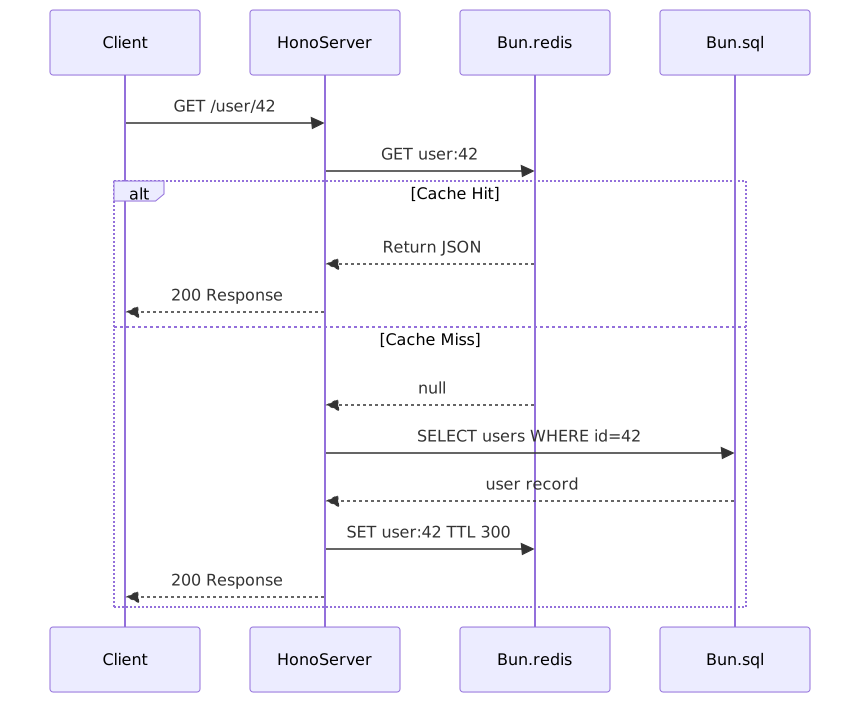
Scenario 2: File Upload API (S3 + Presigned URL)
Bun.s3's default credentials are read from the S3_BUCKET, AWS_ACCESS_KEY_ID, AWS_SECRET_ACCESS_KEY, and AWS_REGION environment variables. If these are absent, an error is thrown at runtime.
import { Hono } from "hono";

const app = new Hono();

// Receive upload on the server and save to S3
app.post("/upload", async (c) => {
  const formData = await c.req.formData();
  const file = formData.get("file");

  // Guard against the case where it arrives as a string
  if (!(file instanceof File)) {
    return c.json({ error: "No file provided or invalid format" }, 400);
  }

  const key = `uploads/${Date.now()}-${file.name}`;
  const s3File = Bun.s3.file(key);

  await s3File.write(await file.arrayBuffer(), { type: file.type });

  // Synchronous computation — no network request
  const downloadUrl = s3File.presign({ expiresIn: 86400 });

  return c.json({ key, downloadUrl });
});

// Issue a presigned PUT URL so the client can upload directly to S3
app.get("/upload-url", async (c) => {
  const filename = c.req.query("filename") ?? "unknown";
  const key = `uploads/${Date.now()}-${filename}`;

  const uploadUrl = Bun.s3.file(key).presign({
    method: "PUT",
    expiresIn: 300,
    type: "application/octet-stream",
  });

  return c.json({ key, uploadUrl });
});

export default app;
Scenario 3: Order Processing with Transactions
Use sql.begin() to atomically handle inventory decrement and order creation. FOR UPDATE is a row-locking syntax supported in PostgreSQL and MySQL; it does not work in SQLite. This example targets PostgreSQL.
import { sql } from "bun";
import { RedisClient } from "bun";

const redis = new RedisClient();

async function placeOrder(userId: number, itemId: number, quantity: number) {
  const order = await sql.begin(async (tx) => {
    const [item] = await tx`
      SELECT id, stock, price FROM items WHERE id = ${itemId} FOR UPDATE
    `;

    if (!item || item.stock < quantity) {
      throw new Error("Insufficient stock");
    }

    const [newOrder] = await tx`
      INSERT INTO orders (user_id, item_id, quantity, total_price)
      VALUES (${userId}, ${itemId}, ${quantity}, ${item.price * quantity})
      RETURNING *
    `;

    await tx`
      UPDATE items SET stock = stock - ${quantity} WHERE id = ${itemId}
    `;

    return newOrder;
  });

  // Redis operations after the DB transaction — failures here don't affect order data (best-effort)
  await redis.incr(`order_count:${userId}`);
  await redis.expire(`order_count:${userId}`, 3600);
  await redis.del(`user_orders:${userId}`);

  return order;
}
Scenario 4: Test Setup Without Environment-Specific Code Branching
A single DATABASE_URL determines the connection target, so as long as you stick to standard CRUD queries, no environment-specific code branching is needed.
// db.ts
import { SQL } from "bun";

// "postgres://..." → PostgreSQL, "mysql://..." → MySQL, ":memory:" → SQLite
export const db = new SQL(process.env.DATABASE_URL ?? ":memory:");# Local development
DATABASE_URL=:memory: bun run dev
# Tests (in-memory SQLite)
DATABASE_URL=:memory: bun test
# Production
DATABASE_URL=postgres://user:pass@host/db bun run startSyntax that behaves differently depending on the DB type — like FOR UPDATE — needs separate verification when switching environments. "Zero code changes to switch" is only true within the scope of standard SELECT, INSERT, UPDATE, and DELETE.
Pros and Cons
What You Actually Gain
| Item | Details |
|---|---|
| Eliminated driver dependencies | Roughly 12 packages are removed from the data and storage driver layer |
| SQL performance | ~50% faster query processing compared to pg/postgres.js¹ |
| Redis performance | ~7.9× higher throughput compared to ioredis¹ |
| S3 performance | ~5× higher throughput compared to @aws-sdk/client-s3¹ |
| Cold start | Under 10ms (vs. ~200ms for Node.js) |
| Unified SQL API | PostgreSQL, MySQL, and SQLite with the same syntax |
| Simplified CI | Fewer driver package install steps means lighter Docker images and CI pipelines |
| Valkey support | Free from Redis BSL license concerns |
¹ Based on Bun official benchmarks, measured at the I/O driver layer in isolation. In DB-bound CRUD apps, end-to-end request throughput differences can be as small as ~3%. In practice, the bigger gains often come from dependency elimination and cold start reduction rather than raw performance.
Disadvantages and Limitations
| Item | Details |
|---|---|
| N-API native addons | Support scope varies by Bun version. Verify compatibility for native builds like sharp and bcrypt against the current Bun version before proceeding |
| Redis Pub/Sub is experimental | Has remained in experimental status since v1.2.23 — recommended to wait for stabilization before production use |
| Redis Cluster not supported | Requested via GitHub issue but not yet implemented |
| S3 multipart uploads | Large file uploads require a custom implementation |
| APM and compliance gaps | Some enterprise APM tools do not yet officially support Bun |
Common Pitfalls in Practice
1. Migrating services that rely on N-API addons without checking compatibility first
If you're using native addons like sharp or bcrypt, verify compatibility with the current Bun version before migrating. Bun's N-API support scope has changed across versions and is still improving, so check the official compatibility docs and release notes first. If something isn't compatible, consider finding an alternative package or splitting that processing into a separate service.
2. Trying to migrate while running Redis Cluster
Bun.redis does not currently support Redis Cluster. Sentinel has been reported to partially work, but if you're running in cluster mode, monitor the GitHub issue and make a judgment call from there.
3. Pushing Pub/Sub to production immediately
Redis Pub/Sub landed as experimental in v1.2.23. The team is still collecting feedback, so for real-time systems where recovery from failure matters, it's safer to wait for stabilization or run it alongside ioredis in parallel.
4. Expecting driver benchmark numbers to translate to whole-service performance improvements
The 7.9× Redis and 50% SQL figures are isolated driver-layer measurements. Bottlenecks in CRUD-heavy applications are usually in the DB or external APIs, so end-to-end request throughput differences are far narrower. A more realistic primary motivation for migration is dependency elimination, cold start reduction, and CI simplification.
Migration Decision Flow

Node.js Package Replacement Mapping
| Node.js Package | Bun Native Replacement |
|---|---|
pg, postgres.js |
Bun.sql (PostgreSQL) |
mysql2 |
Bun.sql (MySQL) |
better-sqlite3 |
bun:sqlite |
ioredis, node-redis |
Bun.redis (RedisClient) |
@aws-sdk/client-s3 |
Bun.s3, Bun.S3Client |
dotenv |
Built-in (Bun auto-loads .env) |
ts-node, nodemon |
Built-in (Bun runs TS directly, --watch included) |
Closing Thoughts
Bun.sql, Bun.redis, and Bun.s3 are runtime-bundled drivers that replace pg/mysql2, ioredis, and @aws-sdk/client-s3 respectively, offering clear benefits in driver dependency elimination, cold start reduction, and CI simplification. That said, N-API native addon compatibility, the lack of Redis Cluster support, Pub/Sub's experimental status, and large-file multipart uploads are areas that need verification at this point in time.
Here are three steps you can take right now:
-
Audit your N-API dependencies first. Look through
package.jsonfor native addons likesharp,bcrypt, andcanvas, and check compatibility with the current Bun version. If they're absent or compatible, you have no migration blockers. -
Validate with a single new project first. Rather than migrating an existing service wholesale, spin up one new API server with Bun + Hono + Bun.sql/Bun.redis. Connecting to a DB and cache without installing any packages will give you a real feel for what's changed.
-
Just try
bun run --watchandbun test. The moment you realize you no longer needdotenv,ts-node, ornodemon, "batteries-included runtime" stops being a marketing phrase.
References
- SQL - Bun Official Documentation
- Redis - Bun Official Documentation
- S3 - Bun Official Documentation
- Bun 1.3 Official Blog
- Bun 1.2 Improves Node Compatibility and Adds Postgres Client — InfoQ
- Bun adds Bun.SQL — a zero-dependency unified SQL client — Progosling
- Bun.sql vs postgres.js vs Drizzle: Postgres in 2026 — PkgPulse Guides
- Bun 1.2 Deep Dive: Built-in SQLite, S3, and Why It Might Actually Replace Node.js — DEV Community
- Bun's Built-in Redis Client: Fast, Simple, Production-Ready — bunjs.run
- Bun v1.2.23 Release Notes
- Bun vs Node.js in 2026: Benchmarks & Migration Guide — Strapi
- The Case for Bun in 2026: Where It Works and Where It Doesn't — Medium
- Redis/Valkey Cluster Support Issue — GitHub oven-sh/bun