ElysiaJS 1.0 in Practice: Building a Type-Safe REST API with Bun's Native Framework
When you first look at Elysia code, there's a moment of confusion. The body.name is inferred as string inside a handler function, yet there's no type annotation like z.infer<...> anywhere in sight. The idea that the schema definition is both the starting point of type inference and the entirety of runtime validation feels unfamiliar at first.
ElysiaJS is a TypeScript backend framework optimized for the Bun runtime. Since its official 1.0 release in March 2024, it has rapidly evolved to version 1.4 ("Supersymmetry") as of 2025. As the Bun ecosystem gains traction as a Node.js alternative, ElysiaJS is being validated in diverse production environments including real-time streaming, map platforms, and AI backends.
This article covers three things: how a single schema handles both runtime validation and TypeScript type inference simultaneously, practical API composition patterns, and how to share types all the way to a Next.js frontend via Eden Treaty — without any code generation.
How Type Safety Actually Works
ElysiaJS's type safety revolves around TypeBox. TypeBox is a JSON Schema-based type builder, and the schemas defined with it serve two roles simultaneously.
- Runtime: When a request arrives, it validates the actual values and rejects invalid requests.
- Compile time: TypeScript automatically infers the types of
params,body, andqueryinside handler functions.
import { Elysia, t } from 'elysia'

const app = new Elysia()
  .post('/users', ({ body }) => {
    // body is automatically inferred as { name: string; age: number }
    // No z.infer<...>, no manual type casting
    return { id: crypto.randomUUID(), ...body }
  }, {
    body: t.Object({
      name: t.String({ minLength: 1 }),
      age:  t.Number({ minimum: 0, maximum: 150 })
    })
  })
  .listen(3000)
Existing Libraries Like Zod and Valibot Still Work: Standard Schema
Standard Schema is a community-driven specification that defines a common interface for validation libraries like Zod, Valibot, ArkType, and Effect Schema. Starting from ElysiaJS 1.4, any library that conforms to this spec can be passed directly to a handler instead of TypeBox.
import { Elysia } from 'elysia'
import { z } from 'zod'

const UserSchema = z.object({
  name:  z.string().min(1),
  email: z.string().email()
})

const app = new Elysia()
  .post('/users', ({ body }) => {
    // body is inferred as z.infer<typeof UserSchema>
    return { id: crypto.randomUUID(), ...body }
  }, {
    body: UserSchema  // pass Zod schema directly
  })
If your team already has a lot of Zod code, this path enables incremental migration.
Eden Treaty: End-to-End Type Sharing Without Code Generation
Eden Treaty is ElysiaJS's official client library. It import types the server's typeof app — as a type only — transforms HTTP paths into an object chain, and provides full type autocompletion.
The import type { App } part is critical. TypeScript's type import is completely erased after compilation. Server code is never included in the client bundle, yet at build time the server's type information is fully available on the client. The bundle size is under 2KB.

// Server: src/index.ts
import { Elysia, t } from 'elysia'

const app = new Elysia()
  .get('/posts/:id', ({ params }) => ({
    id:      params.id,
    title:   'Hello Elysia',
    content: '...'
  }), {
    params: t.Object({ id: t.String() })
  })
  .post('/posts', ({ body }) => ({
    id: crypto.randomUUID(),
    ...body
  }), {
    body: t.Object({
      title:   t.String(),
      content: t.String()
    })
  })
  .listen(3000)

export type App = typeof app // export type only, not a runtime value// Client: src/client.ts
import { treaty } from '@elysiajs/eden'
import type { App } from '../server/index' // type import — not included in bundle
const api = treaty<App>('localhost:3000')
// /posts/:id → path parameters as function arguments, HTTP method as the terminal chain method
const { data, error } = await api.posts({ id: '1' }).get()
// data: { id: string; title: string; content: string } | null
const { data: created } = await api.posts.post({
title: 'New Post',
content: 'Content'
})
// created: { id: string; title: string; content: string } | nullIf you rename a field on the server, you get an immediate TypeScript compile error on the client. The key point is catching it before runtime.
Practical Application
Initial Project Setup
# Install Bun (if not installed)
curl -fsSL https://bun.sh/install | bash

# Create project
bun create elysia my-api
cd my-api

# Install official plugins
bun add @elysiajs/swagger @elysiajs/jwt @elysiajs/cors

# Eden Treaty: for a single app
bun add @elysiajs/eden

# For a monorepo with pnpm workspaces
pnpm --filter web add @elysiajs/eden
Starting with a Basic CRUD Router
ElysiaJS composes other Elysia instances as plugins using use(). Before reading the authentication code below, it helps to distinguish between the two methods that add values to the context.
decorate('key', value): Injects singletons that don't change during the app's lifetime, like a DB connection. Not executed per request.derive(handler): Adds values derived fresh per request — like the current user or session — to the context.
// src/routes/posts.ts
import { Elysia, t } from 'elysia'

export const postsRouter = new Elysia({ prefix: '/posts' })
  .get('/', () => ({
    posts: [] as { id: string; title: string; content: string }[]
  }))
  .post('/', ({ body }) => ({
    id: crypto.randomUUID(),
    ...body
  }), {
    body: t.Object({
      title:   t.String({ minLength: 1 }),
      content: t.String()
    })
  })
  .get('/:id', ({ params }) => ({
    id:      params.id,
    title:   'Sample Post',
    content: 'Content'
  }), {
    params: t.Object({ id: t.String() })
})// src/index.ts
import { Elysia } from 'elysia'
import { cors } from '@elysiajs/cors'
import { swagger } from '@elysiajs/swagger'
import { postsRouter } from './routes/posts'
const app = new Elysia()
.use(cors())
.use(swagger({
documentation: { info: { title: 'My API', version: '1.0.0' } }
}))
.use(postsRouter)
.listen(3000)
console.log(`Server started: ${app.server?.hostname}:${app.server?.port}`)
export type App = typeof appAdding an Authentication Plugin
Once you're comfortable with the basic router, let's add authentication. This is the most common mistake when first learning Elysia. derive() is for "adding" properties to the context; onBeforeHandle() is responsible for "blocking" requests. Mixing both roles into a single derive() can cause the error handler to behave unexpectedly.
// src/plugins/auth.ts
import { Elysia } from 'elysia'
import { jwt } from '@elysiajs/jwt'

export const authPlugin = new Elysia({ name: 'auth' })
  .use(jwt({
    name:   'jwt',
    secret: process.env.JWT_SECRET!
  }))
  // derive: responsible only for parsing the token and populating user
  .derive(async ({ jwt, headers }) => {
    const token = headers.authorization?.replace('Bearer ', '')
    if (!token) return { user: null as { id: string; email: string } | null }
    const payload = await jwt.verify(token)
    return { user: (payload || null) as { id: string; email: string } | null }
  })
  // onBeforeHandle: blocks the request here if user is absent
  .onBeforeHandle(({ user, error }) => {
    if (!user) return error(401, { error: 'Unauthorized' })
})// src/routes/posts.ts (with authentication)
import { Elysia, t } from 'elysia'
import { authPlugin } from '../plugins/auth'
export const postsRouter = new Elysia({ prefix: '/posts' })
.use(authPlugin)
.get('/', ({ user }) => ({
// user type is automatically propagated to handlers that use() authPlugin
// TypeScript may not automatically narrow user to non-null after onBeforeHandle,
// so user! may be necessary in some cases
posts: [] as { id: string; title: string; content: string }[],
userId: user!.id
}))
.post('/', ({ body, user }) => ({
id: crypto.randomUUID(),
authorId: user!.id,
...body
}), {
body: t.Object({
title: t.String({ minLength: 1 }),
content: t.String()
})
})
.get('/:id', ({ params }) => ({
id: params.id,
title: 'Sample Post',
content: 'Content'
}), {
params: t.Object({ id: t.String() })
})Here's a visual view of the structure where each router independently use()s authPlugin. Rather than the root app controlling authentication, each router that needs protection pulls in the plugin itself.

Error Handling and Custom Error Types
import { Elysia, t } from 'elysia'

class NotFoundError extends Error {
  constructor(resource: string) {
    super(`${resource} not found`)
    this.name = 'NotFoundError'
  }
}

const app = new Elysia()
  .error({ NotFoundError })
  .onError(({ code, error, set }) => {
    if (code === 'NotFoundError') {
      set.status = 404
      return { error: error.message, code: 'NOT_FOUND' }
    }
    if (code === 'VALIDATION') {
      set.status = 422
      // error.message contains a validation failure summary
      // With TypeBox, error.all can also be used to access per-field error lists
      return { error: 'Invalid input', details: error.message }
    }
    set.status = 500
    return { error: 'Internal server error' }
  })
  .get('/posts/:id', ({ params }) => {
    if (params.id === '999') throw new NotFoundError('Post')
    return { id: params.id, title: 'Post Title' }
  }, {
    params: t.Object({ id: t.String() })
  })
Integrating with Next.js App Router via Eden Treaty
Here's an example where the GET /posts and POST /posts routes from the postsRouter created earlier are reflected directly in the Eden Treaty client types.
// packages/api-client/src/index.ts (shared package)
import { treaty } from '@elysiajs/eden'
import type { App } from '@my-project/api'

export const api = treaty<App>(
  process.env.NEXT_PUBLIC_API_URL ?? 'http://localhost:3000'
)// apps/web/app/posts/page.tsx (Server Component)
import { api } from '@my-project/api-client'
export default async function PostsPage() {
const { data, error } = await api.posts.get() // GET /posts
if (error) return <div>Error: {error.value.error}</div>
// data type is fully inferred — no explicit type annotation needed
return (
<ul>
{data.posts.map(post => (
<li key={post.id}>{post.title}</li>
))}
</ul>
)
}// apps/web/app/posts/new/CreatePostForm.tsx
'use client'
import { api } from '@my-project/api-client'
import { useState } from 'react'
export function CreatePostForm() {
const [title, setTitle] = useState('')
async function handleSubmit(e: React.FormEvent) {
e.preventDefault()
const { data, error } = await api.posts.post({ title, content: '...' })
// If the title field is removed on the server, a type error appears here immediately
if (error) console.error(error.value)
}
return (
<form onSubmit={handleSubmit}>
<input value={title} onChange={e => setTitle(e.target.value)} />
<button type="submit">Submit</button>
</form>
)
}Using Eden Treaty in environments where the server and client are in separate repositories requires caution. Because typeof app disappears from build output, you need to set up a separate package with only type declaration files using "declaration": true and "emitDeclarationOnly": true in tsconfig. This configuration is a prerequisite in environments where a monorepo isn't an option.
Integrating Drizzle ORM
The most commonly paired ORM with ElysiaJS is Drizzle. Injecting the DB instance via decorate() reuses it as a singleton.
import { Elysia, t } from 'elysia'
import { drizzle } from 'drizzle-orm/bun-sqlite'
import { Database } from 'bun:sqlite'
import { posts } from './schema'
import { eq } from 'drizzle-orm'

const db = drizzle(new Database('app.db'))

export const postsRouter = new Elysia({ prefix: '/posts' })
  .decorate('db', db)  // singleton for the app's lifetime — not recreated per request
  .get('/:id', async ({ params, db, set }) => {
    const [post] = await db
      .select()
      .from(posts)
      .where(eq(posts.id, params.id))
      .limit(1)

    if (!post) {
      set.status = 404
      return { error: 'Post not found' }
    }
    return post  // Drizzle return type propagates automatically to the Eden Treaty client
  }, {
    params: t.Object({ id: t.String() })
  })
Full Request Flow
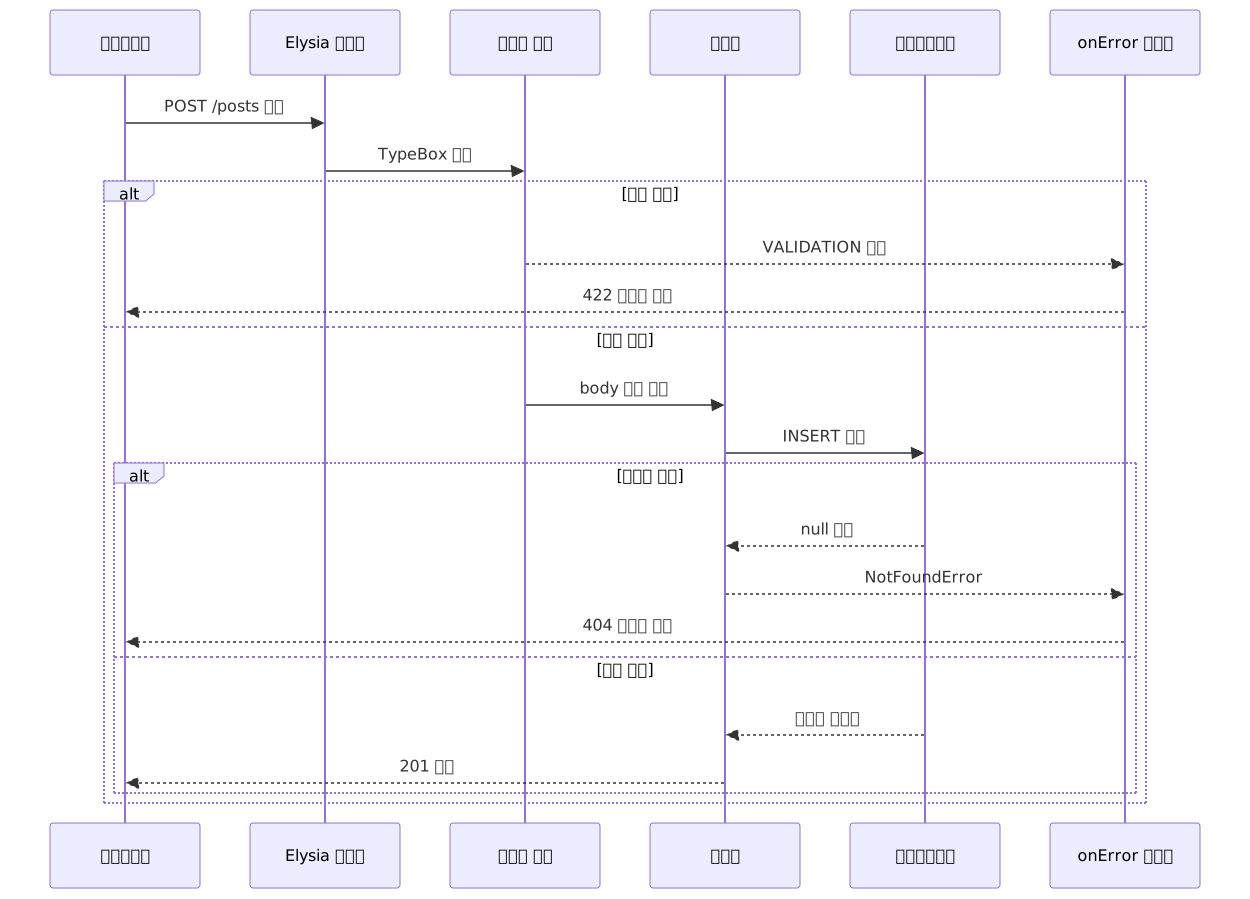
Common Mistakes
Duplicate plugin registration due to missing plugin name
// Without a name, use()-ing across multiple routers causes duplicate registration
const authPlugin = new Elysia()
  .use(jwt({ name: 'jwt', secret: 'secret' }))

// Solved by specifying a name
const authPlugin = new Elysia({ name: 'auth' })
  .use(jwt({ name: 'jwt', secret: 'secret' }))
Confusion over path parameter mapping in Eden Treaty
// Wrong
await api.users[':id']({ id: '1' }).get()

// Correct — path parameters as function arguments
await api.users({ id: '1' }).get()
Attempting to block requests inside derive()
// Wrong — derive is for adding properties, not blocking requests
.derive(async ({ headers, set }) => {
  if (!headers.authorization) {
    set.status = 401
    throw new Error('Unauthorized')  // error handler behavior not guaranteed
  }
  return { user: /* ... */ }
})

// Correct
.derive(async ({ jwt, headers }) => ({ user: /* token verification result */ }))
.onBeforeHandle(({ user, error }) => {
  if (!user) return error(401, { error: 'Unauthorized' })
})
Pros and Cons
Advantages
| Item | Details |
|---|---|
| Type safety | Schema → runtime validation → TypeScript type single-source sync. End-to-end type sharing without code generation |
| Performance | ~290,000 req/s in Bun environment per official benchmarks. ~30x faster than Express, ~5x faster than Fastify (measurement conditions and source) |
| Eden Treaty | Frontend type autocompletion under 2KB. Immediate compile error on frontend when a backend field name changes |
| Auto OpenAPI generation | Swagger UI and OpenAPI 3.0 spec auto-generated with @elysiajs/swagger |
| Official plugins | Official support for CORS, JWT, WebSocket, OpenTelemetry, GraphQL Yoga, and more |
| Standard Schema | Since 1.4, freely choose your team's preferred validation library — Zod, Valibot, ArkType, etc. |
| Multi-runtime | Deploy to Node.js, Cloudflare Workers, Vercel Edge via @elysiajs/node |
Considerations
| Item | Details |
|---|---|
| Ecosystem size | ~18,400 GitHub Stars vs ~30,600 for Hono as of 2025. npm download count also lags behind Hono |
| Bun dependency | Node.js adapter exists but the Bun-specific performance advantage disappears. Windows support is not complete |
| Learning curve | Takes time to learn derive, decorate, onBeforeHandle, and the plugin composition model |
| Monorepo assumption | Eden Treaty works by directly importing server types. Separate deployment environments require a types-only package setup |
| Edge case coverage | Fewer third-party plugins and community Q&A compared to Hono |
ElysiaJS vs Hono
| Criteria | ElysiaJS | Hono |
|---|---|---|
| Primary runtime | Bun | Multi-runtime (CF Workers, Deno, Node, etc.) |
| Type-safe client | Eden Treaty (official, feature-complete) | RPC mode (available but limited) |
| Ecosystem size | Growing | Larger and more mature |
| Edge deployment | Possible but secondary | Primary goal |
| Recommended for | Bun full-stack teams, type sharing as a core requirement | Multi-runtime/edge-first, ecosystem matters |
Who Is This For
If you're already on Bun and the repeated friction of updating the frontend every time a backend field name changes is a real pain point, ElysiaJS is worth adopting. Eden Treaty turns that friction into compile errors.
If you're still on Node.js, look at Hono first. You can use Elysia on Node.js via an adapter, but the performance advantage disappears, and Hono's multi-runtime ecosystem is more mature.
To get started now:
- Create a project with
bun create elysia my-api, addbun add @elysiajs/swagger, and openlocalhost:3000/swagger. Seeing Swagger UI auto-generated from schema definitions alone is the fastest entry point. - Build a simple CRUD router, export the type with
export type App = typeof app, and see firsthand how autocompletion works in an Eden Treaty client. - Connect Drizzle ORM to experience the full chain — where a DB schema change propagates to API types and all the way to client autocompletion.
References
- ElysiaJS Official Documentation
- Eden Treaty Overview — ElysiaJS Official
- End-to-End Type Safety — ElysiaJS Official
- Elysia 1.4 Supersymmetry Release Notes
- ElysiaJS Integration with Next.js Official Guide
- Standard Schema Specification
- GitHub — elysiajs/elysia
- GitHub — elysiajs/eden
- Elysia vs Hono — In-Depth Comparison by Encore.dev
- ElysiaJS + Drizzle ORM REST API Guide 2026 — 1xAPI
- Elysia.js: Type-Safe APIs Without the Mess — Atomic Object
- Hono vs Express vs Fastify vs Elysia 2026 Comparison — PkgPulse
- Who uses Elysia at work — GitHub Discussion #1312