Fastify v5 + TypeBox로 TypeScript REST API 구축하기
Express로 API를 작성할 때 생기는 구조적 문제를 코드로 먼저 보겠습니다.
// Express 방식: 같은 정보가 세 군데에 흩어져 있습니다
interface CreateUserDto {            // 1. TypeScript 타입
  name: string
  email: string
  role: 'admin' | 'editor' | 'viewer'
}

app.post('/users',
  body('email').isEmail(),           // 2. 런타임 검증
  body('name').notEmpty(),
  async (req, res) => {
    const errors = validationResult(req)
    if (!errors.isEmpty()) return res.status(400).json({ errors: errors.array() })

    // 3. Swagger 문서는 별도 JSDoc 또는 YAML 파일에서 관리
    const user = req.body as CreateUserDto
    res.json(await createUser(user))
  }
)
TypeScript 타입, 런타임 검증 규칙, API 문서가 각각 다른 곳에 있습니다. 셋 중 하나가 바뀌어도 나머지가 자동으로 따라오지 않습니다. Fastify v5 + TypeBox는 이 세 가지를 스키마 하나로 통합합니다.
핵심 개념
Fastify가 빠른 이유
Express와 Koa는 요청이 들어올 때마다 JSON.parse()로 바디를 파싱하고, 응답 시 JSON.stringify()를 호출합니다. 이 비용이 높은 요청 처리량 환경에서 누적됩니다.
Fastify는 서버 시작 시점에 JSON Schema를 컴파일합니다. Ajv는 스키마를 인터프리팅하지 않고 최적화된 검증 함수를 미리 생성하고, fast-json-stringify도 마찬가지로 직렬화 함수를 사전에 생성합니다. 런타임에는 이미 컴파일된 함수만 실행합니다.
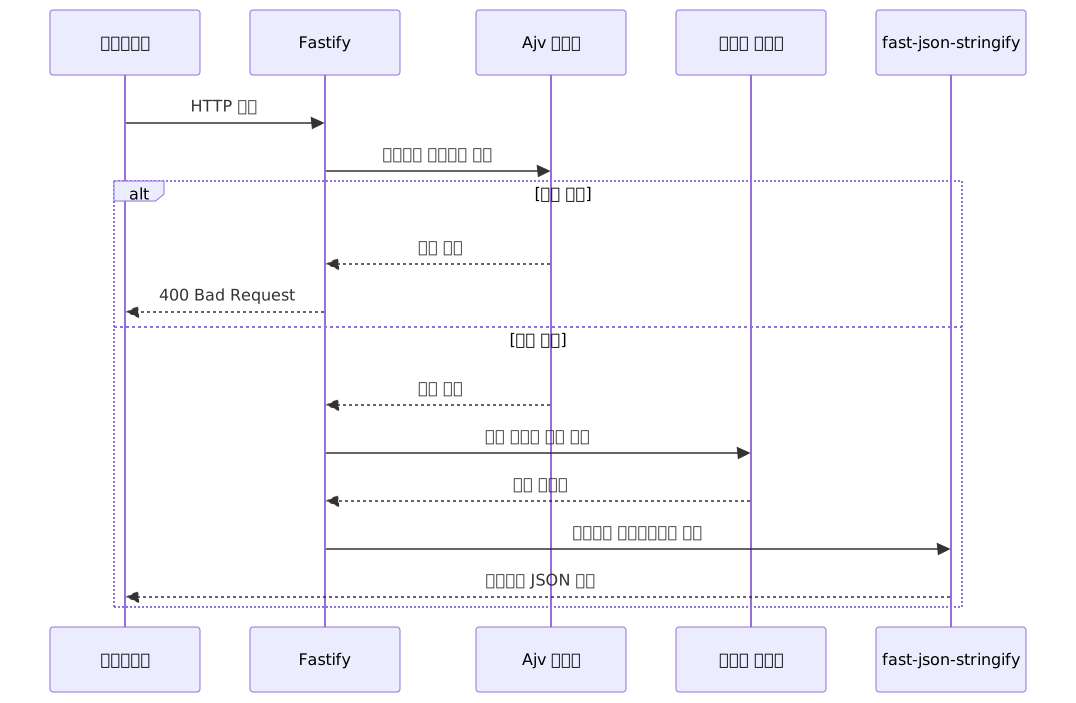
처리량 측면에서는 공식 벤치마크(fastify.dev/benchmarks) 기준으로 Express 대비 두 배 이상입니다. Fastify v5는 Node.js v20+만 지원하므로 최신 V8 JIT 최적화도 최대한 활용합니다.
TypeBox: 타입과 스키마를 한 번에
@sinclair/typebox는 TypeScript 타입과 JSON Schema를 동시에 선언합니다.
import { Type, Static } from '@sinclair/typebox'

const UserSchema = Type.Object({
  id: Type.Number(),
  name: Type.String({ minLength: 1 }),
  email: Type.String({ format: 'email' })
})

// 별도 interface 선언 없이 타입이 자동으로 추론됩니다
type User = Static<typeof UserSchema>
// => { id: number; name: string; email: string }Type.Object()의 반환값은 TypeScript 컴파일러가 읽는 타입 정보이기도 하고, Fastify가 Ajv에게 전달하는 JSON Schema이기도 합니다. Fastify의 내부 파이프라인이 JSON Schema를 직접 소비하는 구조여서, TypeBox는 별도 어댑터 없이 네이티브로 연결됩니다. 이것이 TypeBox가 Fastify 공식 문서에 권장 라이브러리로 등재된 이유입니다.
단일 스키마가 만들어내는 파이프라인
TypeBox 스키마 하나가 어떻게 여러 역할을 동시에 하는지 보면 이렇습니다.

@fastify/type-provider-typebox의 .withTypeProvider<TypeBoxTypeProvider>()를 호출하면 라우트 핸들러의 request.body, request.params, request.query가 스키마에서 정의한 TypeScript 타입으로 자동 추론됩니다.
실전 적용
프로젝트 초기 설정
npm install fastify @sinclair/typebox @fastify/type-provider-typebox
npm install @fastify/swagger @fastify/swagger-ui
npm install -D typescript @types/node tsx
서버 진입점과 앱 설정을 완성된 형태로 먼저 보겠습니다.
// src/app.ts
import Fastify from 'fastify'
import { TypeBoxTypeProvider } from '@fastify/type-provider-typebox'
import swagger from '@fastify/swagger'
import swaggerUi from '@fastify/swagger-ui'
import usersRoute from './routes/users'

export async function buildApp() {
  const app = Fastify({
    logger: true
  }).withTypeProvider<TypeBoxTypeProvider>()

  await app.register(swagger, {
    openapi: {
      info: {
        title: 'Users API',
        version: '1.0.0'
      }
    }
  })

  await app.register(swaggerUi, {
    routePrefix: '/docs'
  })

  await app.register(usersRoute, { prefix: '/api/v1' })

  app.setErrorHandler((error, req, reply) => {
    if (error.validation) {
      return reply.code(400).send({
        statusCode: 400,
        error: 'Validation Error',
        message: error.message,
        details: error.validation
      })
    }

    app.log.error(error)
    return reply.code(500).send({
      statusCode: 500,
      error: 'Internal Server Error',
      message: 'Something went wrong'
    })
  })

  return app
}// src/server.ts
import { buildApp } from './app'
async function main() {
const app = await buildApp()
await app.listen({ port: 3000, host: '0.0.0.0' })
}
main()스키마 정의
스키마를 별도 파일로 분리하면 여러 라우트에서 재사용하기 편합니다.
// src/schemas/user.ts
import { Type } from '@sinclair/typebox'

export const UserIdParams = Type.Object({
  id: Type.Number({ minimum: 1 })
})

export const CreateUserBody = Type.Object({
  name: Type.String({ minLength: 1, maxLength: 100 }),
  email: Type.String({ format: 'email' }),
  role: Type.Union([
    Type.Literal('admin'),
    Type.Literal('editor'),
    Type.Literal('viewer')
  ])
})

export const UserResponse = Type.Object({
  id: Type.Number(),
  name: Type.String(),
  email: Type.String(),
  role: Type.String(),
  createdAt: Type.String({ format: 'date-time' })
})

export const UserListQuery = Type.Object({
  page: Type.Optional(Type.Number({ minimum: 1, default: 1 })),
  limit: Type.Optional(Type.Number({ minimum: 1, maximum: 100, default: 20 }))
})UserListQuery의 default 값은 Fastify의 기본 Ajv 설정이 useDefaults: true이므로 별도 설정 없이 자동으로 적용됩니다. 쿼리스트링에 page가 없으면 req.query.page는 1이 됩니다.
라우트 연결
// src/routes/users.ts
import { FastifyPluginAsyncTypebox } from '@fastify/type-provider-typebox'
import { Type } from '@sinclair/typebox'
import {
  UserIdParams,
  CreateUserBody,
  UserResponse,
  UserListQuery
} from '../schemas/user'

// 아래는 실제 DB 레이어로 교체할 인-메모리 스텁입니다
type UserRecord = { id: number; name: string; email: string; role: string; createdAt: string }
const db: UserRecord[] = []
let nextId = 1

async function fetchUsers(page: number, limit: number): Promise<UserRecord[]> {
  return db.slice((page - 1) * limit, page * limit)
}

async function findUser(id: number): Promise<UserRecord | undefined> {
  return db.find(u => u.id === id)
}

async function findUserByEmail(email: string): Promise<UserRecord | undefined> {
  return db.find(u => u.email === email)
}

async function createUser(data: { name: string; email: string; role: string }): Promise<UserRecord> {
  const user: UserRecord = { ...data, id: nextId++, createdAt: new Date().toISOString() }
  db.push(user)
  return user
}

const usersRoute: FastifyPluginAsyncTypebox = async (app) => {
  // GET /users — 목록 조회
  app.get('/users', {
    schema: {
      querystring: UserListQuery,
      response: {
        200: Type.Array(UserResponse)
      }
    }
  }, async (req) => {
    // req.query.page, req.query.limit 모두 number | undefined로 추론됩니다
    const { page = 1, limit = 20 } = req.query
    return fetchUsers(page, limit)
  })

  // GET /users/:id — 단건 조회
  app.get('/users/:id', {
    schema: {
      params: UserIdParams,
      response: {
        200: UserResponse,
        404: Type.Object({ message: Type.String() })
      }
    }
  }, async (req, reply) => {
    // req.params.id는 number로 추론됩니다
    // Ajv가 coerceTypes 옵션으로 URL의 문자열 "42"를 숫자 42로 변환합니다
    const user = await findUser(req.params.id)
    if (!user) {
      return reply.code(404).send({ message: 'User not found' })
    }
    return user
  })

  // POST /users — 생성
  app.post('/users', {
    schema: {
      body: CreateUserBody,
      response: {
        201: UserResponse,
        409: Type.Object({ message: Type.String() })
      }
    },
    preHandler: async (req, reply) => {
      // 비동기 검증은 preHandler 훅에서 처리합니다
      // Ajv $async를 직접 쓰면 DoS 위험이 있습니다
      const existing = await findUserByEmail(req.body.email)
      if (existing) {
        return reply.code(409).send({ message: 'Email already exists' })
      }
    }
  }, async (req, reply) => {
    // req.body.name, req.body.email, req.body.role 모두 완전히 타입 추론됩니다
    const user = await createUser(req.body)
    return reply.code(201).send(user)
  })
}

export default usersRoute
서버를 실행하면 http://localhost:3000/docs에서 Swagger UI가 자동으로 켜집니다. 라우트에 선언한 TypeBox 스키마가 그대로 OpenAPI 3.x 명세로 변환됩니다. 응답 스키마에 선언하지 않은 상태 코드는 Swagger 문서에 반영되지 않으므로, preHandler에서 반환할 수 있는 409 같은 상태 코드도 schema.response에 명시하는 것이 좋습니다.
장단점 분석
성능과 생산성 면의 장점
| 항목 | Fastify v5 | Express 5 | Koa |
|---|---|---|---|
| 처리량 | Express 대비 2배 이상 (공식 벤치마크 기준) | 기준선 | Express보다 높음 |
| 타입 안전성 | 컴파일·런타임 동시 | 수동 관리 | 수동 관리 |
| 요청 검증 | 내장 (Ajv) | 별도 라이브러리 | 별도 라이브러리 |
| OpenAPI 문서 | 스키마 기반 자동화 | 어노테이션 또는 수동 | 수동 |
| JSON 직렬화 | fast-json-stringify | JSON.stringify | JSON.stringify |
응답 스키마에 없는 필드는 fast-json-stringify가 직렬화 시 자동으로 제거합니다. 민감한 필드를 실수로 노출하는 것을 구조적으로 방지하는 부수효과가 있습니다.
TypeBox 스키마를 공유 패키지로 분리하면 여러 서비스 간 API 계약을 단일 소스로 유지할 수 있습니다. 스키마가 바뀌면 자동 생성되는 OpenAPI 명세도 함께 업데이트되므로, 프론트엔드 팀이 별도 협의 없이 최신 명세를 참조할 수 있습니다.
TypeBox vs Zod에서 자주 묻는 질문이 있는데, Fastify 기반 프로젝트라면 TypeBox 선택에 명확한 이유가 있습니다. Zod v4가 이전 버전 대비 런타임 성능을 크게 개선했지만, Ajv는 스키마를 인터프리팅하는 대신 컴파일 시점에 최적화된 검증 함수로 변환합니다. 구조적 차이입니다. Fastify 외부 환경(NestJS, 독립 검증 레이어 등)이라면 Zod의 DX와 풍부한 에러 메시지가 더 매력적일 수 있습니다.
전환 시 마주치는 현실적인 어려움
Express → Fastify 전환 시:
| 항목 | 내용 |
|---|---|
| Express 미들웨어 비호환 | Connect/Express 미들웨어를 직접 사용할 수 없습니다. @fastify/express 호환 레이어가 있지만 성능 이점이 상당 부분 소멸됩니다 |
| 플러그인 스코프 학습 | 플러그인 등록 순서, decorate API, 스코프 경계를 이해하는 데 시간이 필요합니다 |
| 생태계 규모 | Express 생태계가 압도적으로 크고, Fastify 서드파티 플러그인 선택지는 적습니다 |
Fastify v4 → v5 마이그레이션 시:
| 항목 | 내용 |
|---|---|
| 브레이킹 체인지 규모 | 20개 이상의 브레이킹 체인지. 특히 타입 프로바이더 분리가 기존 플러그인 타입 정의에 영향을 줍니다 |
| 공식 Migration Guide | fastify.dev/docs/latest/Guides/Migration-Guide-V5/에서 항목별로 확인하세요 |
TypeBox 자체의 한계:
Zod 대비 복잡한 union/discriminated union 표현 시 코드가 장황해집니다. 복잡한 도메인 모델이 많다면 이 부분을 먼저 비교해보는 것이 좋습니다.
자주 마주치는 실수
1. 구버전 가변인자 listen 시그니처 사용
// 동작하지 않습니다 — v5에서 제거된 시그니처
app.listen(3000, '0.0.0.0', () => {
  console.log('listening')
})

// v5에서는 객체 형태를 사용합니다
await app.listen({ port: 3000, host: '0.0.0.0' })
2. withTypeProvider 없이 타입 추론 기대하기
// withTypeProvider 없이는 body가 unknown으로 추론됩니다
const app = Fastify()

// 이렇게 해야 라우트 핸들러에서 타입 추론이 됩니다
const app = Fastify().withTypeProvider<TypeBoxTypeProvider>()
3. params에 플랫 객체 스키마 사용하기
// 위험한 방식 — 오류 없이 검증이 조용히 무시됩니다
schema: {
  params: { id: { type: 'number' } }
}

// 올바른 방식 — type: 'object' + properties 구조를 갖춘 JSON Schema
schema: {
  params: Type.Object({ id: Type.Number() })
}
첫 번째 방식은 에러가 발생하지 않아서 더 위험합니다. Ajv는 최상위 id 키를 type: 'object' + properties 구조 없이 선언하면 해당 필드를 인식하지 못하고, 어떤 값이 들어와도 검증을 통과시킵니다.
마치며
Fastify v5 + TypeBox 조합의 핵심은 스키마가 곧 계약이라는 단일 진실 원칙입니다. TypeBox 스키마 하나가 TypeScript 타입, Ajv 런타임 검증, fast-json-stringify 직렬화, OpenAPI 문서를 동시에 만들어냅니다. 이 파이프라인은 서버 시작 시점에 컴파일되어 런타임 오버헤드를 최소화합니다.
Fastify v4는 이미 지원이 종료되었고 v5가 메인스트림입니다. 전환을 고려하고 있다면 아래 순서로 시작하는 것이 부드럽습니다.
1단계 — 새 엔드포인트 하나로 시작: 기존 Express 프로젝트 전체를 한 번에 전환하지 않아도 됩니다. 새로운 기능 하나를 Fastify로 작성해보면서 플러그인 시스템과 TypeBox 스키마 선언 방식을 체득하세요.
2단계 — 스키마 패키지 분리: TypeBox 스키마를 별도 패키지나 디렉토리로 분리하면 여러 서비스 간 API 계약을 단일 소스로 관리할 수 있습니다. 스키마가 바뀌면 자동 생성되는 OpenAPI 명세와 함께 프론트엔드 팀의 타입 생성 파이프라인도 함께 업데이트됩니다.
3단계 — 공식 플러그인으로 확장: @fastify/jwt, @fastify/rate-limit, @fastify/cors는 Fastify의 스코프 시스템과 자연스럽게 통합됩니다. 인증이 필요한 라우트 그룹에만 JWT 플러그인을 스코프 단위로 적용하는 패턴이 특히 깔끔하게 동작합니다.
참고 자료
- Fastify 공식 문서 v5 — Validation and Serialization
- Fastify 공식 문서 v5 — Type Providers
- Fastify 공식 문서 v5 — TypeScript Reference
- Fastify v5 Migration Guide
- Fastify Performance Benchmarks
- Fastify v5 is Here! — Platformatic Blog
- Fastify v5 Breaking Changes: Worth the Upgrade? — Encore Blog
- fastify/fastify-swagger — GitHub
- Fastify JSON API: Schema Validation, Serialization, and TypeBox — Jsonic
- TypeBox vs Zod: Choosing the Right TypeScript Validation Library — Better Stack
- Fastify Fundamentals: How to Validate API Responses — Platformatic Blog
- Migrating from Express to Fastify: A Complete Guide — Better Stack
- How to Generate OpenAPI with Fastify — Speakeasy
- Zod vs Yup vs TypeBox: The Ultimate Schema Validation Guide for 2025 — DEV Community