Managing PostgreSQL Schemas Like Git — Declarative Diff, Linting, Drift Detection, and Automatic Rollback with Atlas and GitHub Actions
"Hey, who deleted a column directly from the production DB?" — the moment that message appears in the team Slack, the day's deployment plans are blown. Migration files pile up faithfully, but when someone fires off an ALTER TABLE directly against the production DB as a "hotfix," the files and the actual schema quietly fall out of sync. That drift goes unnoticed until the next deployment, where it explodes like a bomb.
The root of the problem is the absence of a single source of truth that tracks the "intended state" and the "actual state" of the schema. Atlas attacks exactly this point. Just as Terraform manages infrastructure declaratively, Atlas manages database schemas declaratively. The developer defines the desired schema state, and Atlas automatically computes the SQL to execute by comparing it against the current DB state.
This article walks through how to connect Atlas with GitHub Actions to build a pipeline that covers migration linting at the PR stage, production drift detection, and automatic rollback on deployment failure. Rather than introducing the tool itself, the focus is on "why this structure" — examining the specific judgment calls that matter in real production environments.
Core Concepts
The Approach Covered Here: Versioned Migrations
Atlas supports two workflows. The declarative approach uses atlas schema apply to directly compare and apply the target state defined in schema.hcl against the current DB — Atlas computes the diff and executes it immediately, with no separate migration files. The versioned approach uses atlas migrate diff to detect changes and generate numbered migration files, then applies them in order with atlas migrate apply.
This article is based on the versioned approach. The change history remains in Git history for audit trails, PRs let reviewers see exactly which SQL will execute, and you can roll back precisely to a specific version. It also serves as a natural intermediate step for teams migrating from Flyway or Liquibase to Atlas.
Declarative Schema vs. Version-Based Migrations
The core difference is who knows "what the current schema is," and how. Version-based tools accumulate change history as files — V001__init.sql, V002__add_column.sql, and so on. To know the current schema you must replay those files from the beginning, and if someone touched the DB directly in the middle, the tool has no way to detect the divergence between the files and the actual DB.
Atlas treats the schema itself as the source of truth. You define the desired final state in schema.hcl, and Atlas directly introspects the current DB, computes the diff, and generates only the SQL that is needed.

Even in the versioned workflow, you can leverage Atlas's diff computation. Define the target state in schema.hcl and run atlas migrate diff — it automatically detects changes and generates numbered migration files. This gives you a structure where schema.hcl owns the "intended final state" and the migrations/ directory owns the "change history."
Migration Linting
atlas migrate lint is a static analysis tool for migration files. It includes numerous built-in analyzers that detect destructive changes, lock risks, security patterns, and more (see the full list of analyzers).
| Analyzer Category | Detection Examples |
|---|---|
| Destructive changes | Dropping tables, columns, or indexes |
| Data-dependent modifications | Adding a NOT NULL column without a default value |
| Lock risks | ALTER statements that trigger table rewrites |
| SQL injection patterns | Injection vulnerabilities in dynamic queries |
| Transaction nesting errors | Incorrect BEGIN/COMMIT nesting |
When integrated with GitHub Actions, linting runs automatically when a PR is opened and posts the results as a PR comment. CI catches DB-level risks that humans tend to miss during code review.
You can also define custom lint rules to enforce team conventions — things like "foreign keys must explicitly specify an ON DELETE option" or "FK columns without an index are prohibited." However, this feature is currently limited to enterprise and paid plans. The built-in analyzers remain available on the free tier, so this is a judgment call based on your team's budget.
Drift Detection
Drift refers to schema changes that occur outside the standard migration process. The classic case is "someone ran ALTER TABLE directly as a hotfix." That change isn't in Git, and it isn't in the migration history.
Atlas's drift detection periodically introspects the actual DB schema and compares it against the intended state (the schema file). When a discrepancy is found, it outputs a diff in HCL or SQL format.

Advanced drift monitoring features such as an ERD visualization dashboard require Atlas Cloud (SaaS) integration. You can build a continuous drift detection pipeline with the CLI alone, and that is what this article covers.
Rollback: Dynamic Reverse SQL Computation
With traditional tools, rolling back requires a down file written in advance. If you create V003__add_column.sql, you also have to create V003__add_column_down.sql. Forget it, or write it incorrectly, and the rollback itself fails.
Atlas takes a different approach. When atlas migrate down runs, it dynamically computes the reverse SQL based on the current DB state. No pre-written down files required. Combining this dynamic computation with GitHub Actions' if: failure() condition lets you build a pipeline where a rollback is triggered automatically on deployment failure.
Because PostgreSQL supports transactional DDL, Atlas wraps an entire rollback in a single transaction. If it fails midway, everything rolls back — so you avoid ending up with a half-applied schema change.
That said, rollbacks are structurally complex. If a migration includes data transformations (backfills), rolling back the schema alone is not enough — you also need to design data recovery logic. The Atlas blog posts "The Myth of Down Migrations" and "The Hard Truth About GitOps and DB Rollbacks" are worth reading.
Practical Implementation
Step 1: Configure atlas.hcl
Create an atlas.hcl configuration file at the project root to define your data sources and environments.
# atlas.hcl
variable "db_url" {
  type    = string
  default = getenv("DATABASE_URL")
}

env "local" {
  src = "file://schema.hcl"
  url = var.db_url
  dev = "docker://postgres/15/dev"
  migration {
    dir = "file://migrations"
  }
}

env "production" {
  url = var.db_url
  migration {
    dir = "file://migrations"
  }
}
Specifying a Docker URL for dev causes Atlas to spin up a temporary container for linting and diff computation. This lets Atlas work safely without touching your actual development DB.
Step 2: Define the Schema
The workflow is to define schema changes in schema.hcl and auto-generate migration files with atlas migrate diff.
# schema.hcl
table "users" {
  schema = schema.public
  column "id" {
    type = bigserial
  }
  column "email" {
    type = varchar(255)
    null = false
  }
  column "created_at" {
    type    = timestamptz
    default = sql("now()")
  }
  primary_key {
    columns = [column.id]
  }
  index "users_email_idx" {
    columns = [column.email]
    unique  = true
  }
}
Edit this file and run the command below, and a timestamped SQL file will be automatically created in the migrations/ directory.
atlas migrate diff --env local --name add_users_tableStep 3: Configure the GitHub Actions Pipeline
This covers the full flow from opening a PR through post-merge deployment and automatic rollback on failure. There is one important architectural point here: the GitHub Actions Runner directly executes linting and migration apply, while Atlas Cloud serves only as a registry for migration versions. The Runner connects directly to the production DB — Atlas Cloud does not act as an intermediary.
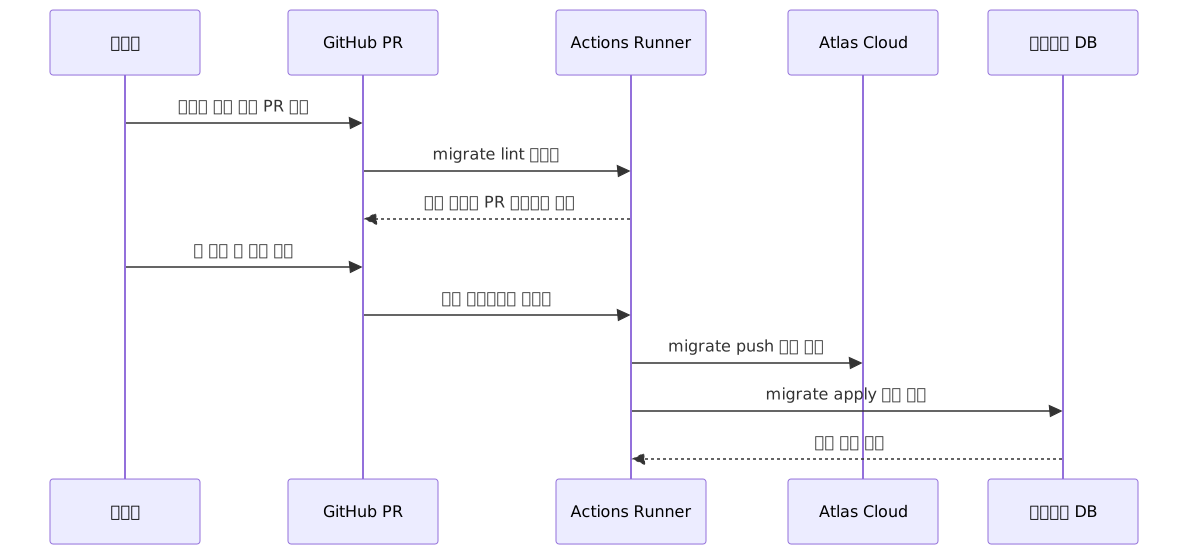
Implement this flow with two workflow files.
PR validation workflow:
# .github/workflows/atlas-ci.yml
name: Atlas CI

on:
  pull_request:
    paths:
      - 'migrations/**'
      - 'schema.hcl'

jobs:
  lint:
    runs-on: ubuntu-latest
    services:
      postgres:
        image: postgres:15
        env:
          POSTGRES_PASSWORD: postgres
          POSTGRES_DB: dev
        options: >-
          --health-cmd pg_isready
          --health-interval 10s
          --health-timeout 5s
          --health-retries 5
        ports:
          - 5432:5432

    steps:
      - uses: actions/checkout@v4

      - uses: ariga/setup-atlas@v0
        with:
          cloud-token: ${{ secrets.ATLAS_CLOUD_TOKEN }}

      - uses: ariga/atlas-action/migrate/lint@v1
        with:
          dir: 'file://migrations'
          dev-url: 'postgres://postgres:postgres@localhost:5432/dev?sslmode=disable'
          config: './atlas.hcl'
        env:
          GITHUB_TOKEN: ${{ secrets.GITHUB_TOKEN }}
Passing GITHUB_TOKEN is required for lint results to be automatically posted as PR comments.
Deploy workflow (with automatic rollback):
# .github/workflows/atlas-deploy.yml
name: Atlas Deploy

on:
  push:
    branches:
      - main
    paths:
      - 'migrations/**'

jobs:
  deploy:
    runs-on: ubuntu-latest
    steps:
      - uses: actions/checkout@v4

      - uses: ariga/setup-atlas@v0
        with:
          cloud-token: ${{ secrets.ATLAS_CLOUD_TOKEN }}

      - name: Push migration to Atlas Cloud
        uses: ariga/atlas-action/migrate/push@v1
        with:
          dir: 'file://migrations'
          dir-name: 'myapp'
          config: './atlas.hcl'

      - name: Apply to production
        id: apply
        uses: ariga/atlas-action/migrate/apply@v1
        with:
          url: ${{ secrets.DATABASE_URL }}
          dir-name: 'myapp'
          config: './atlas.hcl'

      - name: Auto rollback on failure
        if: failure() && steps.apply.outcome == 'failure'
        run: |
          echo "Deployment failure detected — rolling back the last migration"
          atlas migrate down \
            --url "${{ secrets.DATABASE_URL }}" \
            --dir "file://migrations" \
            --amount 1
When the apply step fails, the if: failure() condition is met and the rollback step triggers automatically. Note that this rollback only reverts schema changes, so migrations that include data transformations (backfills) also require a separate data recovery procedure.
Step 4: Configure Drift Detection on a Schedule
atlas schema diff exits with code 0 by default even when a diff exists. This means running the command alone will not fail the workflow if drift is present. To actually fail the pipeline when drift is detected, you need to capture the output and call exit 1 explicitly when it is non-empty.
Also, when comparing against an HCL file with atlas schema diff --to "file://schema.hcl", a dev DB is needed to normalize the HCL schema. The example below uses a service container for this purpose.
# .github/workflows/atlas-drift.yml
name: Drift Detection

on:
  schedule:
    - cron: '0 * * * *'  # runs every hour

jobs:
  detect:
    runs-on: ubuntu-latest
    services:
      postgres:
        image: postgres:15
        env:
          POSTGRES_PASSWORD: postgres
          POSTGRES_DB: dev
        options: >-
          --health-cmd pg_isready
          --health-interval 10s
          --health-timeout 5s
          --health-retries 5
        ports:
          - 5432:5432

    steps:
      - uses: actions/checkout@v4

      - uses: ariga/setup-atlas@v0
        with:
          cloud-token: ${{ secrets.ATLAS_CLOUD_TOKEN }}

      - name: Run drift detection
        run: |
          DIFF=$(atlas schema diff \
            --config ./atlas.hcl \
            --from "${{ secrets.DATABASE_URL }}" \
            --to "file://schema.hcl" \
            --dev-url "postgres://postgres:postgres@localhost:5432/dev?sslmode=disable")
          if [ -n "$DIFF" ]; then
            echo "Schema drift detected:"
            echo "$DIFF"
            exit 1
          fi
When drift is found, exit 1 fails the workflow and GitHub sends a notification. Adding a Slack integration step lets you push the message directly to a team channel.
Step 5: Rollback Scenarios
When a manual rollback is needed outside the deployment pipeline, run atlas migrate down directly.
# Preview what SQL will be applied before executing
atlas migrate down --dry-run \
  --url "$DATABASE_URL" \
  --dir "file://migrations" \
  --amount 1

# Execute the actual rollback after confirming
atlas migrate down \
  --url "$DATABASE_URL" \
  --dir "file://migrations" \
  --amount 1

# Roll back to a specific version
atlas migrate down \
  --url "$DATABASE_URL" \
  --dir "file://migrations" \
  --to-version "20250601120000"
It is recommended to review the plan with --dry-run before proceeding. Because Atlas dynamically computes the reverse SQL from the current DB state, no pre-written down files are needed.
Pros and Cons
Advantages
| Item | Description |
|---|---|
| Declarative workflow | Define only the target state; migration SQL is auto-generated |
| Dynamic rollback | Reverse SQL computed automatically without pre-written down files |
| Built-in analyzers | Destructive changes, lock risks, security patterns — auto-detected in CI |
| Native GitHub Actions | Automated PR comments, built-in pre-approval flow |
| PostgreSQL transactional DDL | Guarantees full migration rollback on failure |
| Multi-ORM support | Direct diff computation from Ent, GORM, and SQLAlchemy schemas |
| Drift detection | Immediate alerts for unintended schema changes |
| pgvector support | Native management of vector columns for the LLM ecosystem |
Disadvantages and Considerations
| Item | Description |
|---|---|
| Currently paid-only features | Custom lint rules and advanced drift monitoring require enterprise or paid plans |
| Learning curve | Upfront cost to learn the HCL DSL and shift to declarative thinking |
| No data migration support | Schema changes are automated, but backfill logic must be written manually |
| Atlas Cloud dependency | Advanced features like the drift dashboard and Registry require SaaS integration |
| Reality of production rollbacks | Schema-only rollback may be insufficient when data transformations are involved |
Common Mistakes in Practice
1. Attempting to lint without a dev-url
atlas migrate lint requires a temporary DB to validate migration plans. Without specifying dev-url, some analyzers will not run. Spinning up a PostgreSQL service container in CI or passing a Docker URL in the form docker://postgres/15/dev is the reliable approach.
2. Manually editing migration files generated by Atlas
Manually altering the content causes a checksum mismatch with migrations/atlas.sum, which will fail validation. If a change is needed, the safest approach is to delete the affected migration file and all subsequent files, then regenerate them with atlas migrate diff.
If a manual edit was unavoidable, run atlas migrate hash --force. This command force-rewrites migrations/atlas.sum based on the current state of the files. Running atlas migrate hash without --force only checks for mismatches and does not modify the file. Be aware that overwriting the checksum with --force makes it impossible to validate the previous state, so the entire team must be aware of the change before using it.
3. Failing to keep schema.hcl and migration files in sync
Modifying schema.hcl without running atlas migrate diff causes the two sources to diverge. Adding a step in CI to verify with atlas migrate diff that no new changes are pending prevents this issue.
Closing Thoughts
The core value of the Atlas + GitHub Actions combination is "putting schema changes through the same validation process as code changes." When a PR opens, the linter catches destructive changes. When it merges, the version is registered in Atlas Cloud. When it deploys, it is applied to production. If deployment fails, rollback is triggered automatically. And if someone quietly touches the DB, drift detection notifies the team.
There is no need to adopt every feature at once. A phased approach is realistic: start with the linting pipeline, stabilize it, add drift detection, then wire in the automatic rollback step. The fastest starting point is atlas schema inspect --url "$DATABASE_URL" > schema.hcl — importing the current schema into a file. That single line is where all the automation begins.
References
- Atlas Official Documentation
- GitHub Actions Integration Official Guide
- Step-by-Step Guide for Declarative CI/CD
- Schema Drift Detection Official Docs
- Down Migrations Official Docs
- Migration Lint Official Docs
- Migration Analyzers List
- v0.31 Release Notes: Custom schema rules, pgvector
- v0.38 Release Notes: Linting Analyzers, PII Detection, Migration Hooks
- Design Background for Dynamic Rollback: The Myth of Down Migrations
- The Hard Truth About GitOps and DB Rollbacks
- PR Pre-Approval Workflow
- Atlas vs Flyway, Liquibase, and ORM Tool Comparison
- GitHub — ariga/atlas
- Palark Real-World Operations Review
- 2026 Database CI/CD Tool Trends