Building an Edge-Native SQLite Backend with Cloudflare D1 and Drizzle ORM
If you need a database that delivers low read latency to users worldwide without managing servers yourself, that combination is now a pretty realistic choice. Cloudflare D1 launched Global Read Replication in public beta in April 2025, opening the door to running SQLite queries across more than 300 Cloudflare data centers worldwide. Users in Seoul read from the Seoul replica, users in Tokyo read from the Tokyo replica — with no extra configuration.
This post covers D1's architecture and consistency model, type-safe query design with Drizzle ORM, and the full workflow from local development to production migrations. The focus is on practical questions: "How do you handle write bottlenecks?", "How do you survive row-scan billing?", and "How do you guarantee that data you just wrote is visible from a read replica?"
D1 Architecture and Consistency Model
How Read Replication Works
Traditional centralized databases physically exist in a specific region. When a user in Seoul sends a query to a PostgreSQL instance in Virginia, tens to hundreds of milliseconds pass as the request travels back and forth over fiber optic cables. D1 changes this structure by automatically distributing read replicas across the globe.
Writes flow through a single Primary node. Reads are served by the replica closest to the requesting user. Cloudflare handles routing automatically, and global read replication is enabled on the relevant D1 database settings page in the Cloudflare dashboard.

Workers access this database through a single env.DB binding — no TCP connections, no connection pools, no driver installation required. The V8 Isolates architecture means there are no cold starts, and D1 access through the binding runs on the same Cloudflare infrastructure, minimizing network hops.
Sessions API and Read-After-Write Consistency
Global replication introduces a new problem. If a user reads immediately after writing, replication lag may cause the data they just wrote to be invisible. This is called a read-after-write inconsistency, or a read-your-own-writes failure. D1's Sessions API solves this problem.
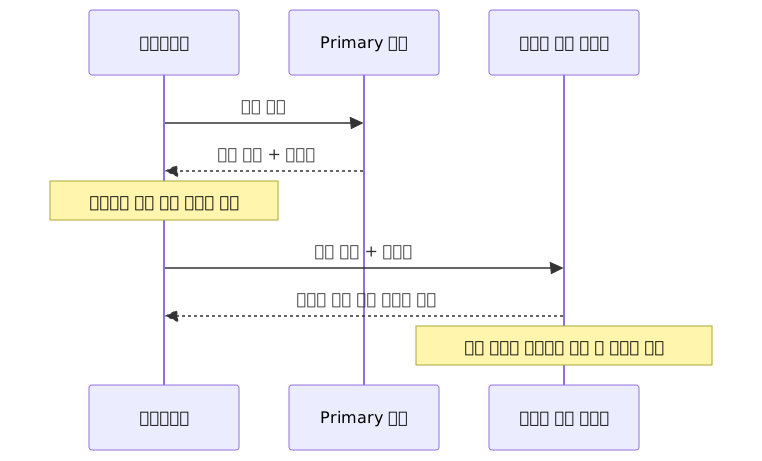
With the Sessions API, you receive a bookmark after a write completes and attach it to the next read request. The replica uses this bookmark to guarantee it returns data that is "at least this up to date." This is especially important in scenarios where "what I saved should be immediately visible to me" — social feeds, user settings changes, shopping carts, and similar flows.
Why Drizzle Fits the Workers Environment
There are three reasons Drizzle has an edge when choosing an ORM for the Workers environment.
Bundle size: Prisma requires a separate binary, which either doesn't work in Workers or requires complex workarounds. Drizzle is pure TypeScript — it just works.
SQL transparency: Drizzle's philosophy is to express SQL in TypeScript rather than hide it. The queries the ORM generates are predictable, making debugging easy even in specialized environments like D1.
Native D1 driver: drizzle-orm/d1 is officially supported. You connect through the official path without building your own adapter.
Project Setup
Installing Packages and Creating a D1 Database
bun create cloudflare@latest my-app --template=hono
cd my-app
bun add drizzle-orm
bun add -d drizzle-kit wrangler

# Create D1 database — paste the output database_id into wrangler.toml
wrangler d1 create my-app-db
Add the D1 binding to wrangler.toml.
name = "my-app"
compatibility_date = "2024-09-23"

[[d1_databases]]
binding = "DB"
database_name = "my-app-db"
database_id = "id-received-from-wrangler-d1-create"
Defining the Schema
Write the Drizzle schema in src/db/schema.ts. Since D1 is SQLite-based, use drizzle-orm/sqlite-core.
import { sqliteTable, text, integer, index } from 'drizzle-orm/sqlite-core'

export const users = sqliteTable('users', {
  id: integer('id').primaryKey({ autoIncrement: true }),
  email: text('email').notNull().unique(),
  name: text('name').notNull(),
  postCount: integer('post_count').notNull().default(0),
})

export const posts = sqliteTable('posts', {
  id: integer('id').primaryKey({ autoIncrement: true }),
  title: text('title').notNull(),
  slug: text('slug').notNull().unique(),
  content: text('content'),
  authorId: integer('author_id').notNull(),
  publishedAt: integer('published_at', { mode: 'timestamp' }),
  createdAt: integer('created_at', { mode: 'timestamp' })
    .notNull()
    .$defaultFn(() => new Date()),
}, (table) => ({
  authorIdx: index('idx_posts_author_id').on(table.authorId),
}))
drizzle.config.ts is needed when drizzle-kit accesses D1 directly via drizzle-kit push, drizzle-kit studio, etc. If you only generate migration files (generate), these credentials are not used.
import type { Config } from 'drizzle-kit'

export default {
  schema: './src/db/schema.ts',
  out: './migrations',
  dialect: 'sqlite',
  driver: 'd1-http',
  dbCredentials: {
    accountId: process.env.CLOUDFLARE_ACCOUNT_ID!,
    databaseId: process.env.CLOUDFLARE_D1_DATABASE_ID!,
    token: process.env.CLOUDFLARE_D1_TOKEN!,
  },
} satisfies Config
Connecting with Hono
When creating an instance with drizzle(c.env.DB, { schema }), you must pass the schema alongside to fully use Drizzle's relational query builder (RQB). Initializing without schema allows basic CRUD to work, but db.query.* style relational queries become unavailable.
import { Hono } from 'hono'
import { drizzle } from 'drizzle-orm/d1'
import * as schema from './db/schema'
import { posts, users } from './db/schema'
import { eq, desc, sql } from 'drizzle-orm'

type Env = {
  DB: D1Database
}

const app = new Hono<{ Bindings: Env }>()

app.get('/posts', async (c) => {
  const db = drizzle(c.env.DB, { schema })

  const result = await db
    .select({
      id: posts.id,
      title: posts.title,
      slug: posts.slug,
      authorName: users.name,
    })
    .from(posts)
    .leftJoin(users, eq(posts.authorId, users.id))
    .orderBy(desc(posts.createdAt))
    .limit(20)

  return c.json(result)
})

export default app
The return type is fully inferred by TypeScript without any separate declaration. Hovering over result automatically shows { id: number; title: string; slug: string; authorName: string | null }[].
Key Patterns
Using the Sessions API
In a global read replication environment, endpoints that need to read immediately after a write should use the Sessions API. Start a session with env.DB.withSession(), then after the write completes, get the current replication position as a bookmark using session.getBookmark(). Since D1DatabaseSession implements D1Database, you can pass it directly as drizzle(session, { schema }).
// POST /settings — write, then return bookmark
app.post('/settings', async (c) => {
  const body = await c.req.json<{ userId: number; name: string }>()

  const session = c.env.DB.withSession('first-unconstrained')
  const db = drizzle(session, { schema })

  await db.update(users)
    .set({ name: body.name })
    .where(eq(users.id, body.userId))

  // opaque string representing the replication state at this point
  const bookmark = session.getBookmark()

  return c.json({ ok: true }, 200, {
    'x-d1-bookmark': bookmark ?? '',
  })
})

// GET /settings/:userId — read based on bookmark
app.get('/settings/:userId', async (c) => {
  // client passes the bookmark received from the previous response as a header
  const bookmark = c.req.header('x-d1-bookmark') ?? 'first-unconstrained'

  const session = c.env.DB.withSession(bookmark)
  const db = drizzle(session, { schema })

  const [user] = await db.select()
    .from(users)
    .where(eq(users.id, Number(c.req.param('userId'))))
    .limit(1)

  return c.json(user ?? null)
})
A bookmark is an opaque string that you don't need to parse or construct yourself. When strong consistency is required, pass 'first-primary' instead of 'first-unconstrained' to force reads to always go to the Primary.
Handling Multiple Writes with batch()
D1 does not support interactive transactions using BEGIN / COMMIT over the Workers binding. db.batch() is the only way to process multiple writes atomically. All statements in the array execute as a single unit, and if any one fails, the entire batch is rolled back.
app.post('/posts', async (c) => {
  const db = drizzle(c.env.DB, { schema })
  const body = await c.req.json<{
    title: string
    slug: string
    content: string
    authorId: number
  }>()

  // atomically insert post + update author stats
  const [createdPosts] = await db.batch([
    db.insert(posts).values({
      title: body.title,
      slug: body.slug,
      content: body.content,
      authorId: body.authorId,
    }).returning(),
    db.update(users)
      .set({ postCount: sql`${users.postCount} + 1` })
      .where(eq(users.id, body.authorId)),
  ] as const)

  return c.json(createdPosts[0], 201)
})
batch() returns the result of each statement as an array. The as const assertion is needed for TypeScript to accurately infer each element's type. The result of the first statement (INSERT … RETURNING) becomes createdPosts, and the result of the second statement (UPDATE) is ignored.
Migration Workflow
The flow is: change the schema, generate migration files, validate locally, then apply to production.

# 1. Generate migration SQL file after schema changes
bunx drizzle-kit generate

# 2. Apply locally (uses miniflare's built-in SQLite)
wrangler d1 execute my-app-db --local --file=./migrations/0001_add_post_count.sql

# 3. Apply to production
wrangler d1 migrations apply my-app-db --remote
D1 internally manages a d1_migrations table automatically to track which migrations have been applied. Migration files are in .sql format, so they version-control cleanly in Git.
If you need a staging environment, add an [env.staging] block to wrangler.toml, bind a separate D1 database, and apply with wrangler d1 migrations apply my-app-db --env staging --remote.
Addressing Row-Scan Billing
D1 bills based on the number of rows scanned, not the number of rows returned. Running WHERE author_id = 5 without an index can result in scanning the entire table — thousands of rows counted — even if only 10 rows are returned.
Use EXPLAIN QUERY PLAN to inspect query execution plans.
EXPLAIN QUERY PLAN SELECT * FROM posts WHERE author_id = 5;

-- If it says SCAN posts, there's no index → full table scan
-- You want to see SEARCH posts USING INDEX idx_posts_author_id
As shown in the schema above, declaring an index with index() inside a Drizzle schema definition automatically includes the CREATE INDEX statement in the migration file. It's good practice to add indexes on columns used in WHERE, JOIN, and ORDER BY clauses at the schema design stage.
Pros and Cons Summary
When This Combination Works Well
| Item | Description |
|---|---|
| Zero cold starts | No function startup delay thanks to the V8 Isolates architecture |
| Global low-latency reads | Served from the nearest replica. Advantageous for read-heavy workloads |
| No operational overhead | DB servers, connection pools, backups, and patches are all managed by Cloudflare |
| Generous free tier | Low-traffic services incur virtually no cost (see limits docs for exact figures) |
| Built-in SQLite features | FTS5 full-text search, JSON functions, and standard SQL syntax work as-is |
| Type safety | Full type inference from schema to query with Drizzle + TypeScript |
| Multi-tenant SaaS | Unlimited number of databases. Independent DB per tenant enables file-level data isolation |
When This Combination Doesn't Fit
| Item | Description |
|---|---|
| 10 GB storage cap | Maximum 10 GB per database. Not suitable for large datasets |
| Write throughput limits | Around 500–2,000 writes per second. Insufficient for high-frequency event logging or real-time payment processing |
| Cloudflare lock-in | Accessible only via Workers binding. Cannot be used directly outside the platform |
| Missing advanced SQL features | No PostgreSQL-level features like ENUMs or complex window functions |
| Row-scan billing | Queries without indexes can cause costs to spike due to billing by rows scanned |
Three Common Mistakes
1. Deploying to production without indexes
During development, small data volumes hide the problem. As production data grows, costs rise. Adding EXPLAIN QUERY PLAN to your migration review routine catches this early.
2. Trying interactive transactions instead of db.batch()
BEGIN/COMMIT style transactions do not work in D1 Workers bindings. If you need atomic multi-write operations, db.batch() is the only option — not "supported but risky," but simply not supported.
3. Enabling global read replication and forgetting the Sessions API
If you turn on read replication and then read immediately after a write without the Sessions API, the data you just wrote may not appear — which looks like a bug to the user. Apply the Sessions API to any flow that reads immediately after a write.
Conclusion
The reasons D1 + Drizzle ORM is practical in an edge environment are clear. Global read replication addresses geographic latency, the Sessions API maintains read-after-write consistency, and Drizzle enables type-safe queries. Operational burden is also low.
That said, write throughput (around 500–2,000 writes per second) and the 10 GB storage cap are real constraints. If you need write-intensive workloads or large datasets, compare Neon (serverless PostgreSQL) or Turso (edge SQLite based on libSQL). D1 shines under the condition of "overwhelmingly read-heavy, moderate writes, globally serverless."
If you're getting started, this order is practical:
Step 1 — Create a D1 database with wrangler d1 create and generate the first migration file with drizzle-kit generate. Use the --local option to verify queries work correctly against local SQLite first.
Step 2 — Write API endpoints with Hono + Drizzle. Use db.batch() for multiple writes, and declare indexes in the schema definition for columns you filter on frequently.
Step 3 — Deploy to production with wrangler d1 migrations apply --remote and enable global read replication in the Cloudflare dashboard. If you have flows that read immediately after a write, apply the Sessions API alongside.
References
- Cloudflare D1 Official Overview
- D1 Global Read Replication Official Docs
- D1 Migrations Official Docs
- D1 Best Practices Official Docs
- D1 Limits Official Docs
- Cloudflare Blog: D1 Global Read Replication Public Beta Announcement
- Cloudflare Blog: Building D1 as a Global Database
- Drizzle ORM Official D1 Integration Guide
- Drizzle ORM D1 Getting Started
- Drizzle ORM D1 HTTP API + drizzle-kit Guide
- InfoQ: Analysis of Cloudflare D1 Global Replication Upgrade
- DEV Community: Cloudflare D1 + Drizzle ORM Practical Guide
- Hono + D1 + Drizzle Setup Tutorial
- Cloudflare D1 Global Replication Deep Dive
- Drizzle ORM 2026 Trends Analysis
- Turso vs Cloudflare D1 Comparison 2026
- SQLite at the Edge 2026: Database Renaissance
- Durable Objects + D1 + Drizzle Combination Example