Seoul at 50ms, São Paulo at 280ms — How to Close the Gap with Turso LibSQL
"Why are São Paulo users getting 280ms?" The answer is usually simple: the DB is locked in a single region. You solved static files with a CDN, but the DB ends up being the bottleneck — that situation exactly.
Entering 2025–2026, the phrase "SQLite Renaissance" is popping up more and more. The days of treating SQLite as a toy DB are over; it's now being seriously considered as a production DB for edge environments. At the center of this is Turso and LibSQL.
In this post, we'll walk through code covering how LibSQL overcomes SQLite's limitations, the architecture that achieves 50ms responses with embedded replicas, type-safe queries using Drizzle ORM with the turso dialect, and safe schema migration workflows for production. Multi-tenant SaaS patterns are included as well.
LibSQL: A Distributed Database with SQLite DNA
SQLite is open source, but it doesn't accept external contributions. That means there's no official way to add features like network access, server-side replication, or concurrent multi-connection support. LibSQL is a project that was created by forking SQLite to address these limitations.
| Feature | SQLite | LibSQL |
|---|---|---|
| HTTP protocol access | Not supported | Native support |
| Server-side replication | Not supported | WAL streaming-based replication |
| Embedded replicas | Not supported | Auto-sync with remote DB |
| Vector search | Not supported | Natively built-in |
| Existing SQLite compatibility | — | Fully compatible |
| Connection pool required | Not required | Not required |
In local development, you use it like a regular SQLite file with file:./dev.db, and switching to production is as simple as replacing it with a Turso Cloud URL.
Turso Architecture: One Writer, Readers Everywhere
Turso's fundamental structure is a single primary + multiple read replicas. Write requests are always routed to the primary, and read requests are served by the replica at the PoP (Point of Presence, used interchangeably with "region" in this post) closest to the user. The primary propagates the WAL (Write-Ahead Log) to replicas via streaming.

There are two important points to keep in mind here.
Watch out for write-heavy workloads: Since writes are concentrated on a single primary, Turso is not suited for write-intensive workloads exceeding thousands of writes per second. It's a great fit for content sites, documentation services, and note-taking apps where reads dominate, but for write-heavy services like order processing or real-time chat, you should consider alternatives like CockroachDB or PlanetScale.
Eventual consistency: WAL streaming is asynchronous. Replicas guarantee eventual consistency. If your scenario requires immediately reading the latest data from a replica right after a write, you'll need special handling. This topic is covered later with code examples. It's best to account for this characteristic from the start when designing your architecture.
Read Replicas vs. Embedded Replicas: How Fast and Where
The word "replica" is used for two different concepts, which can be confusing. This distinction is the core argument of this entire post.
| Read Replica | Embedded Replica | |
|---|---|---|
| Location | A specific Turso Cloud PoP server | Inside the application process |
| Read latency | A few to tens of ms (network round-trip required) | Hundreds of microseconds (disk I/O only) |
| How it works | Routes requests to the nearest PoP server | Returns immediately from a local SQLite file |
| Available environments | All environments | Environments with a persistent filesystem |
| Configuration | Automatic (Turso handles routing) | syncUrl + syncInterval options |
There's an important environmental constraint here. Cloudflare Workers (V8 isolate) have no persistent filesystem, so embedded replicas cannot be used. In Workers, you connect to read replicas via an HTTP remote client. The microsecond read speeds of embedded replicas are only available in environments that can maintain a local filesystem, such as Node.js servers or Deno servers.
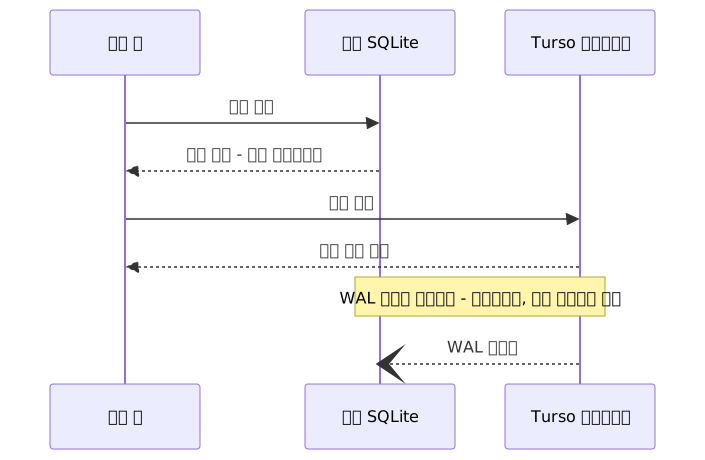
WAL streaming proceeds asynchronously in the background. The local replica is not immediately updated at the moment a write request completes.
@libsql/client Basic Connection Setup
npm install @libsql/client drizzle-orm
npm install -D drizzle-kit
Remote connection (basic pattern)
import { createClient } from "@libsql/client";

const client = createClient({
  url: process.env.TURSO_DATABASE_URL!,
  authToken: process.env.TURSO_AUTH_TOKEN!,
});
Embedded replica connection
import { createClient } from "@libsql/client";

const client = createClient({
  url: "file:./local.db",
  syncUrl: process.env.TURSO_DATABASE_URL!,
  authToken: process.env.TURSO_AUTH_TOKEN!,
  syncInterval: 60, // unit: seconds. omitting disables automatic sync
});

// Sync to latest state on app startup
await client.sync();
When syncUrl is present, it operates in embedded replica mode. The unit for syncInterval is seconds; omitting this option disables automatic periodic sync, and the remote is only synced when client.sync() is called manually. If you miss this when first using embedded replicas, your app will gradually return increasingly stale data.
For local development, simply specifying url: "file:./dev.db" works as-is without Turso.
Practical Application
Step 1: Create a DB and Add Replicas with the Turso CLI
# Install Turso CLI (macOS)
brew install tursodatabase/tap/turso

# Log in
turso auth login

# Create a DB (Tokyo as primary)
turso db create my-app --location nrt

# Add read replicas
turso db replicate my-app --location iad  # Virginia (US East)
turso db replicate my-app --location lhr  # London

# Check connection info
turso db show my-app --url
turso db tokens create my-app
You can view the full list of PoP codes with the turso db locations command. The approach is to add replicas from the 35+ PoPs to match your user distribution.
Step 2: Define Drizzle ORM Schema
Turso's officially recommended ORM is Drizzle ORM, used together with the drizzle-orm/libsql adapter.
Schema definition (src/schema.ts)
import { text, integer, sqliteTable } from "drizzle-orm/sqlite-core";
import { sql, relations } from "drizzle-orm";

export const users = sqliteTable("users", {
  id: integer("id").primaryKey({ autoIncrement: true }),
  name: text("name").notNull(),
  email: text("email").notNull().unique(),
  createdAt: integer("created_at", { mode: "timestamp" })
    .notNull()
    .default(sql`(unixepoch())`),
});

export const posts = sqliteTable("posts", {
  id: integer("id").primaryKey({ autoIncrement: true }),
  title: text("title").notNull(),
  content: text("content"),
  userId: integer("user_id")
    .notNull()
    .references(() => users.id, { onDelete: "cascade" }),
  publishedAt: integer("published_at", { mode: "timestamp" }),
});

export const usersRelations = relations(users, ({ many }) => ({
  posts: many(posts),
}));

export const postsRelations = relations(posts, ({ one }) => ({
  author: one(users, {
    fields: [posts.userId],
    references: [users.id],
  }),
}));
DB connection setup (src/db.ts)
import { drizzle } from "drizzle-orm/libsql";
import { createClient } from "@libsql/client";
import * as schema from "./schema";

const client = createClient({
  url: process.env.TURSO_DATABASE_URL ?? "file:./dev.db",
  authToken: process.env.TURSO_AUTH_TOKEN,
});

export const db = drizzle(client, { schema });
export { client };
authToken is not required in local file mode. If the TURSO_DATABASE_URL environment variable is absent, it falls back to a local SQLite file.
Type-safe query examples
import { db } from "./db";
import { users, posts } from "./schema";
import { eq, desc } from "drizzle-orm";

// Fetch all users
const allUsers = await db.select().from(users);

// Latest 5 posts for a specific user (JOIN)
const recentPosts = await db
  .select({
    title: posts.title,
    publishedAt: posts.publishedAt,
    authorName: users.name,
  })
  .from(posts)
  .innerJoin(users, eq(posts.userId, users.id))
  .where(eq(posts.userId, 1))
  .orderBy(desc(posts.publishedAt))
  .limit(5);

// Add a new user (write → routed to primary)
const newUser = await db
  .insert(users)
  .values({ name: "John Doe", email: "kim@example.com" })
  .returning();
Step 3: Safe Schema Migration Workflow
Since drizzle-kit 0.25.0, the turso dialect has been separated from sqlite. Specifying dialect: "sqlite" may cause LibSQL-specific features to not work correctly, so you must specify dialect: "turso".
drizzle.config.ts
import { defineConfig } from "drizzle-kit";

export default defineConfig({
  dialect: "turso",
  schema: "./src/schema.ts",
  out: "./drizzle",
  dbCredentials: {
    url: process.env.TURSO_DATABASE_URL ?? "file:./dev.db",
    authToken: process.env.TURSO_AUTH_TOKEN,
  },
});
Adding the same local fallback as db.ts lets you run npx drizzle-kit generate locally without the TURSO_DATABASE_URL environment variable.
The safe order for production migrations is as follows.

# Generate migration file after schema changes
npx drizzle-kit generate

# Review the generated SQL file in the drizzle/ directory
cat drizzle/0001_add_published_at.sql

# Apply to the actual DB
npx drizzle-kit migrate
drizzle-kit push is convenient for rapid prototyping in local development, but it leaves no migration history, and if a column disappears from the schema it's immediately dropped from the DB too. I once used push early on and wiped my local test data — it would have been terrifying if it had been production. Stick to generate → review SQL → migrate for production.
Step 4: Multi-tenant DB Pattern
This pattern creates an independent Turso DB for each tenant (customer). Data isolation, per-tenant backup and restore, and complete deletion of a specific tenant's data (for GDPR Right to Erasure compliance, etc.) are all handled with a single DB deletion. Note that GDPR compliance involves additional elements beyond data deletion — such as processing record management and consent management — that need to be handled separately.
Programmatic DB creation via Turso Platform API
async function createTenantDatabase(tenantId: string): Promise<string> {
  const response = await fetch(
    `https://api.turso.tech/v1/organizations/${process.env.TURSO_ORG}/databases`,
    {
      method: "POST",
      headers: {
        Authorization: `Bearer ${process.env.TURSO_API_TOKEN}`,
        "Content-Type": "application/json",
      },
      body: JSON.stringify({
        name: `tenant-${tenantId}`,
        group: "default",
      }),
    }
  );

  if (!response.ok) {
    throw new Error(`DB creation failed: ${response.status} ${response.statusText}`);
  }

  const data = await response.json();
  return data.database.Hostname;
}
Per-tenant DB connection factory (with caching)
import { createClient } from "@libsql/client";
import { drizzle } from "drizzle-orm/libsql";
import * as schema from "./schema";

const tenantDbCache = new Map<string, ReturnType<typeof drizzle>>();

function getTenantDb(tenantId: string) {
  if (tenantDbCache.has(tenantId)) {
    return tenantDbCache.get(tenantId)!;
  }

  const client = createClient({
    url: `libsql://tenant-${tenantId}-${process.env.TURSO_ORG}.turso.io`,
    authToken: process.env.TURSO_AUTH_TOKEN!,
  });
  const db = drizzle(client, { schema });
  tenantDbCache.set(tenantId, db);
  return db;
}

// API router example (Next.js App Router)
export async function GET(
  request: Request,
  { params }: { params: { tenantId: string } }
) {
  const db = getTenantDb(params.tenantId);
  const data = await db.select().from(schema.posts);
  return Response.json(data);
}
Without Map caching, a new client object would be created per request. LibSQL is HTTP-based so it's not a TCP connection exhaustion issue, but it results in repeated unnecessary object creation. In serverless environments, module-level caches persist for the lifetime of the instance.
Turso is designed to support hundreds of thousands of DBs per organization, so this pattern is genuinely economical to run.
Handling Read Consistency After Writes
This is a problem you'll encounter frequently with embedded replicas. In the default configuration, the local replica guarantees eventual consistency, so reading from the local replica immediately after a write may return stale data that hasn't been reflected yet.
The solution is to explicitly call client.sync() after a write completes. This pattern is only valid for embedded replica clients (local url + syncUrl configured). sync() does not work on a client configured with only a remote URL and no syncUrl.
import { createClient } from "@libsql/client";
import { drizzle } from "drizzle-orm/libsql";
import { users } from "./schema";

// Embedded replica client — syncUrl is required
const client = createClient({
  url: "file:./local.db",
  syncUrl: process.env.TURSO_DATABASE_URL!,
  authToken: process.env.TURSO_AUTH_TOKEN!,
});
const db = drizzle(client, { schema: { users } });

async function createUserAndReturn(name: string, email: string) {
  const newUser = await db
    .insert(users)
    .values({ name, email })
    .returning();

  // Immediately sync local replica with remote primary
  await client.sync();

  // From this point on, the data just written is reflected in local replica reads
  return newUser;
}
Even if you configure periodic sync with syncInterval, it's safest to call client.sync() explicitly in flows where you need the latest data immediately after a write.
Pros and Cons Summary
Pros
| Item | Details |
|---|---|
| Global read latency | 50ms or less with 35+ PoP replication + embedded replicas; hundreds of microseconds in ideal conditions |
| Full SQLite compatibility | Use existing codebases and tools as-is; local development uses a simple file DB |
| Serverless-friendly | HTTP-based connections, no connection pool required |
| Multi-tenancy cost efficiency | Hundreds of thousands of small DBs can be run cheaply |
| Built-in vector search | Handle AI embedding similarity search without a separate vector DB |
| Developer experience | Official Drizzle ORM integration, type-safe queries, drizzle-kit automation |
Cons
| Item | Details |
|---|---|
| Write bottleneck | Single primary architecture; unsuitable for writes exceeding thousands per second |
| Eventual consistency | Default is eventual consistency; immediate read-after-write guarantees require special handling |
| SQL feature limitations | No ENUM, ARRAY, or UUID types compared to PostgreSQL; ALTER TABLE is limited |
| No multi-region writes | If strong consistency is required, consider alternatives like CockroachDB or PlanetScale |
| Filesystem required | Embedded replicas cannot be used in environments without a filesystem, such as Cloudflare Workers |
| Potential vendor lock-in | Switching to self-hosting from Turso Cloud may incur migration costs |
Common Mistakes
1. Using drizzle-kit push in production
The most common mistake. push force-syncs the current schema state to the DB without any migration history. If you remove a column from the schema, it's immediately dropped from the DB. In production, always stick to generate → review SQL → migrate.
2. Specifying dialect as "sqlite"
The turso dialect was separated after drizzle-kit 0.25.0. Specifying dialect: "sqlite" may cause LibSQL-specific features to not work correctly.
3. Applying to write-heavy workloads
Some teams apply Turso to services with low read ratios and high write volumes (real-time chat, order processing, etc.) and then hit primary bottlenecks. Turso is optimized for read-heavy services.
4. Setting up embedded replicas without syncInterval
Omitting syncInterval disables automatic periodic sync. Even if you call client.sync() on app startup, data won't be refreshed afterward and the app will gradually return increasingly stale data. Either explicitly specify something like syncInterval: 60, or choose a strategy of manually calling client.sync() at appropriate points.
5. Attempting to use embedded replicas in Cloudflare Workers
Workers run in a V8 isolate environment with no persistent filesystem. Bringing over your embedded replica config as-is won't work. In a Workers environment, use the HTTP remote client approach — specify only url without syncUrl.
Closing Thoughts
Turso LibSQL is an excellent choice for globally distributed, read-heavy services. Embedded replicas can achieve read times in the hundreds of microseconds, replication across 35+ PoPs enables sub-50ms responses from anywhere, and full SQLite compatibility keeps migration overhead low. The combination of Drizzle ORM and the turso dialect provides type-safe queries and a safe migration workflow in one package.
That said, it's important to understand and account for the single primary write bottleneck, the eventual consistency characteristics, SQLite's feature limitations, and the fact that embedded replicas won't work in environments without a filesystem — and to apply Turso to workloads where it's a good fit.
3 steps to get started now
- Create a DB with
turso db createand add replicas at PoPs that match your user distribution. - Specify
dialect: "turso"indrizzle.config.tsand write type-safe schemas and queries with Drizzle ORM. - Make it a habit to follow
drizzle-kit generate→ review the SQL file →drizzle-kit migratefor every schema change.
References
- Turso Official Docs — LibSQL Overview
- Turso Official Docs — Drizzle ORM Integration
- Drizzle ORM Official Tutorial — Drizzle with Turso
- Drizzle ORM Official Docs — Turso Cloud Connection
- Drizzle ORM Official Docs — Get Started with Turso
- Turso Official Blog — Microsecond-level SQL query latency with libSQL local replicas
- Turso Official Blog — Beyond the Single-Writer Limitation with Turso's Concurrent Writes
- DEV Community — Distributed SQLite: Why LibSQL and Turso are the New Standard in 2026
- BotMonster — Turso and libSQL: SQLite at the Edge With Embedded Replicas
- Better Stack — How Turso Eliminates SQLite's Single-Writer Bottleneck
- Oflight Inc. — Turso Complete Guide 2026
- Calmops — Turso and LibSQL Complete Guide
- GitHub — drizzle-kit 0.25.0 Changelog