Deno 2 Practical Guide — Building a Serverless Backend Without External Infrastructure Using Node.js Compatibility Mode, Built-in KV, and Queues
When Deno 2 was released in October 2024, the first question backend developers asked was a single one: how naturally does it coexist with the existing npm ecosystem? The previous version of Deno was immediately ruled out as a practical option for one reason alone — "npm doesn't work."
This guide is based on a thorough reading of the official documentation and release notes, along with hands-on experience building sample projects. It covers how far the Node.js compatibility mode is practical, and where Deno KV and Queues can realistically replace Redis and RabbitMQ — and where they can't. If you want an environment where you can run .ts files directly without any TypeScript configuration, with testing, linting, and formatting built in, this is worth your time.
One important premise upfront: Deno is not a full replacement for Node.js. The community and third-party ecosystem gap is still significant, and while adoption is growing quickly, it remains far smaller than Node.js. However, for new serverless projects, edge functions, and side services where you want to simplify your infrastructure, it has become a genuinely realistic option.
Version note: The examples in this article are based on Deno 2.x. KV, Queues, and Cron are stable APIs as of Deno 2.0. OpenTelemetry support still requires the
--unstable-otelflag. Check the official release notes for the latest flag requirements.
Core Concepts
How Deno 2 Coexists with the Node.js Ecosystem
The most decisive change in Deno 2 is backward compatibility. You can now tap into the npm ecosystem in three ways:
npm:prefix imports — import immediately without separate installation- Recognition of existing
package.json—deno installinstalls dependencies and createsnode_modules - Node built-in modules via the
node:prefix — usenode:fs,node:path,node:http, and more as-is
// npm: prefix — use immediately without node_modules
import express from "npm:express@4";
import { Hono } from "npm:hono@4";

// node: prefix — Node.js built-in modules as-is
import { createServer } from "node:http";
import { join } from "node:path";
Here is how Deno interprets import statements:

What is JSR? JSR stands for JavaScript Registry — an npm-alternative registry created by the Deno team. It is designed to distribute TypeScript source directly, guarantee version immutability, and work with both Deno and Node.js. It uses scoped names like
jsr:@std/http.
One thing to keep in mind: when resolving prefix-free imports, Deno checks the import map in deno.json before package.json. In projects where both files coexist, be aware of this priority order.
According to Deno's own announcements, most npm packages are compatible, but there are exceptions for native addons (.node binaries) and certain CommonJS patterns. It is a good idea to validate your dependencies with deno check or a run test before migrating.
Deno KV — A Key-Value Store Built Into the Runtime
The design philosophy behind Deno KV is simple. In local development it runs on top of SQLite, but the moment you deploy to Deno Deploy it automatically switches to a globally distributed store backed by FoundationDB. The code stays the same — just Deno.openKv().
const kv = await Deno.openKv();

// Organize data with a hierarchical key structure
await kv.set(["users", "alice"], { name: "Alice", email: "alice@example.com" });
await kv.set(["users", "bob"], { name: "Bob", email: "bob@example.com" });

// Look up a single key
const user = await kv.get(["users", "alice"]);
console.log(user.value); // { name: "Alice", email: "alice@example.com" }

// List by prefix
const iter = kv.list({ prefix: ["users"] });
for await (const entry of iter) {
  console.log(entry.key, entry.value);
}
Keys are expressed as arrays, and you can use this hierarchical structure to create logical namespaces like ["posts", postId, "comments"]. This is conceptually similar to Redis key naming conventions (posts:123:comments), but with stronger type safety.
ACID transactions and Optimistic Concurrency Control (OCC) are also supported. The key concept is the versionstamp. Deno KV automatically assigns a monotonically increasing identifier to each key-value pair every time a write occurs. .check(entry) verifies that "the versionstamp at the time I read is still the same at commit time." If another transaction has modified that key in between, the versionstamp will differ, the commit fails, and the loop retries.
This is useful in situations where race conditions arise, such as inventory deductions or balance transfers.
async function transferBalance(fromId: string, toId: string, amount: number) {
  const kv = await Deno.openKv();

  while (true) {
    const [fromEntry, toEntry] = await kv.getMany([
      ["balances", fromId],
      ["balances", toId],
    ]);

    if (fromEntry.value === null || toEntry.value === null) {
      throw new Error("Account not found");
    }

    const fromBalance = fromEntry.value as number;
    const toBalance = toEntry.value as number;

    if (fromBalance < amount) throw new Error("Insufficient balance");

    const res = await kv.atomic()
      .check(fromEntry)  // detect versionstamp change
      .check(toEntry)
      .set(["balances", fromId], fromBalance - amount)
      .set(["balances", toId], toBalance + amount)
      .commit();

    if (res.ok) break;  // exit on success, retry on conflict
  }
}
One constraint worth knowing upfront: there are limits such as a maximum of 10 keys per kv.watch() call and a total size limit of 800 KiB per atomic operation (exact figures may vary by version — consult the official docs). JOIN or aggregation queries are difficult to implement with KV, and for those use cases a setup that pairs it with PostgreSQL is more practical.
Deno Queues — Message Queues Without Separate Infrastructure
Queues is an asynchronous job processing system built on top of KV. You publish with kv.enqueue() and consume with kv.listenQueue() — no separate daemon or infrastructure needed. With at-least-once delivery guaranteed, you can build patterns similar to Redis + Bull Queue without any external dependencies.
const kv = await Deno.openKv();

// Publish a message — execute immediately
await kv.enqueue({
  type: "welcome-email",
  jobId: crypto.randomUUID(),
  userId: "alice",
  to: "alice@example.com",
});

// Deferred execution — process after 30 minutes
await kv.enqueue(
  { type: "trial-reminder", jobId: crypto.randomUUID(), userId: "alice" },
  { delay: 30 * 60 * 1000 }
);
Because of the at-least-once semantics, idempotency handling must be implemented yourself. This means the same message being processed twice must produce the same result — which is equally true when using RabbitMQ or SQS. The concrete implementation is covered below in the "Common Mistakes in Practice" section.
Practical Application
Before looking at four scenarios, understanding how all the pieces fit together will help each individual example make more sense.

KV, Queues, and Cron all work as-is in a local development environment. When you deploy to Deno Deploy, only the KV store automatically switches from local SQLite to a globally distributed store.
Scenario 1: Running an Existing Express App on Deno
If you are considering a migration, you do not have to rewrite everything. Just run the following from your existing project root:
# Install dependencies from the existing package.json
deno install

# Run the package.json scripts.start as a deno task
deno task start

# Or run directly (specify required permissions)
deno run --allow-net --allow-env --allow-read src/index.ts
You can also migrate incrementally, file by file, using npm: prefix imports.
import express from "npm:express@4";
import cors from "npm:cors@2";

const app = express();
app.use(cors());

app.get("/health", (_req, res) => {
  res.json({ status: "ok", runtime: "deno" });
});

app.listen(3000, () => console.log("Server started: http://localhost:3000"));
When run from a folder that contains a package.json, Deno will automatically search node_modules. You do not need to change all imports to npm:.
Check for incompatible cases beforehand. Packages that use native addons (.node binaries) will not work. Packages that depend on C++ bindings, such as bcrypt and better-sqlite3, fall into this category. Some CommonJS patterns that use require() dynamically may also throw errors. It is a good idea to validate your dependencies with deno check or a run test before migrating.
Scenario 2: A Lightweight REST API Server with Hono + KV
For new projects, the Hono + Deno KV combination is the most concise approach. Hono is an Express-style framework that runs across multiple runtimes: Deno, Bun, and Cloudflare Workers.
// main.ts
import { Hono } from "npm:hono@4";

type EmailQueueMessage =
  | { type: "verify-email"; jobId: string; userId: string; email: string }
  | { type: "welcome-email"; jobId: string; userId: string; email: string };

const app = new Hono();
const kv = await Deno.openKv();

// Create a user
app.post("/users", async (c) => {
  const body = await c.req.json();
  const id = crypto.randomUUID();
  const user = { id, ...body, createdAt: new Date().toISOString() };

  await kv.set(["users", id], user);

  const msg: EmailQueueMessage = {
    type: "verify-email",
    jobId: crypto.randomUUID(),
    userId: id,
    email: body.email,
  };
  await kv.enqueue(msg);

  return c.json(user, 201);
});

// Get a user
app.get("/users/:id", async (c) => {
  const entry = await kv.get(["users", c.req.param("id")]);
  if (!entry.value) return c.json({ error: "Not found" }, 404);
  return c.json(entry.value);
});

// Email processing worker
kv.listenQueue(async (msg: EmailQueueMessage) => {
  switch (msg.type) {
    case "verify-email":
      console.log(`Sending verification email: ${msg.email}`);
      // actual email sending logic
      break;
    case "welcome-email":
      console.log(`Sending welcome email: ${msg.email}`);
      break;
  }
});

Deno.serve({ port: 3000 }, app.fetch);deno run --allow-net --allow-env main.tsNo Docker, no Redis, no separate worker process. A single file contains both the API server and background processing.
Scenario 3: Real-Time Chat with KV Watch
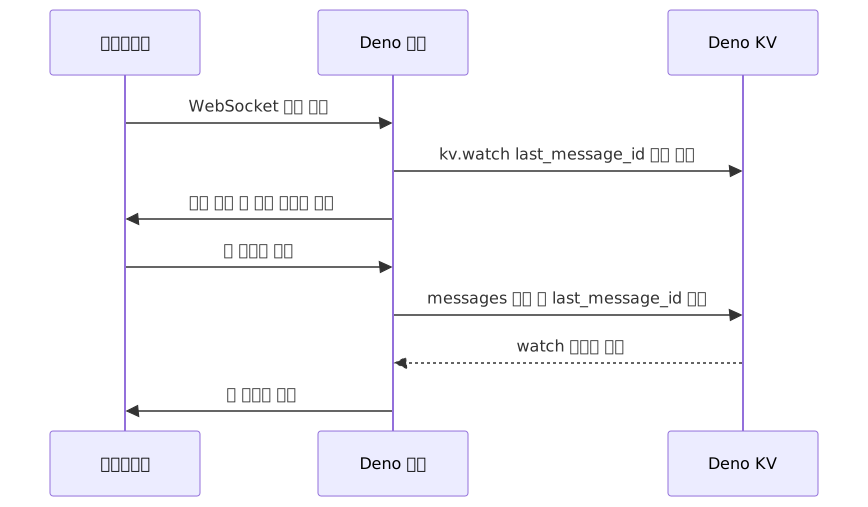
Combining WebSockets with the KV watch() API lets you build real-time features without any Pub/Sub infrastructure. The pattern is to update a single indicator key in KV whenever a new message arrives, and have each connected client watch that key.
// chat.ts
const kv = await Deno.openKv();

Deno.serve({ port: 8080 }, async (req) => {
  if (req.headers.get("upgrade") !== "websocket") {
    return new Response("Only WebSocket is allowed", { status: 400 });
  }

  const url = new URL(req.url);
  const roomId = url.searchParams.get("room") ?? "general";
  const { socket, response } = Deno.upgradeWebSocket(req);

  socket.onopen = async () => {
    // Send the last 50 messages
    const messages = [];
    for await (const entry of kv.list(
      { prefix: ["messages", roomId] },
      { limit: 50, reverse: true }
    )) {
      messages.unshift(entry.value);
    }
    socket.send(JSON.stringify({ type: "history", messages }));

    // Start watching for new messages
    const watcher = kv.watch([["last_message_id", roomId]]);

    // Clean up watcher on WebSocket close — omitting this leaks stream resources
    socket.onclose = () => watcher.cancel();

    (async () => {
      for await (const [entry] of watcher) {
        if (socket.readyState !== WebSocket.OPEN) break;
        const latest = await kv.get(["messages", roomId, entry.value as string]);
        if (latest.value) {
          socket.send(JSON.stringify({ type: "message", data: latest.value }));
        }
      }
    })();
  };

  socket.onmessage = async (e) => {
    const { text, userId } = JSON.parse(e.data);
    const msgId = crypto.randomUUID();
    const message = { id: msgId, text, userId, timestamp: Date.now() };

    await kv.atomic()
      .set(["messages", roomId, msgId], message)
      .set(["last_message_id", roomId], msgId)
      .commit();
  };

  return response;
});
Given the 10-key limit on kv.watch(), using a single key like last_message_id as an indicator is an effective pattern as the number of chat rooms grows.
Scenario 4: Cron Job Scheduling
You can declare schedules directly in code, without Celery or crontab. Deploy to Deno Deploy and they run without any additional infrastructure.
Deno.cron("daily-report", "0 9 * * *", async () => {
  const kv = await Deno.openKv();
  const stats = await collectDailyStats(kv);
  await sendSlackReport(stats);
});

Deno.cron("cleanup-sessions", "*/30 * * * *", async () => {
  const kv = await Deno.openKv();
  const now = Date.now();
  for await (const entry of kv.list({ prefix: ["sessions"] })) {
    const session = entry.value as { expiresAt: number };
    if (session.expiresAt < now) {
      await kv.delete(entry.key);
    }
  }
});
Pros and Cons
Advantages
| Item | Practical Meaning |
|---|---|
| Zero-config TypeScript | Run .ts files directly without tsconfig.json. No need to install ts-node or tsx |
| All-in-one built-in tooling | deno test, deno lint, deno fmt — all available with no separate installation |
| Built-in KV + Queues + Cron | Implement key-value storage, message queues, and scheduling without Redis, RabbitMQ, Bull Queue, or Celery |
| Secure by default | File, network, and environment variable access is blocked by default. Fine-grained control down to specific hosts and ports with --allow-net=host:port |
| Lightweight cold starts | Deno Deploy's edge runtime runs without containers, resulting in short cold starts. Exact figures vary by deployment environment — measure for yourself |
| Built-in OpenTelemetry | Enable distributed tracing and metrics instantly with the --unstable-otel flag |
| Single binary deployment | Create an executable including the runtime with deno compile. Deploy CLI tools without Docker |
| Broad npm compatibility | Per Deno's own announcements, most npm packages can be used directly with the npm: prefix |
Disadvantages and Caveats
| Item | Practical Meaning |
|---|---|
| Relatively small ecosystem | Fewer community Q&A resources and third-party tutorials. Problems often require direct root-cause investigation |
| Structural limitations of KV | No JOIN or aggregation queries. Max 10 keys per watch(), size limits on atomic operations (see official docs for exact figures) |
| At-least-once queue semantics | Idempotency must be implemented manually. If exactly-once delivery is required, an external queue is needed |
| Deno Deploy vendor lock-in | KV's global distribution is exclusive to Deno Deploy. Self-hosting is limited to single-node SQLite |
| Migration cost | Large production projects require CI/CD updates, native addon compatibility review, and team training |
| Hiring difficulty | Deno experts are scarce. Onboarding new hires comes with a learning curve |
| No native addon support | Packages that use .node binaries cannot be used |
Common Mistakes in Practice
1. Runtime errors from missing permissions
Forgetting --allow-net causes a runtime error on any network request. It may be tempting to use --allow-all for development convenience, but specifying only the required permissions in production is safer from a security standpoint.
# During development — allow all for convenience
deno run --allow-all main.ts

# Production — specify minimum permissions
deno run \
  --allow-net=0.0.0.0:3000 \
  --allow-env=DATABASE_URL,SMTP_HOST \
  --allow-read=/app/static \
  main.ts
2. Not handling idempotency in at-least-once queues
kv.listenQueue() can process the same message twice. Operations with side effects — such as sending an email or processing a payment — must always include duplicate-processing prevention logic. A get-then-set approach is vulnerable to re-entry between the two calls, so you must use an atomic claim-and-preempt pattern.
type QueueMessage =
  | { type: "send-email"; jobId: string; to: string }
  | { type: "process-payment"; jobId: string; orderId: string };

kv.listenQueue(async (msg: QueueMessage) => {
  const markerKey = ["processing_jobs", msg.jobId];

  // Atomically claim the processing marker — commit fails if it already exists
  const claim = await kv.atomic()
    .check({ key: markerKey, versionstamp: null })
    .set(markerKey, true, { expireIn: 24 * 60 * 60 * 1000 })
    .commit();

  if (!claim.ok) return;  // already processed or in progress

  switch (msg.type) {
    case "send-email":
      await sendEmail(msg.to);
      break;
    case "process-payment":
      await processPayment(msg.orderId);
      break;
  }
});
3. Trying to use KV like a relational database
Data that requires complex filtering or aggregation is not a good fit for KV. It works best with patterns that look up data directly by key — session tokens, cached data, simple user profiles. For core data that needs complex queries, pairing it with a relational database like PostgreSQL is the practical approach.
Closing Thoughts
Deno 2 is not about "replacing Node.js" — it is about being "a much simpler choice in specific situations." There is no reason to migrate a large production Node.js service right now. But for new serverless services, edge functions, and side projects where you want to minimize infrastructure, it is genuinely worth evaluating.
To summarize the key points: native TypeScript + built-in KV, Queues, and Cron + lightweight cold starts + broad npm compatibility is the real value Deno 2 delivers. If you can eliminate Redis, RabbitMQ, tsconfig.json, and a separate test runner, your development environment becomes significantly simpler. On the other hand, ecosystem size, the structural constraints of KV, Deno Deploy lock-in, and hiring difficulty are factors you need to weigh realistically.
If you want to get started, here is the recommended path:
Step 1 — Install and run existing code
# macOS/Linux
curl -fsSL https://deno.land/install.sh | sh

# In your existing Node.js project folder
deno install
deno task start
Step 2 — Try KV + Queues in a new side project
Build a small API server with Hono + Deno KV. Experiencing firsthand how much simpler session management or basic queue processing becomes without Redis is one of the fastest ways to understand this ecosystem.
Step 3 — Deploy to Deno Deploy's free tier
Connect a GitHub repository and it auto-deploys on every push. Experiencing KV automatically switch from local SQLite to a globally distributed FoundationDB will give you a much clearer sense of where this ecosystem is headed.
References
- Announcing Deno 2 (Official blog)
- Deno KV Quick Start (Official docs)
- Deno KV Transactions (Official docs)
- Using Queues (Official docs)
- Deno Queues announcement blog
- Node and npm Compatibility (Official docs)
- Build Real-time Applications with KV Watch (Official blog)
- KV on Deno Deploy (Official docs)