Implementing Real-Time Collaboration Features with Cloudflare Durable Objects + Hono
WebSocket connections must be kept alive. Workers lose their memory when a request ends. Durable Objects emerge at exactly this point of conflict. Each instance runs as a single copy worldwide, holding both persistent in-memory state and built-in SQLite storage. It combines the scalability of stateless serverless with the consistency of stateful servers.
This article covers the pattern of combining the Hono framework with Durable Objects to implement real-time collaboration features. Going beyond a simple chat room example, it covers per-connection isolated state storage, cost optimization using the Hibernation API, and common troubleshooting points encountered in production. The Router-State Separation pattern is the core concept — the Worker handles routing and authentication while the Durable Object is solely responsible for state management, explored together with code.
Core Concepts
Router-State Separation Pattern
The essence of Durable Objects is the single-instance guarantee: calling get() with the same ID reaches the same instance from anywhere in the world. Worker global variables are independent per instance with no sharing guarantee, but a Durable Object with the same ID always points to the same object.
The architecture in one line: Worker is a stateless router, Durable Object is a stateful entity.

The Worker receives a request, generates a deterministic ID via env.ROOM.idFromName(roomId), verifies authentication, then injects the validated user identity into a custom header and forwards it via env.ROOM.get(id).fetch(). The actual WebSocket connection and message handling happen only inside the Durable Object.
There is an important detail here. Many examples show Worker auth middleware verifying a token but then forwarding only the original request with stub.fetch(c.req.raw). This causes the Durable Object to blindly trust whatever the client submitted as a query parameter — if a client appends ?userId=admin arbitrarily, identity spoofing is possible even after passing Worker authentication. A structure where the Worker places the verified userId in an X-User-Id header, and the DO trusts only that header, is required.
WebSocket Hibernation API — The Key to Cost
Calling ctx.acceptWebSocket(ws) marks that connection as hibernation-eligible in the runtime. When there are no messages, the Durable Object is evicted from memory and no charges are incurred; the moment the next message arrives, the runtime recreates the object and routes it to the webSocketMessage() handler.
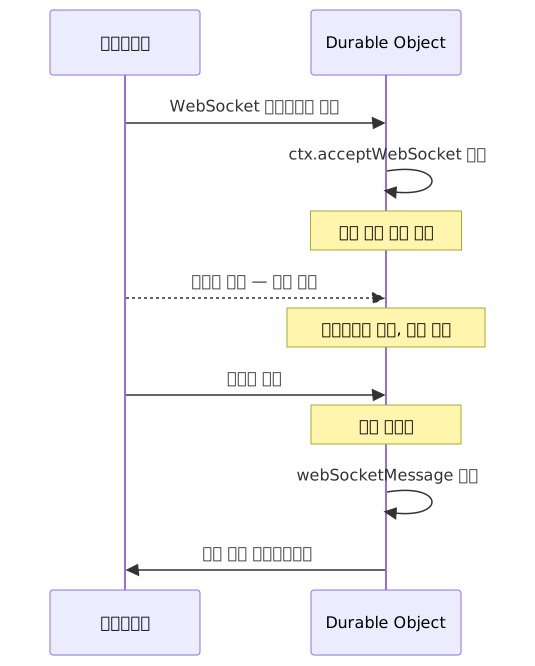
The important point is that the client-side WebSocket connection does not drop during Hibernation. The client remains unaware and perceives the connection as alive.
Per-Connection Isolated State — serializeAttachment
The API you must know alongside Hibernation is serializeAttachment()/deserializeAttachment(). When an object is recreated, in-memory variables are reset, but attachment data serialized onto the WebSocket object is preserved.
For this data to be a "trusted context," it must contain values from a trusted source. As seen in the code below, values read from the X-User-Id header verified by the Worker must be stored in serializeAttachment, leaving no room for values forged by the client via query parameters to creep in.
Wrangler Configuration and Bindings
If the wrangler.toml configuration is not exact, the Durable Object will not be triggered at all. In particular, cases where the class_name differs from the actual exported class name — failing silently with no error message — are frequently reported in issue trackers.
name = "realtime-collab"
main = "src/index.ts"
compatibility_date = "2024-09-23"

[[durable_objects.bindings]]
name = "ROOM"
class_name = "Room"

[[migrations]]
tag = "v1"
new_sqlite_classes = ["Room"]
Using new_sqlite_classes instead of new_classes is required to create an SQLite-based Durable Object. Since there is storage-usage-based billing and a per-instance storage limit, be sure to check the current figures in the official Pricing docs and Limits docs before applying to production.
Practical Implementation
Worker Router — Authentication and Forwarding
// src/index.ts
import { Hono } from 'hono';
import { Room } from './room';

export { Room };

type Env = {
  ROOM: DurableObjectNamespace;
};

const app = new Hono<{ Bindings: Env }>();

app.use('/room/*', async (c, next) => {
  const token = c.req.header('Authorization')?.replace('Bearer ', '');
  if (!token) return c.json({ error: 'Unauthorized' }, 401);

  const userId = verifyToken(token).sub;
  c.set('userId', userId);
  await next();
});

app.get('/room/:roomId/ws', async (c) => {
  const roomId = c.req.param('roomId');
  const userId = c.get('userId');

  const id = c.env.ROOM.idFromName(roomId);
  const stub = c.env.ROOM.get(id);

  // Inject the verified userId into a header — .set() overwrites any client-provided value
  const headers = new Headers(c.req.raw.headers);
  headers.set('X-User-Id', userId);

  return stub.fetch(new Request(c.req.raw, { headers }));
});

export default app;
There is a reason for using headers.set(). Using append() would allow two values to coexist if the client pre-attached X-User-Id before sending. .set() overwrites any existing value, ensuring only the Worker-verified value is passed to the DO.
This is genuinely all the Worker does. After verifying authentication, it injects X-User-Id and forwards to the DO.
Real-Time Chat Room — Full Room Class Implementation
// src/room.ts
import { DurableObject } from 'cloudflare:workers';

interface SessionMeta {
  userId: string;
  username: string;
}

interface Env {}

export class Room extends DurableObject<Env> {
  constructor(ctx: DurableObjectState, env: Env) {
    super(ctx, env);

    // Instance = single room, so a room_id column is unnecessary
    this.ctx.blockConcurrencyWhile(async () => {
      this.ctx.storage.sql.exec(`
        CREATE TABLE IF NOT EXISTS messages (
          id         INTEGER PRIMARY KEY AUTOINCREMENT,
          user_id    TEXT    NOT NULL,
          username   TEXT    NOT NULL,
          content    TEXT    NOT NULL,
          created_at INTEGER NOT NULL
        )
      `);
    });
  }

  async fetch(request: Request): Promise<Response> {
    if (request.headers.get('Upgrade') !== 'websocket') {
      return new Response('WebSocket expected', { status: 426 });
    }

    // Read userId only from the Worker-injected header — do not trust query parameters
    const userId = request.headers.get('X-User-Id');
    if (!userId) {
      return new Response('Missing user identity', { status: 400 });
    }

    const url = new URL(request.url);
    const username = url.searchParams.get('username') ?? 'Guest';

    const { 0: client, 1: server } = new WebSocketPair();

    // Enable Hibernation — without this one line, idle connections are also billed
    this.ctx.acceptWebSocket(server);

    // Based on Worker-verified userId, cannot be forged by the client
    const meta: SessionMeta = { userId, username };
    server.serializeAttachment(meta);

    // Send recent message history to the new connection
    this.sendHistory(server);

    this.broadcast(
      { type: 'join', userId, username, timestamp: Date.now() },
      server,
    );

    return new Response(null, { status: 101, webSocket: client });
  }

  async webSocketMessage(ws: WebSocket, message: string | ArrayBuffer) {
    // Binary messages are not supported in this implementation
    if (typeof message !== 'string') {
      ws.send(JSON.stringify({ type: 'error', message: 'Binary messages not supported' }));
      return;
    }

    const meta = ws.deserializeAttachment() as SessionMeta;

    let parsed: { content?: unknown };
    try {
      parsed = JSON.parse(message);
    } catch {
      ws.send(JSON.stringify({ type: 'error', message: 'Invalid JSON' }));
      return;
    }

    const content = parsed.content;
    if (typeof content !== 'string' || content.trim() === '') return;

    // storage.sql.exec() is a synchronous API — no await needed
    this.ctx.storage.sql.exec(
      `INSERT INTO messages (user_id, username, content, created_at)
       VALUES (?, ?, ?, ?)`,
      meta.userId,
      meta.username,
      content,
      Date.now(),
    );

    this.broadcast({
      type: 'message',
      userId: meta.userId,
      username: meta.username,
      content,
      timestamp: Date.now(),
    });
  }

  async webSocketClose(ws: WebSocket, _code: number) {
    const meta = ws.deserializeAttachment() as SessionMeta;
    this.broadcast(
      { type: 'leave', userId: meta.userId, username: meta.username, timestamp: Date.now() },
      ws,
    );
  }

  async webSocketError(ws: WebSocket, _error: unknown) {
    // webSocketClose is sometimes not called automatically, so handle it separately
    const meta = ws.deserializeAttachment() as SessionMeta | null;
    if (meta) {
      this.broadcast(
        { type: 'leave', userId: meta.userId, username: meta.username, timestamp: Date.now() },
        ws,
      );
    }
  }

  private sendHistory(ws: WebSocket) {
    const rows = this.ctx.storage.sql
      .exec(
        `SELECT user_id, username, content, created_at
         FROM messages
         ORDER BY created_at DESC
         LIMIT 50`,
      )
      .toArray();

    ws.send(JSON.stringify({ type: 'history', messages: rows.reverse() }));
  }

  private broadcast(data: unknown, exclude?: WebSocket) {
    const payload = JSON.stringify(data);
    for (const conn of this.ctx.getWebSockets()) {
      if (conn !== exclude) {
        try {
          conn.send(payload);
        } catch {
          // Ignore already-closed connections
        }
      }
    }
  }
}
A few points worth noting in the code.
The room_id column was removed. A Durable Object instance corresponds to a single room, and storage is isolated between instances. Filtering by room_id within the same instance is meaningless redundancy.
storage.sql.exec() is a synchronous API. Adding await won't break the runtime, but it reads as if it returns a Promise, misleading readers. The code above omits await.
A webSocketError handler was added. The Hibernation API supports webSocketError in addition to webSocketMessage and webSocketClose. Since webSocketClose is sometimes not called automatically on error, all three handlers must be implemented for safe disconnection handling.
Concurrent Editing with Yjs CRDT
A chat room only needs messages broadcast in order, but a scenario where multiple people edit the same document simultaneously — like Google Docs — is different. When two people modify the same location at the same time, it must be decided whose change takes priority; a simple last-write-wins approach overwrites one person's edits.
CRDT (Conflict-free Replicated Data Type) is a data structure that resolves this conflict mathematically. Regardless of the order in which changes arrive, the final state converges to the same result, so all clients see the same document state even with network delays or out-of-order packets.
y-durableobjects is a library that rewrites Yjs CRDT for the Cloudflare Workers environment. It works without Node.js dependencies, and a single line of class inheritance handles all of WebSocket management and document synchronization.
// src/collab-document.ts
import { DurableObject } from 'cloudflare:workers';
import { YDurableObjects } from 'y-durableobjects';

export class CollabDocument extends YDurableObjects(DurableObject) {
  // fetch, webSocketMessage, webSocketClose are all handled by the mixin
  // Conflict resolution is handled automatically by Yjs CRDT
}
The Worker router looks up the DO using the document ID as the key.
// src/index.ts
app.get('/doc/:docId/ws', async (c) => {
  const id = c.env.COLLAB_DOC.idFromName(c.req.param('docId'));
  return c.env.COLLAB_DOC.get(id).fetch(c.req.raw);
});
For a deeper dive, y-durableobjects GitHub and Toonsquare Tech's implementation case are good starting points.
Pros and Cons
| Item | Advantages | Disadvantages / Considerations |
|---|---|---|
| Consistency | Single-instance guarantee — no distributed locks or race conditions | Single bottleneck — overload when connections concentrate |
| Latency | Runs at 300+ PoP edge locations | Pinned to creation location — latency for distant users |
| Cost | No charges for idle periods with Hibernation | Storage-usage-based billing applies |
| Storage | Built-in SQLite, no external DB needed | Per-instance storage limit (see official Limits docs) |
| Cold Start | V8 isolate-based, minimal cold starts | — |
| Portability | — | Deeply coupled to Cloudflare-specific APIs |
| Debugging | Local simulation possible with wrangler dev |
Local simulation is incomplete; staging environment recommended |
Common Mistakes in Practice
Mistake 1 — Omitting acceptWebSocket
Creating a connection with new WebSocketPair() and returning a 101 response without this.ctx.acceptWebSocket(server) means Hibernation is not activated, and idle time is fully billed.
Mistake 2 — Using an In-Memory Map Without serializeAttachment
// Dangerous pattern — reset when recreated after hibernation
private sessions = new Map<WebSocket, SessionMeta>();

async webSocketMessage(ws: WebSocket, msg: string) {
  const meta = this.sessions.get(ws); // undefined after recreation
}
When Hibernation recreates the object, the sessions Map is empty. Per-connection state must be attached directly to the WebSocket object via ws.serializeAttachment().
Mistake 3 — Excessive Connection Concentration on a Single DO
When traffic spikes, the error Durable Object is overloaded. Too many requests for the same object within a 10 second window appears. For chat rooms with more than 100 users, a sharding strategy that physically splits them — like roomId-shard-0, roomId-shard-1 — should be considered.
Mistake 4 — wrangler.toml Binding Mismatch
[[durable_objects.bindings]]
name = "ROOM"
class_name = "RoomHandler" # Does not match the actual export name// src/room.ts
export class Room extends DurableObject {} // Mismatch with class_nameIf class_name does not exactly match the actual exported class name, it fails silently with no error message.
When to Choose Durable Objects

Closing Thoughts
What makes Durable Objects appealing is the ability to run "serverless but stateful" units at the edge worldwide. The Worker handles only routing and authentication, while the Durable Object is responsible for all state and connections of a specific room, document, or session within a single instance. Hibernation eliminates the cost of idle connections, and serializeAttachment restores per-connection context even after recreation.
The pattern itself is simple: look up a DO by entity ID, accept WebSockets inside the DO, and broadcast. Once these three layers are in place, the rest is a matter of layering on domain logic.
If you're interested, generate a Hono + Workers template with npm create cloudflare@latest -- --template cloudflare/templates/worker-hono, paste in the Room class from this article, and run it with wrangler dev. SQLite-based Durable Objects are supported on the Workers Free plan, so you have an environment to start prototyping without worrying about cost.
References
- Cloudflare Durable Objects Official Docs
- WebSocket Hibernation API Official Guide
- WebSocket Hibernation Server Example (Official)
- Hono Official Docs — WebSocket Helper
- Hono Official Examples — Cloudflare Durable Objects
- Zero-latency SQLite Storage in Durable Objects
- Build Real-Time Apps With Cloudflare, Hono, Durable Objects — DZone
- Creating a WebSocket server in Hono with Durable Objects — Fiberplane
- How To Build Serverless WebSockets With Cloudflare, Hono, And Durable Objects — Volito
- y-durableobjects — Yjs on Cloudflare Workers (GitHub)
- PartyKit / partyserver (GitHub)
- Building a Real-Time Collaborative Editor with CRDT and Durable Objects — Medium/Toonsquare
- Cloudflare acquires PartyKit — Official Blog
- Durable Objects Limits Official Docs
- Durable Objects Pricing Official Docs