Bun 2.0 Complete Guide — Building a Production Full-Stack Server Without External Packages Using Built-in SQLite, S3 Client, and HTML Bundler
When you open package.json in a Node.js project, you always see a familiar pattern. better-sqlite3, @aws-sdk/client-s3, webpack or vite, jest or vitest... As these dependencies pile up, node_modules grows exponentially, CI build times increase, and the risk of supply chain attack exposure rises with them. If you've ever spent hours just configuring dependencies while trying to build a simple internal admin tool, this problem probably hits close to home.
Bun takes a fundamental approach to this problem. It integrates SQLite, S3, PostgreSQL/MySQL clients, an HTTP server, a TypeScript runtime, a bundler, and a test runner into a single executable. The SQLite and S3 clients were added in January 2025 with version 1.2, the HTML bundler and MySQL/MariaDB support were added in October of the same year with version 1.3, and Bun 2.0 is the current version where these features have been stabilized and integrated. Using an HTML file as the server entry point to run a React app and API server in a single process, uploading files to S3 and querying SQLite data without any npm packages — these are now realistic production choices.
In this article, we'll explore through code and real-world examples how Bun's built-in APIs actually work, when they're worth using, and where you need to be careful. If you're using Node.js or Deno and are interested in improving performance and developer experience, this should be a useful reference.
Core Concepts
Bun is a runtime — but it's more than that
Bun is a JavaScript/TypeScript runtime written in Zig. Its execution engine uses WebKit's JavaScriptCore (JSC) instead of V8, which has a direct impact on cold start times. While Node.js's V8 initialization is in the hundreds of milliseconds range, Bun is reported to be under 10ms (based on local environments and simple scripts; results vary by execution environment). This difference is felt significantly in serverless and edge environments.
However, viewing Bun simply as "faster Node.js" misses the point. The real differentiator is what it bundles inside the runtime.

Features that previously required external packages in Node.js are now built into Bun itself. This isn't just a matter of convenience — it means a smaller dependency graph, smaller bundle sizes, and a simpler build pipeline.
bun:sqlite — Synchronous by design, and that's actually intuitive
Bun's SQLite driver was inspired by better-sqlite3 and is designed to be fully synchronous. This may feel at odds with JavaScript's async-first conventions, but for a local file-based DB like SQLite, direct synchronous calls are actually more intuitive than synchronous operations wrapped in async/await.
import { Database } from "bun:sqlite";

const db = new Database("app.db");

db.run(`
  CREATE TABLE IF NOT EXISTS posts (
    id INTEGER PRIMARY KEY AUTOINCREMENT,
    title TEXT NOT NULL,
    body TEXT,
    created_at DATETIME DEFAULT CURRENT_TIMESTAMP
  )
`);

// Use get() for a single row
const post = db.query("SELECT * FROM posts WHERE id = ?").get(1);

// Use all() for multiple rows
const posts = db.query("SELECT * FROM posts ORDER BY created_at DESC").all();

// Create prepared statements once outside the router
const insertPost = db.prepare("INSERT INTO posts (title, body) VALUES (?, ?)");
insertPost.run("First post", "Here is the content.");
Officially, it claims 3–6x faster read performance compared to better-sqlite3, and 8–9x compared to deno.land/x/sqlite. There are more cases than you might think where SQLite is sufficient for small-scale services or internal tools without a separate DB server like PostgreSQL — and being able to use it without an external package is a major advantage in those situations.
Synchronous API and concurrent request handling
"If bun:sqlite has a synchronous API, doesn't it block when requests come in concurrently?" — a natural question. Bun runs on a single-threaded event loop, just like Node.js. While a synchronous SQLite call is in progress, processing of other network I/O events will briefly wait. Most SQLite queries complete in microseconds, so this isn't a practical issue on servers with moderate traffic, but you should keep this in mind if you have many large aggregation queries. Since SQLite uses a single write-lock structure by nature, migrating to PostgreSQL is the natural path when write traffic increases.
Bun.S3Client — S3 integration without aws-sdk
S3 integration has long been dominated by @aws-sdk/client-s3 in the Node.js ecosystem — and that package is heavy. Bun.S3Client, built in since Bun 1.2, connects to AWS S3 as well as Cloudflare R2, MinIO, DigitalOcean Spaces, Backblaze B2, and any other S3-compatible storage.
const s3 = new Bun.S3Client({
  accessKeyId: process.env.AWS_ACCESS_KEY_ID,
  secretAccessKey: process.env.AWS_SECRET_ACCESS_KEY,
  bucket: process.env.S3_BUCKET,
  region: process.env.AWS_REGION ?? "us-east-1",
  // For Cloudflare R2, also specify an endpoint
  // endpoint: "https://<account-id>.r2.cloudflarestorage.com",
});

// Upload — JSON, text, or Buffer all work
await s3.write("uploads/report.json", JSON.stringify({ generated: true }));

// Download
const file = s3.file("uploads/report.json");
const content = await file.json(); // .text() and .arrayBuffer() also work

// Presigned URLs are generated instantly with no network request
const url = s3.presign("uploads/report.json", { expiresIn: 3600 });
Official announcements cite a 5x upload speed improvement over @aws-sdk/client-s3. Real-world improvements have been reported in environments where S3 uploads are the bottleneck, such as image processing pipelines. Actual gains vary depending on network conditions, file size, and upload patterns.
HTML Bundler and Bun.serve() — Frontend and backend in a single process
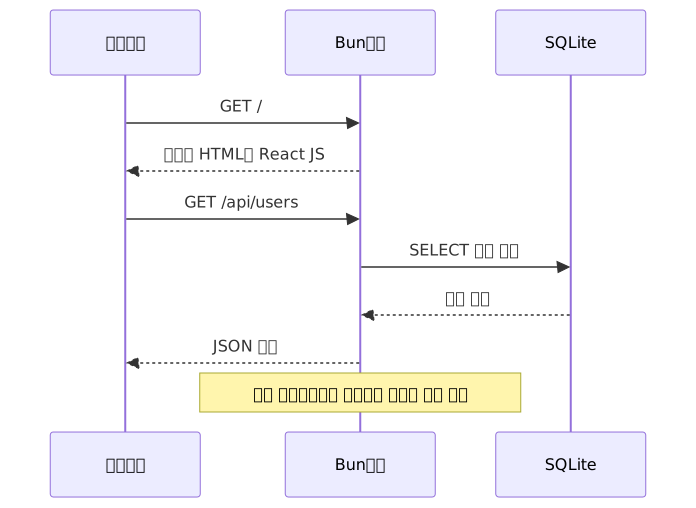
This is the flagship feature of Bun 1.3. Just import an HTML file and pass it to the router, and Bun automatically bundles the React, TypeScript, and CSS inside it.
// index.ts
import dashboard from "./dashboard.html"; // React + TS + CSS bundled automatically

Bun.serve({
  development: process.env.NODE_ENV !== "production", // HMR enabled automatically
  routes: {
    "/": dashboard,                        // Frontend route
    "GET /api/users": async () => {
      const users = db.query("SELECT * FROM users").all();
      return Response.json(users);
    },
    "POST /api/users": async (req) => {
      const { name } = await req.json();
      db.run("INSERT INTO users (name) VALUES (?)", [name]);
      return new Response("Created", { status: 201 });
    },
  },
});<!-- dashboard.html -->
<!DOCTYPE html>
<html>
<head><title>Dashboard</title></head>
<body>
<div id="root"></div>
<script type="module" src="./dashboard.tsx"></script>
</body>
</html>A single bun run index.ts brings up both the React app serving and the API server. With development: true, React Fast Refresh-based HMR is also activated automatically, and browser console logs are forwarded to the terminal as well. No Webpack or Vite config files required.
Bun.sql — Same syntax regardless of DB type
This is a unified SQL API that started as a PostgreSQL client in Bun 1.2 and expanded to MySQL and MariaDB in 1.3. Set the DATABASE_URL environment variable and you can access any supported database with the same syntax.
const sql = Bun.sql; // Auto-connects using the DATABASE_URL environment variable

// Tagged template literals pass parameters as separate bindings,
// so SQL injection prevention is automatic
const users = await sql`SELECT * FROM users WHERE active = ${true}`;
const user = await sql`SELECT * FROM users WHERE id = ${userId} LIMIT 1`;

await sql`INSERT INTO users (name, email) VALUES (${name}, ${email})`;
Values inside ${} are not inserted directly into the SQL string; they are passed as parameter bindings at the DB driver level. This is why even if userId contains a value like '; DROP TABLE users; --, the query structure itself is not altered.
bun:sqlite is a synchronous API while Bun.sql is asynchronous. Be careful not to confuse the two when using both together.
Real-World Application
Scenario 1: Zero-dependency REST API server
The SQLite + Bun.serve combination shines in situations where there's no need to run a separate PostgreSQL server — like internal admin tools or prototypes.
The following is a minimal working example. In production, add input validation and error handling.
// server.ts — 0 npm packages
import { Database } from "bun:sqlite";

const db = new Database("app.db");
db.run(`
  CREATE TABLE IF NOT EXISTS users (
    id INTEGER PRIMARY KEY AUTOINCREMENT,
    name TEXT NOT NULL,
    email TEXT UNIQUE
  )
`);

// Create prepared statements once outside the router
const getUsers = db.prepare("SELECT * FROM users");
const getUserById = db.prepare("SELECT * FROM users WHERE id = ?");
const insertUser = db.prepare("INSERT INTO users (name, email) VALUES (?, ?)");

Bun.serve({
  port: 3000,
  routes: {
    "GET /users": () => {
      return Response.json(getUsers.all());
    },
    "GET /users/:id": (req) => {
      const user = getUserById.get(req.params.id);
      if (!user) return new Response("Not Found", { status: 404 });
      return Response.json(user);
    },
    "POST /users": async (req) => {
      const { name, email } = await req.json();
      insertUser.run(name, email);
      return new Response("Created", { status: 201 });
    },
  },
});
Creating a prepared statement on every request throws away much of SQLite's performance advantage. The pattern of putting db.query() inside route handlers shows a noticeable difference in high-traffic environments.
Scenario 2: Full-stack server with S3 uploads
The following is a minimal working example. In production, add file type/size validation and error handling.
// fullstack-server.ts
import { Database } from "bun:sqlite";
import dashboard from "./dashboard.html";

const db = new Database("app.db");
db.run(`
  CREATE TABLE IF NOT EXISTS files (
    id INTEGER PRIMARY KEY AUTOINCREMENT,
    name TEXT,
    s3_key TEXT,
    uploaded_at DATETIME DEFAULT CURRENT_TIMESTAMP
  )
`);

const s3 = new Bun.S3Client({
  accessKeyId: process.env.AWS_ACCESS_KEY_ID,
  secretAccessKey: process.env.AWS_SECRET_ACCESS_KEY,
  bucket: process.env.S3_BUCKET,
  region: process.env.AWS_REGION ?? "ap-northeast-2",
});

const insertFile = db.prepare("INSERT INTO files (name, s3_key) VALUES (?, ?)");
const getFiles = db.prepare("SELECT * FROM files ORDER BY uploaded_at DESC");

Bun.serve({
  development: process.env.NODE_ENV !== "production",
  routes: {
    "/": dashboard,

    "POST /api/upload": async (req) => {
      const form = await req.formData();
      const file = form.get("file");
      if (!(file instanceof File)) {
        return new Response("Missing file field", { status: 400 });
      }
      const key = `uploads/${Date.now()}-${file.name}`;

      await s3.write(key, await file.arrayBuffer());
      insertFile.run(file.name, key);

      // Presigned URLs are generated instantly with no network request
      const url = s3.presign(key, { expiresIn: 86400 });
      return Response.json({ url, key });
    },

    "GET /api/files": () => Response.json(getFiles.all()),
  },
});
Scenario 3: Hybrid migration of an existing Node.js service
Migrating an entire existing service to Bun can carry significant risk. A more realistic approach is a hybrid strategy of migrating only the build tooling to Bun.
{
  "scripts": {
    "dev": "bun run src/index.ts",
    "build": "bun build src/index.ts --outdir dist --target node",
    "start": "node dist/index.js",
    "test": "bun test"
  }
}
This approach lets you get the benefits of bun install's fast installation speed (roughly 20–30x faster than npm) and bun test's fast test execution, while keeping production execution on the battle-tested Node.js.
There is an important caveat. Code that uses Bun built-in APIs like bun:sqlite or Bun.S3Client will not run on Node.js even if built with --target node. This hybrid strategy is suitable for existing codebases that do not use Bun built-in APIs. If you want to make full use of built-in APIs, you need to adopt Bun directly as your production runtime.
Pros and Cons
Runtime Comparison
| Item | Bun 2.0 | Node.js 22 | Deno 2.x |
|---|---|---|---|
| HTTP throughput | ~180,000 req/s | ~65,000 req/s | ~75,000 req/s |
| Cold start | < 10ms | ~200ms | ~100ms |
| TypeScript execution | Native | --experimental-strip-types |
Native |
| Package install speed | 20–30x faster than npm | Baseline | Depends on environment/version |
| Built-in SQLite | Yes bun:sqlite |
No | No |
| Built-in S3 client | Yes Bun.S3Client |
No | No |
| npm ecosystem compatibility | ~92% | 100% | ~95% |
Native addons .node |
No | Yes | Limited |
HTTP throughput is based on simple endpoints and varies by hardware and concurrency settings. npm compatibility figures are estimates based on top packages.
An honest look at the downsides
| Limitation | Specific scenario | Impact |
|---|---|---|
| No native addon support | Cannot run sharp, bcrypt native builds, or node-gyp dependent packages |
High |
| Memory usage | Some production environments report 50–75% higher RAM usage than Node.js | Medium |
| APM and PM2 compatibility | Some APM agents and PM2 may malfunction due to process API differences |
Medium |
| npm compatibility | ~8% of packages may not work | Project-dependent |
| No official Lambda runtime | Must configure as an AWS custom runtime | Low–Medium |
| I/O-bound real-world gap | Runtime differences may be negligible in API servers dominated by DB queries | Caution against over-relying on benchmarks |
While benchmark numbers look attractive, the runtime difference may be negligible in typical REST API servers where DB queries consume most of the time. It's better to identify where the bottleneck actually is first.
Migration Decision Flow

Common mistakes in practice
When first using bun:sqlite, people often habitually add async/await. Since it's a synchronous API, await isn't needed — and while adding it still works, it obscures intent.
// Unnecessary pattern (works but confusing)
const users = await db.query("SELECT * FROM users").all();

// Correct pattern — bun:sqlite is synchronous
const users = db.query("SELECT * FROM users").all();

// Bun.sql is the opposite — it's asynchronous
const rows = await sql`SELECT * FROM users`;
Closing Thoughts
To summarize the picture Bun 2.0 has painted: SQLite via bun:sqlite, S3 via Bun.S3Client, PostgreSQL/MySQL via Bun.sql, and frontend/backend serving via Bun.serve() — with this combination, you can build a production-grade server without external npm packages in many cases. Cold start is under 10ms, and package installation is 20–30x faster than npm.
That said, if you have dependencies on native addons, PM2, certain APM tools, or are operating in a memory-constrained environment, careful evaluation should come first. If you expect benchmark numbers to hold in an API server where DB queries are the bottleneck, you may be disappointed. Changing the runtime doesn't make the bottleneck disappear.
If you're ready to give it a try, this order is realistic:
- Start new side projects or internal tools with
bun init. You can experience the built-in SQLite andBun.servefirsthand with zero risk. - For existing projects, you can try switching just
bun installandbun testfirst. It's the lowest-risk starting point to immediately capture build speed improvements without replacing the runtime. - If you have a service with S3 integration, replacing
@aws-sdk/client-s3withBun.S3Clientis a good experiment. You can remove one package and directly measure the performance change yourself.
References
- Bun Official Blog
- Bun Official SQLite Docs
- Bun Official S3 Docs
- Bun Fullstack Dev Server Docs
- Bun 1.2 Deep Dive: SQLite, S3 — DEV Community
- The Register: Bun 1.3 Feature Review
- Bun vs Node.js 2026 Migration — Strapi Blog
- Bun vs Deno vs Node.js 2026 Benchmarks — DEV Community
- Bun in Production — akousa.net
- Bun 1.2 Production Migration Case Study — DEV Community