Swapping Out Your Feature Flag Backend with a Single Provider Line — Eliminating Vendor Lock-in with OpenFeature SDK and flagd in Node.js
Imagine @launchdarkly/node-server-sdk scattered throughout your entire codebase, with hundreds of client.variation('flag-key', user, false) calls baked in everywhere. Even if you want to switch backends, the cost is too high, so you just keep the status quo. That's vendor lock-in.
Relying entirely on a single SaaS flag service means inheriting its vulnerabilities too. Just like the 2021 Fastly outage, when an external service goes down without warning, feature flag evaluation becomes impossible altogether. Falling back to defaults is all you can do — and whether that's safe varies by situation.
This is why more teams are introducing an abstraction layer with the OpenFeature SDK + flagd combination. OpenFeature is a CNCF project — an open standard that lets you evaluate flags through the same interface regardless of which flag backend you use. flagd is one of the daemons that implements that standard. The two are not a bundled package — OpenFeature is the interface, and flagd is one of the implementations you can connect through that interface.
In this article, we'll explore how to understand OpenFeature SDK's Provider abstraction model and implement progressive rollouts using flagd, with Node.js code examples. If you're currently using LaunchDarkly or Unleash, you can also check out the migration path.
Core Concepts
The Provider Abstraction Model
The core of OpenFeature is simple: code that evaluates flags doesn't need to know "which backend is being used." Once you install @openfeature/server-sdk, your app code always uses the same methods — getBooleanValue, getStringValue, getNumberValue. The actual evaluation logic is handled by a Provider, and swapping out that Provider is all it takes to change the backend.

Only one Provider is active at any given time. The others shown with dashed lines are replacement candidates — they aren't connected simultaneously.
No matter which provider you connect, the following code stays the same.
const client = OpenFeature.getClient();
const isNewCheckoutEnabled = await client.getBooleanValue('new-checkout', false, {
  targetingKey: user.id,
  email: user.email,
  plan: user.plan,
});
Here, targetingKey is a reserved field in the OpenFeature Evaluation Context that identifies the evaluation target (typically the user). It must be a string, and it's common to use a unique identifier like user.id. The name targetingKey rather than userId exists so that, regardless of which backend provider is connected, the targeting subject is communicated in a standardized way.
What is flagd
flagd is an official flag evaluation daemon provided by the OpenFeature project. Capabilities beyond flag definition loading, evaluation, and stream serving — such as authentication, web UI, and RBAC — are intentionally left out of scope. It reads flag definitions from JSON files, HTTP endpoints, or gRPC sources and responds to evaluation requests.
There are two operating modes, and the difference between them may not be immediately obvious at first.
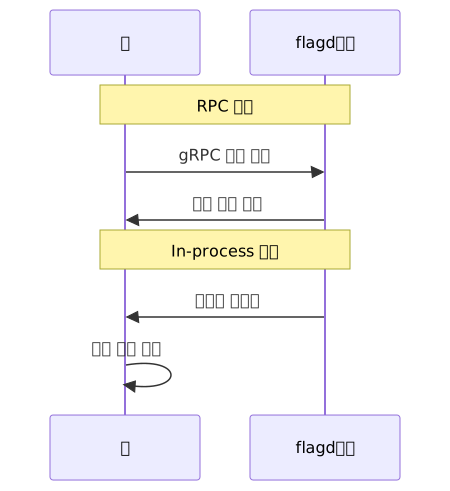
RPC mode is where the app sends gRPC requests to flagd and receives results back. Configuration is simple and flagd rule updates are reflected immediately. It's sufficient as the default choice. In-process mode synchronizes flagd's ruleset into the app process itself and evaluates locally without a network round-trip. Consider this for microservice environments or when you have a clear requirement to reduce evaluation latency to sub-millisecond. Start with RPC mode until a clear need arises.
OFREP and the Flag Definition Format
OFREP (OpenFeature Remote Evaluation Protocol) is an HTTP-based wire protocol that flagd serves by default on port 8016. It's the option for communicating with flagd in environments where a gRPC client isn't available (serverless, edge runtimes, etc.). In a standard Node.js server environment, you can use the gRPC-based FlagdProvider as-is.
Flag definitions are written in a flags.json file.
{
  "$schema": "https://flagd.dev/schema/v0/flags.json",
  "flags": {
    "new-checkout": {
      "state": "ENABLED",
      "variants": {
        "on": true,
        "off": false
      },
      "defaultVariant": "off"
    }
  }
}
Practical Application
1. Basic Setup — From Running flagd to Evaluating Flags
First, spin up flagd locally with Docker.
docker run --rm -p 8013:8013 -p 8016:8016 \
  -v $(pwd)/flags.json:/etc/flagd/flags.json \
  ghcr.io/open-feature/flagd:latest start \
  --uri file:/etc/flagd/flags.json
Install Node.js dependencies.
npm install @openfeature/server-sdk @openfeature/flagd-providerRegister the Provider at your app's entry point. Using setProviderAndWait() is important. Using setProvider() alone can create a race condition where requests arrive before the flag state has finished loading.
import express from 'express';
import { OpenFeature } from '@openfeature/server-sdk';
import { FlagdProvider } from '@openfeature/flagd-provider';

async function bootstrap() {
  await OpenFeature.setProviderAndWait(
    new FlagdProvider({ host: 'localhost', port: 8013 })
  );

  // Flag evaluation is safe from this point on
  const app = express();
  app.listen(3000);
}
2. Progressive Rollout — Fractional Evaluation
This is a scenario where the new checkout UI is exposed to only 50% of users. flagd's fractional feature distributes users deterministically using hashing. Users with the same targetingKey always receive the same variant, guaranteeing session consistency.
{
  "flags": {
    "new-checkout": {
      "state": "ENABLED",
      "variants": {
        "control": false,
        "treatment": true
      },
      "defaultVariant": "control",
      "targeting": {
        "fractional": [
          { "var": "targetingKey" },
          ["control", 50],
          ["treatment", 50]
        ]
      }
    }
  }
}
Here's the evaluation flow as a diagram.

In app code, just include targetingKey in the Evaluation Context and flagd handles the rest.
const client = OpenFeature.getClient();

app.post('/checkout', async (req, res) => {
  const context = {
    targetingKey: req.user.id,
    email: req.user.email,
    plan: req.user.plan,
  };

  const useNewCheckout = await client.getBooleanValue(
    'new-checkout',
    false,
    context
  );

  if (useNewCheckout) {
    return newCheckoutHandler(req, res);
  }
  return legacyCheckoutHandler(req, res);
});
3. Migrating from LaunchDarkly
Replacing the code interface itself is straightforward.
Before (LaunchDarkly v9.x)
import * as ld from '@launchdarkly/node-server-sdk';

const ldClient = ld.init('sdk-key');
await ldClient.waitForInitialization();

// Starting from v9.x, the Context object requires a kind field
const value = await ldClient.variation('flag-key', { kind: 'user', key: user.id }, false);
After (OpenFeature + FlagdProvider)
import { OpenFeature } from '@openfeature/server-sdk';
import { FlagdProvider } from '@openfeature/flagd-provider';

await OpenFeature.setProviderAndWait(new FlagdProvider());

const client = OpenFeature.getClient();
const value = await client.getBooleanValue('flag-key', false, {
  targetingKey: user.id,
});
If you later want to switch to Flagsmith or DevCycle, you just change the new FlagdProvider() part.
But this code replacement is not the full cost of migration. The majority of the actual cost lies in converting flag definitions. If you're running dozens of flags in LaunchDarkly, the targeting rules, segments, and variant values are all stored in LD's proprietary format. Moving them to the flags.json schema is a manual process — you'll need to rewrite rollout percentages and targeting conditions as flagd fractional and targeting expressions. The codebase can be changed in a day, but flag definition conversion requires a separate plan. Assess the number of flags and the complexity of your targeting rules first, then set a realistic timeline.
4. Controlling Flag Values in Unit Tests
Using InMemoryProvider lets you fully control flag values in tests without a real flagd instance. It's useful for removing external service dependencies in CI environments.
import { OpenFeature, InMemoryProvider } from '@openfeature/server-sdk';

describe('checkout handler', () => {
  beforeEach(async () => {
    await OpenFeature.setProviderAndWait(
      new InMemoryProvider({
        'new-checkout': {
          defaultVariant: 'treatment',
          variants: { treatment: true, control: false },
        },
      })
    );
  });

  afterEach(async () => {
    await OpenFeature.clearProviders();
  });

  it('uses the new checkout in the treatment variant', async () => {
    const client = OpenFeature.getClient();
    const value = await client.getBooleanValue('new-checkout', false, {
      targetingKey: 'user-123',
    });
    expect(value).toBe(true);
  });
});
Calling clearProviders() in afterEach is important. The OpenFeature SDK is a global singleton, so failing to clean up can contaminate provider state across other test suites.
Pros and Cons
| Item | Details |
|---|---|
| Vendor independence | Switch backends by replacing a single Provider line; minimal code migration cost |
| Deterministic rollouts | Hash-based fractional evaluation guarantees the same variant for the same user every time |
| Testability | Full unit test control via InMemoryProvider without a real service |
| Standard Evaluation Context | The same targeting logic applies regardless of which backend is used |
| Growing ecosystem | CNCF project with participation from several major companies; check the OpenFeature site for the official end-user list |
| flagd operational overhead | You must deploy and operate the flagd daemon yourself; configuration complexity increases without orchestration |
| No management UI | flagd is JSON file-based; separate tooling is needed for web UI, audit logs, or RBAC |
| Flag definition conversion cost | Migrating from an existing vendor requires manually converting targeting rules and segments to flagd format |
| Provider quality variance | Differences in feature completeness exist between official providers and community providers |
| Spec still evolving | Some areas are still in active development; it's good practice to verify version compatibility before deployment |
It's best to verify your existing vendor's level of OpenFeature support before migrating. LaunchDarkly provides an official provider, but which features are supported can vary by version — and even more so if you're relying on a community provider.
Common Mistakes in Practice
setProvider() vs setProviderAndWait()
setProvider() initializes the provider asynchronously — if the server receives a request before initialization completes, default values are returned. This tends to slip through in development but surfaces as an intermittent bug in production. Always use setProviderAndWait() at app startup.
Calling without an Evaluation Context
Calling getBooleanValue('flag', false) without a context means fractional targeting won't work. Creating a single Express middleware pattern that always includes targetingKey can reduce this mistake.
Testing only with InMemoryProvider without validating the JSON schema
You can end up in a situation where unit tests pass but the actual flagd throws a schema error. Adding the flagd CLI's validate command to your CI pipeline lets you catch these situations before deployment.
# Validate flag file schema
flagd validate --flag-source-uri file:flags.json
Adding this step to CI for every PR that modifies flags.json lets you catch schema errors that InMemoryProvider tests would miss.
Closing Thoughts
The core value of the OpenFeature SDK is completely decoupling flag evaluation code from the flag backend. If you use flagd today and switch to Flagsmith or DevCycle tomorrow, your business logic code doesn't need to change. Evaluate with standard methods like getBooleanValue and getStringValue, and change just one line of Provider configuration to complete the backend switch. Just make sure to plan separately for converting flag definition files.
The right approach depends on where you're starting from.
If your team is just beginning to build a new feature, you can start without any external flag service. Attach InMemoryProvider first, get comfortable with the OpenFeature interface, then spin up flagd via Docker — this order has the lowest friction.
If your team already runs LaunchDarkly or Unleash, it's more realistic to plan the flag definition conversion before the code replacement. Assess the number of flags and the complexity of targeting rules, then safely migrate by writing new flags to the OpenFeature standard first and gradually moving existing ones over.
If your team is evaluating self-hosting, flagd isn't the only option — Flagsmith, Flipt, and other self-hosting solutions also offer OpenFeature providers. If you need a web UI or audit logs, it may be worth looking at these before going with flagd alone.
References
- OpenFeature official site
- OpenFeature Node.js SDK official docs
- flagd official site
- flagd GitHub repository
- OpenFeature GitHub organization
- OFREP specification
- CNCF OpenFeature project page
- OpenFeature CNCF incubating announcement
- LaunchDarkly → OpenFeature migration guide (Flipt)
- Leaving LaunchDarkly with OpenFeature (Flagsmith)
- Standardized feature flagging with OpenFeature + ConfigCat (Scoro Engineering)
- OpenFeature + flagd deep dive: Is it Observable?
- Five Minutes to Feature Flags tutorial (OpenFeature)